Overview
This article describes how to configure a Logic App that Turbo360 triggers after a schedule has completed its run — after all resources have been started or stopped. Use this hook to perform follow-up actions in external systems, such as re-enabling third-party monitoring after VMs are brought online.
Business value
A post-schedule hook lets you restore the state of dependent systems once Turbo360 has finished acting on resources. Common uses include re-enabling monitoring alerts after VMs start, notifying operations teams that a scale-up is complete, or triggering downstream automation that depends on resources being in a known running state.
Prerequisites
Before configuring this hook, ensure the following are in place:
- A schedule is configured in Cost Analyzer with at least one resource group.
- You have access to create and deploy a Logic App (Consumption) in Azure.
- The Logic App endpoint is accessible from Turbo360 (no firewall blocking outbound webhook calls).
Required permissions
You must have the Contributor or Owner role on the Azure subscription to create the Logic App. Within Turbo360, you must have Manage access on the Cost Analyzer schedule to configure the after-schedule action.
How it works
When a schedule is configured with an after-schedule action, Turbo360 calls the configured Logic App endpoint via HTTP after all resource operations for that schedule run have completed. The request includes HTTP headers identifying the execution context and the direction of the state change.
Your Logic App must return an HTTP 200 response. If it returns an error or times out, the schedule records the failure — but because the resource operations have already completed, the schedule outcome itself is not affected.
Steps
Use the following steps to set up and validate an after-schedule Logic App hook. Start in Cost Analyzer > Schedule Automation and open the schedule you want to extend.
Create the after-schedule action
Configuring the action on the schedule registers the Logic App endpoint that Turbo360 will call once the schedule run completes.
- Open the target schedule in Cost Analyzer > Schedule Automation.
- Navigate to the Actions tab.
- Select After schedule runs and enter the Logic App HTTP trigger URL.
- Save the schedule.
- Use the Validate button to send a test event to the Logic App before the schedule next runs live.
Handle the HTTP headers
The scheduler passes the following HTTP headers to your Logic App on every trigger — use them to control your workflow logic.
| Header | Use | Values |
|---|---|---|
Execution-Type | Indicates whether this is a test event from the Validate button or a live schedule run. | Test — the Validate button was clickedActual — the schedule ran live |
Schedule-Operation | Indicates the state the schedule moved resources to. | Start — resources moved to the started (green) stateStop — resources moved to the stopped (red) state |
In your Logic App, implement the following conditional logic:
- If
Execution-Typeis Test, return an HTTP 200 acknowledgement and terminate — do not perform real actions. - If
Schedule-Operationis Start, perform your post-start actions (for example, re-enable monitoring now that VMs are running). - If
Schedule-Operationis Stop, perform your post-stop actions (for example, notify a team that the scale-down is complete).
Example scenario
A team schedules VMs to start every weekday morning. Their monitoring platform is configured to alert on VM availability. To avoid alert storms during the startup sequence, they suppressed monitoring beforehand (using a before-schedule hook) and now use an after-schedule hook to re-enable monitoring once all VMs are confirmed running. The Logic App checks for Schedule-Operation: Start and calls the monitoring platform's API to resume alerting.
Logic App example
The screenshot below shows a sample Logic App workflow that handles the after-schedule extensibility scenario.
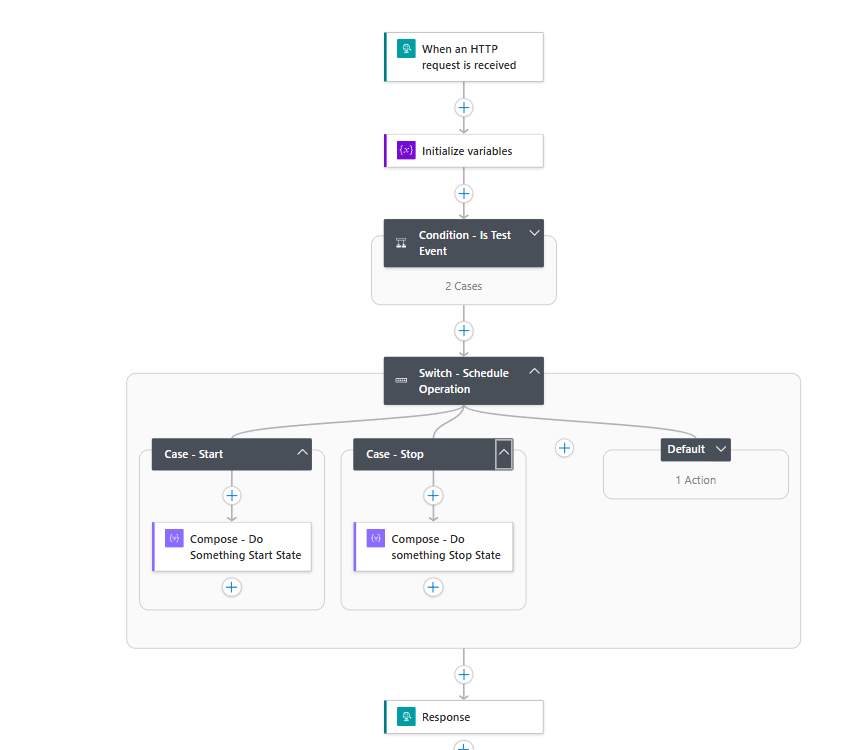
Sample Logic App template
Paste the following JSON into a Logic App Consumption workflow to get started quickly. Replace the action placeholders with your own integration logic.
{
    "definition": {
        "$schema": "https://schema.management.azure.com/providers/Microsoft.Logic/schemas/2016-06-01/workflowdefinition.json#",
        "contentVersion": "1.0.0.0",
        "triggers": {
            "When_an_HTTP_request_is_received": {
                "type": "Request",
                "kind": "Http"
            }
        },
        "actions": {
            "Response": {
                "type": "Response",
                "kind": "Http",
                "inputs": { "statusCode": 200 },
                "runAfter": { "Switch_-_Schedule_Operation": ["Succeeded"] }
            },
            "Initialize_variables": {
                "type": "InitializeVariable",
                "inputs": {
                    "variables": [
                        { "name": "executionType", "type": "string", "value": "@{triggerOutputs()?['headers']?['Execution-Type']}" },
                        { "name": "scheduleOperation", "type": "string", "value": "@{triggerOutputs()?['headers']?['Schedule-Operation']}" }
                    ]
                },
                "runAfter": {}
            },
            "Condition_-_Is_Test_Event": {
                "type": "If",
                "expression": { "and": [{ "equals": ["@variables('executionType')", "Test"] }] },
                "actions": {
                    "Response_-_Ack_-_Test": { "type": "Response", "kind": "Http", "inputs": { "statusCode": 200 } },
                    "Terminate_-_Ack": { "type": "Terminate", "inputs": { "runStatus": "Succeeded" }, "runAfter": { "Response_-_Ack_-_Test": ["Succeeded"] } }
                },
                "else": { "actions": {} },
                "runAfter": { "Initialize_variables": ["Succeeded"] }
            },
            "Switch_-_Schedule_Operation": {
                "type": "Switch",
                "expression": "@variables('scheduleOperation')",
                "default": { "actions": { "Compose_-_Do_nothing": { "type": "Compose", "inputs": "You would do nothing here because the schedule is not going to the start or stop state" } } },
                "cases": {
                    "Case_-_Start": { "actions": { "Compose_-_Do_Something_Start_State": { "type": "Compose", "inputs": "The schedule has run to move the resources to the start state. Do something here AFTER the resources are acted upon" } }, "case": "Start" },
                    "Case_-_Stop": { "actions": { "Compose_-_Do_something_Stop_State": { "type": "Compose", "inputs": "The schedule has run to the stopped state. You can do something here AFTER the schedule is actioned" } }, "case": "Stop" }
                },
                "runAfter": { "Condition_-_Is_Test_Event": ["Succeeded"] }
            }
        },
        "outputs": {},
        "parameters": { "$connections": { "type": "Object", "defaultValue": {} } }
    },
    "parameters": { "$connections": { "type": "Object", "value": {} } }
}
Troubleshooting
- The Logic App is not triggered after the schedule completes.
Cause: The after-schedule action URL may not be saved correctly, or the Logic App HTTP trigger endpoint has changed.
Fix: Re-open the schedule's Actions tab, verify the endpoint URL, and use the Validate button to confirm the trigger fires successfully. - The Logic App runs but does not perform the expected post-schedule action.
Cause: The Switch action may not be matching theSchedule-Operationvalue correctly.
Fix: Confirm the Switch expression references@variables('scheduleOperation')and that case values are exactlyStartandStop(case-sensitive). - Test events trigger real actions in the external system.
Cause: The Logic App is not checking theExecution-Typeheader before performing actions.
Fix: Add a condition at the start of the workflow that checks forExecution-Type: Testand returns HTTP 200 immediately without executing downstream actions. - The Logic App receives the trigger but the
Schedule-Operationheader is empty.
Cause: The header variable expression may be malformed.
Fix: Verify the expression@{triggerOutputs()?['headers']?['Schedule-Operation']}is correctly set in the Initialize variables action. - Post-schedule actions run but the downstream system state is inconsistent.
Cause: The after-schedule hook fires once per schedule run, but individual resources may still be transitioning when the hook is called.
Fix: Add a delay or polling step in the Logic App to verify the target resource state before performing downstream actions that depend on a fully stable state.