Overview
This article describes how to configure a Logic App that Turbo360 triggers before it takes an action on an individual resource — such as turning a VM on or off, or scaling it up or down. Unlike the before-schedule hook (which fires once per schedule run), this hook fires once per resource as the schedule processes each one. Use this hook to run resource-specific logic, such as executing a PowerShell script directly on the VM before it is stopped.
Business value
Per-resource hooks give you fine-grained control over what happens to each individual resource before the schedule acts on it. You can use the Azure resource ID passed in the request to interact directly with that specific resource — for example, running a shutdown script, flushing logs, or calling the Azure Management API to perform a pre-action task on the target VM.
Prerequisites
Before configuring this hook, ensure the following are in place:
- A schedule is configured in Cost Analyzer with at least one resource.
- You have access to create and deploy a Logic App (Consumption) in Azure.
- The Logic App endpoint is accessible from Turbo360 (no firewall blocking outbound webhook calls).
- If the Logic App calls the Azure Management API (for example, to run commands on the VM), a User Assigned Managed Identity with the appropriate RBAC role must be configured on the Logic App.
Required permissions
You must have the Contributor or Owner role on the Azure subscription to create the Logic App and configure managed identity. Within Turbo360, you must have Manage access on the Cost Analyzer schedule to configure the before-resource action. If you call the Azure Management API using Run Command, the managed identity also requires the Virtual Machine Contributor role on the target VMs or resource group.
How it works
When a schedule is configured with a before-resource action, Turbo360 calls the configured Logic App endpoint via HTTP immediately before acting on each resource in the schedule. The request includes the standard schedule headers — execution type and schedule operation — plus an additional AzureResourceId header that identifies the specific Azure resource about to be actioned.
Your Logic App can use this resource ID to make targeted calls to the Azure Management API, such as running a PowerShell script on the VM using the Run Command operation. The Logic App must return an HTTP 200 response within the timeout window for the schedule to proceed with that resource.
Steps
Use the following steps to set up and validate a before-resource Logic App hook. Start in Cost Analyzer > Schedule Automation and open the schedule you want to extend.
Create the before-resource action
Configuring the action on the resource registers the Logic App endpoint that Turbo360 will call before acting on that resource.
- Open the target schedule in Cost Analyzer > Schedule Automation.
- Locate the resource you want to configure within the schedule's resource list.
- Open the resource's action settings and select Before resource action.
- Enter the Logic App HTTP trigger URL.
- Save the schedule.
- Use the Validate button to send a test event to the Logic App before the schedule next runs live.
Handle the HTTP headers
The scheduler passes the following HTTP headers to your Logic App on every trigger — use them to control your workflow logic.
| Header | Use | Values |
|---|---|---|
Execution-Type | Indicates whether this is a test event from the Validate button or a live schedule run. | Test — the Validate button was clickedActual — the schedule ran live |
Schedule-Operation | Indicates the state the schedule is about to move resources to. | Start — moving to the started (green) stateStop — moving to the stopped (red) state |
AzureResourceId | The full Azure resource ID of the resource the schedule is about to action. Use this to make targeted Azure Management API calls. | Azure resource ID string (e.g. /subscriptions/{id}/resourceGroups/{rg}/providers/Microsoft.Compute/virtualMachines/{vmName}) |
In your Logic App, implement the following conditional logic:
- If
Execution-Typeis Test, return an HTTP 200 acknowledgement and terminate — do not perform real actions. - If
Schedule-Operationis Start, perform your pre-start resource actions. - If
Schedule-Operationis Stop, perform your pre-stop resource actions (for example, run a PowerShell script to flush logs before the VM is stopped).
Example scenario
A team wants to write an entry to the Windows Application Event Log on each VM before the scheduler stops it. They configure a before-resource Logic App hook that uses the AzureResourceId header to call the Azure Management API's Run Command operation, executing a PowerShell script that writes event ID 3001 to the Application log with source Turbo360-FinOps. This gives their operations team a reliable audit trail in the VM event log showing exactly when Turbo360 initiated the shutdown.
Logic App example
The screenshot below shows a sample Logic App workflow that handles the before-resource extensibility scenario, including the Run Command call to the Azure Management API.
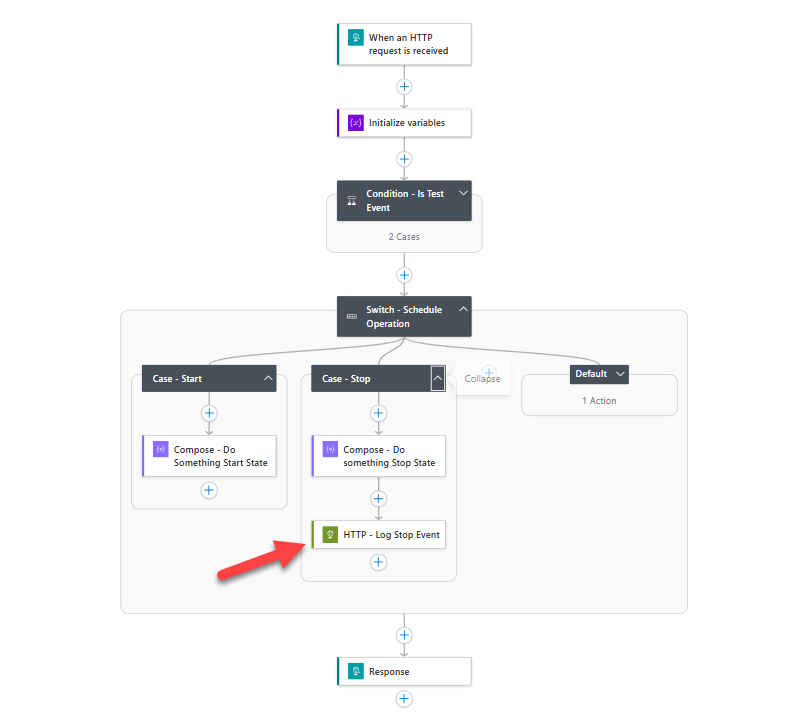
Sample Logic App template
Paste the following JSON into a Logic App Consumption workflow to get started quickly. Replace the managed identity resource path with your own, and update the PowerShell script to suit your pre-stop requirements.
{
    "definition": {
        "$schema": "https://schema.management.azure.com/providers/Microsoft.Logic/schemas/2016-06-01/workflowdefinition.json#",
        "contentVersion": "1.0.0.0",
        "triggers": { "When_an_HTTP_request_is_received": { "type": "Request", "kind": "Http" } },
        "actions": {
            "Response": { "type": "Response", "kind": "Http", "inputs": { "statusCode": 200 }, "runAfter": { "Switch_-_Schedule_Operation": ["Succeeded"] } },
            "Initialize_variables": {
                "type": "InitializeVariable",
                "inputs": {
                    "variables": [
                        { "name": "executionType", "type": "string", "value": "@{triggerOutputs()?['headers']?['Execution-Type']}" },
                        { "name": "scheduleOperation", "type": "string", "value": "@{triggerOutputs()?['headers']?['Schedule-Operation']}" },
                        { "name": "resourceId", "type": "string", "value": "@{triggerOutputs()?['headers']?['AzureResourceId']}" }
                    ]
                },
                "runAfter": {}
            },
            "Condition_-_Is_Test_Event": {
                "type": "If",
                "expression": { "and": [{ "equals": ["@variables('executionType')", "Test"] }] },
                "actions": {
                    "Response_-_Ack_-_Test": { "type": "Response", "kind": "Http", "inputs": { "statusCode": 200 } },
                    "Terminate_-_Ack": { "type": "Terminate", "inputs": { "runStatus": "Succeeded" }, "runAfter": { "Response_-_Ack_-_Test": ["Succeeded"] } }
                },
                "else": { "actions": {} },
                "runAfter": { "Initialize_variables": ["Succeeded"] }
            },
            "Switch_-_Schedule_Operation": {
                "type": "Switch",
                "expression": "@variables('scheduleOperation')",
                "default": { "actions": { "Compose_-_Do_nothing": { "type": "Compose", "inputs": "You would do nothing here because the schedule is not going to the start or stop state" } } },
                "cases": {
                    "Case_-_Start": { "actions": { "Compose_-_Do_Something_Start_State": { "type": "Compose", "inputs": "The schedule is about to run to move the resources to the start state. Do something here before the resources are acted upon" } }, "case": "Start" },
                    "Case_-_Stop": {
                        "actions": {
                            "Compose_-_Do_something_Stop_State": { "type": "Compose", "inputs": "The schedule is going to the stopped or scaled down state. You can do something here before the schedule is actioned" },
                            "HTTP_-_Log_Stop_Event": {
                                "type": "Http",
                                "inputs": {
                                    "uri": "https://management.azure.com/@{variables('resourceId')}/runCommand?api-version=2025-04-01",
                                    "method": "POST",
                                    "headers": { "Content-Type": "application/json" },
                                    "body": {
                                        "commandId": "RunPowerShellScript",
                                        "script": [
                                            "$logName = 'Application'",
                                            "$source  = 'Turbo360-FinOps'",
                                            "$eventId = 3001",
                                            "$message = 'Turbo360 scheduler is about to shut down this VM'",
                                            "",
                                            "if (-not [System.Diagnostics.EventLog]::SourceExists($source)) {",
                                            "  New-EventLog -LogName $logName -Source $source",
                                            "}",
                                            "",
                                            "Write-EventLog -LogName $logName -Source $source -EventId $eventId -EntryType Information -Message $message"
                                        ]
                                    },
                                    "authentication": {
                                        "type": "ManagedServiceIdentity",
                                        "identity": "/subscriptions/{your subscription id here}/resourceGroups/T360-Scheduler-VM-Demo-Actions/providers/Microsoft.ManagedIdentity/userAssignedIdentities/T360-Scheduler-VM-Demo-Actions",
                                        "audience": "https://management.azure.com/"
                                    },
                                    "retryPolicy": { "type": "none" }
                                },
                                "runAfter": { "Compose_-_Do_something_Stop_State": ["Succeeded"] }
                            }
                        },
                        "case": "Stop"
                    }
                },
                "runAfter": { "Condition_-_Is_Test_Event": ["Succeeded"] }
            }
        },
        "outputs": {},
        "parameters": { "$connections": { "type": "Object", "defaultValue": {} } }
    },
    "parameters": { "$connections": { "type": "Object", "value": {} } }
}
Troubleshooting
- The Logic App is not triggered before the resource action.
Cause: The before-resource action URL may not be saved correctly on the resource, or the Logic App HTTP trigger endpoint has changed.
Fix: Re-open the resource action settings in the schedule, verify the endpoint URL, and use the Validate button to confirm the trigger fires. - The Run Command call fails with a 403 Forbidden error.
Cause: The managed identity does not have the required RBAC role on the target resource or resource group.
Fix: Assign the Virtual Machine Contributor role (or a custom role withMicrosoft.Compute/virtualMachines/runCommand/action) to the Logic App's managed identity on the target resource group. - The Run Command call succeeds but no event log entry appears on the VM.
Cause: The PowerShell script may have executed but the event source registration step failed silently.
Fix: Check the Run Command execution output in the Azure portal. Ensure the managed identity has permission to write to the Windows Event Log on the VM. - Test events trigger real Azure API calls.
Cause: The Logic App is not checking theExecution-Typeheader before executing the Run Command action.
Fix: Ensure the Is Test Event condition is positioned before the Switch action and that it terminates the run with HTTP 200 whenExecution-TypeisTest. - The
AzureResourceIdheader is empty in the Logic App run.
Cause: The header variable expression may be malformed.
Fix: Verify the expression@{triggerOutputs()?['headers']?['AzureResourceId']}is correctly set in the Initialize variables action and that the action name matches the reference in subsequent steps.