The SAP IDOCS demo illustrates how Turbo360 can be used to manage an integration solution built around one of the most common patterns for integrating with SAP.
Demo story
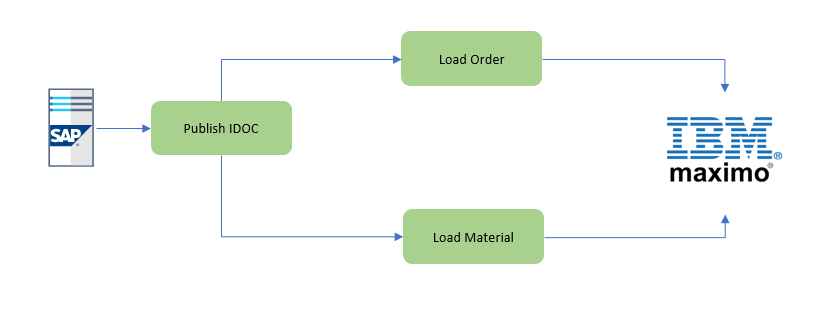
The finance team uses SAP, which publishes IDocs to support multiple outbound integration scenarios. The solution receives IDocs from SAP and implements a pub/sub pattern to drive downstream interfaces that integrate data with different target systems. Specifically, MATMAS and ORDERS05 message types are used to integrate with Maximo.
The diagram below represents the solution architecture.
Implementation
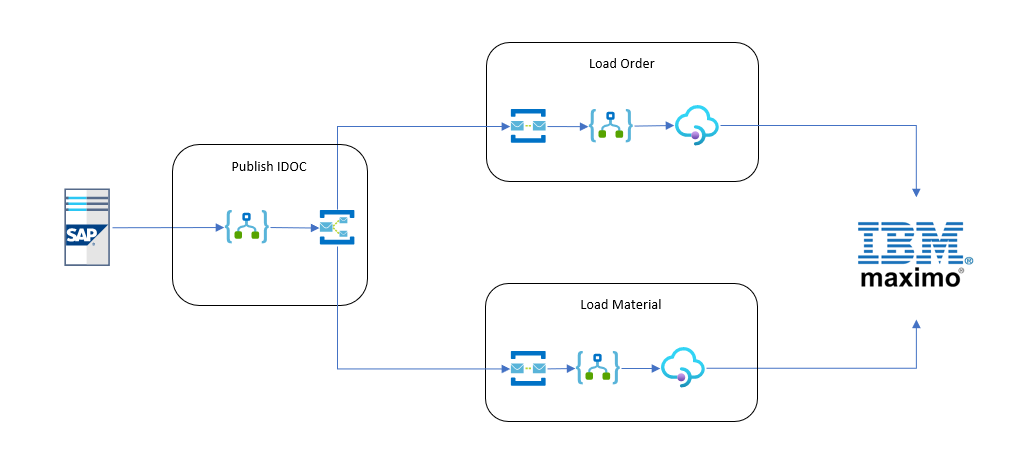
The solution is implemented with Logic Apps and the Logic App SAP connector. IDocs are received from SAP and published to Service Bus, where the pub/sub pattern is applied. Separate Logic Apps then process messages for each subscriber, and API Management is used to integrate with Maximo web services.
The diagram below shows the Azure view of the solution.
Who this demo is for
This demo is relevant if you work with Logic Apps, integrate with SAP, use API Management, or are building iPaaS solutions on Azure.
Azure services covered
- Logic Apps
- API Management
Turbo360 features covered
Business Applications
- Service map
- Business Application dashboard
- Logic Apps: run history, action required, monitoring
- API Management: monitoring
Business Activity Monitoring
- Transaction tracking for SAP IDoc processing