

What are Automated tasks?
- 24 Jun 2026
- 1 Minute to read
- Print
- DarkLight
- Download PDF
What are Automated tasks?
- Updated on 24 Jun 2026
- 1 Minute to read
- Print
- DarkLight
- Download PDF
Article summary
Did you find this summary helpful?
Thank you for your feedback!
Overview
Automated task is a background process that runs according to a predefined configuration. Automated tasks are created under each Business Application and can be triggered manually whenever required or scheduled to run at a specific time in a day.
Business scenario
Consider a scenario where an application that listens for messages from a Service Bus Queue or Topic Subscription went unresponsive.
The number of messages inside the queue will start increasing gradually. Depending on the Time to Live value of the Service Bus resource, either the messages to be processed would pile up drastically, or they would get dead-lettered.
When the application resumes its operation, it might either get overloaded due to the increased number of messages or fail to process the dead-lettered messages.
In cases like these, Turbo360's Automated task feature helps resolve problems automatically by either:
- Purging the messages in the Active end of the Queue to reset the system.
- Performing tasks like Resubmit or Resubmit-and-Delete from the dead-letter back to the same Queue, so that the messages can be consumed by the resumed system.
Supported resource types
Turbo360 supports Automated tasks on the following Azure resource types:
- Event Grid
- Event Grid Domain
- Event Hub
- Logic App
- Logic App Workflow (Standard)
- Service Bus
- Storage Account
- Data Factory Pipeline
- Power Automate Flow
- Synapse Pipeline
- Runbook
- Databrick workflow Job
The Management operation task allows users to schedule enable/disable actions for supported resource types, including APIM Products, Azure Function Apps, and more.
Permissions
Default access
The following roles have complete access to Automated tasks by default, including the ability to view, manage, and run or cancel tasks without any additional configuration:
- Account owner
- Owner
- Contributor
Role-based permissions
For all other roles, access is granted through the Automated Task permissions under User management > Roles > Add/Edit role, within the Specify feature permissions section.
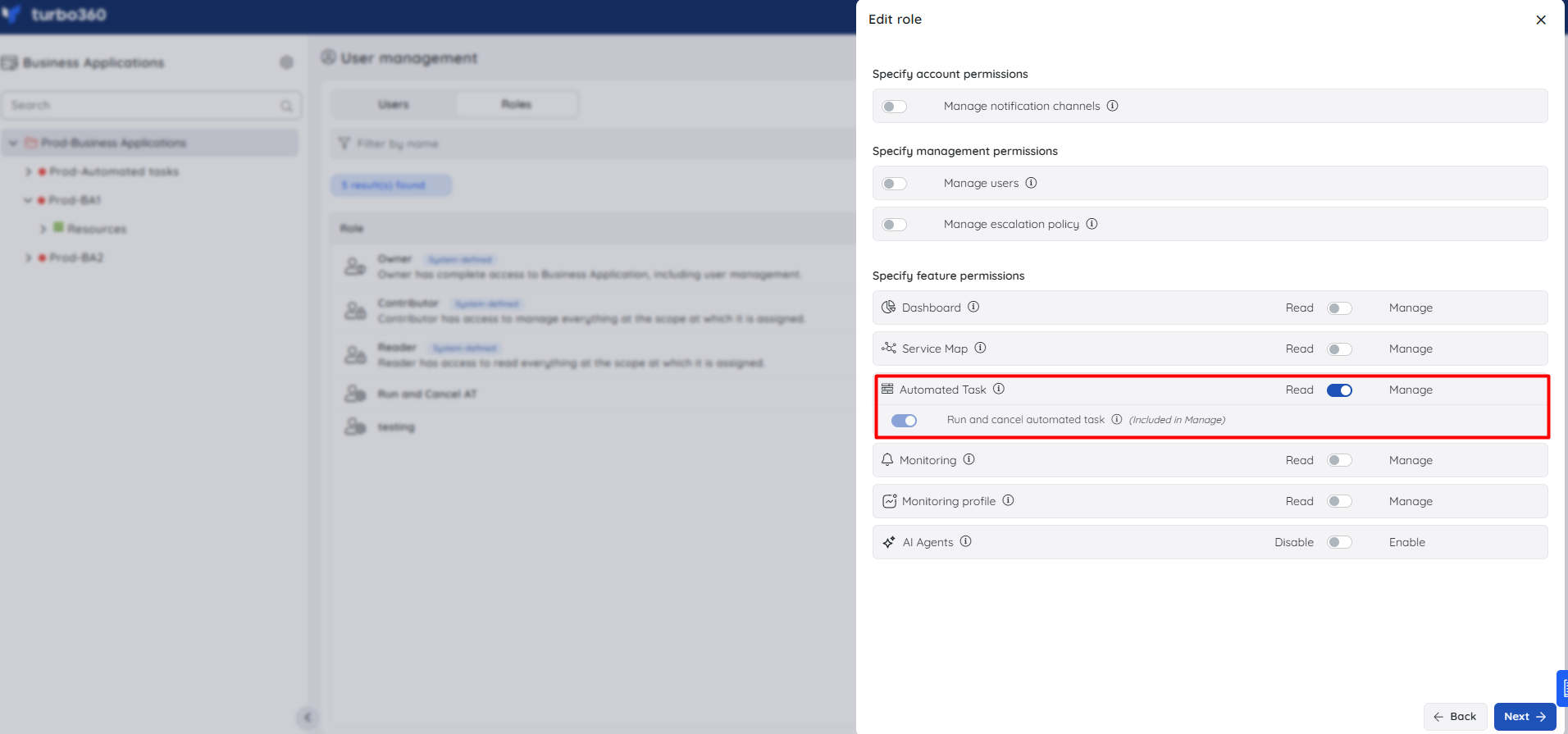
Configuration access
| Permission | Description |
|---|---|
| Read | Allows the user to view Automated Tasks and their configurations within the Business Application |
| Manage | Grants full access to create, edit, and delete Automated Task configurations. Includes Read access |
Operational access
| Permission | Description |
|---|---|
| Run and cancel automated task | Allows the user to manually trigger or cancel an Automated Task execution |
Note:
When Manage is enabled, the Run and cancel permission is automatically included. It can also be granted independently — for example, to an operator who needs to run tasks but should not have access to modify configurations.
Was this article helpful?