Overview
Business Activity Monitoring (BAM) is a module in Turbo360 that gives business users and support teams direct visibility into your integration platform. When a business user asks "Where is my order?" or "Did the payment go through?", Business Activity Monitoring lets them, or a first-line support agent, answer that question without involving a developer.
Business Activity Monitoring tracks message flow and transaction state across your Azure integration services. It models your workflows as business processes made up of stages, tracks each transaction instance through those stages in real time, and surfaces the data through a searchable dashboard with proactive monitoring and alerting.
Business value
Integration platforms are operationally invisible by default. When something goes wrong, support teams escalate to developers, who then spend an estimated 20–30% of their time building and maintaining custom logging components, web dashboards, and tracing utilities. Most of these custom solutions remain immature because enterprise-grade tracking takes significant time and effort to build correctly.
Business Activity Monitoring eliminates that overhead by providing a configurable, production-ready tracking and monitoring layer that business users and support teams can operate independently. Specifically, it helps your organization:
- Reduce developer escalations for routine integration questions
- Enable support teams to detect and recover from issues faster
- Give stakeholders transparent, real-time visibility into the value of your integration investments
How it works
Business Activity Monitoring models your integration workflows as business processes, each composed of named stages that correspond to meaningful milestones in a transaction. Every time a transaction runs, Business Activity Monitoring tracks it through its configured stages and records the result as a transaction instance you can query, inspect, and act on.
Tracking types
Business Activity Monitoring supports two distinct approaches for capturing transaction data. You can use either independently or combine them within the same environment.
Custom logging (Push Model)
Your integration solution sends events to Turbo360 directly via API calls at each stage of the business process. Business Activity Monitoring connectors for each supported Azure service (Logic Apps, Service Bus, Functions, and others) provide the pluggable components that emit these events. Custom logging gives you fine-grained control over what is tracked, including reprocessing, stage properties, and message archival.
Custom logging supports two deployment models:
| Deployment model | Description | Best for |
|---|---|---|
| Use Turbo360 infrastructure | Turbo360 provisions and manages all tracking resources | Low-to-medium data volumes |
| Use your Azure subscription | All Business Activity Monitoring infrastructure is deployed into your own subscription | High data volumes or data residency requirements |
The "Use your Azure subscription" deployment model is also referred to as the Bring Your Own Backend (BYOB) model throughout Business Activity Monitoring documentation.
Data Queries (Pull Model)
Turbo360 queries your existing log sources on a schedule, and Application Insights, Log Analytics, and Azure Data Explorer (ADX) are supported. No custom connectors are required. Data Queries is the right choice when your integration solution already produces structured logs and you want to reuse that investment rather than instrument additional tracking code.
For a detailed comparison of when to use each model, see Push Model vs Pull Model.
Implementation patterns
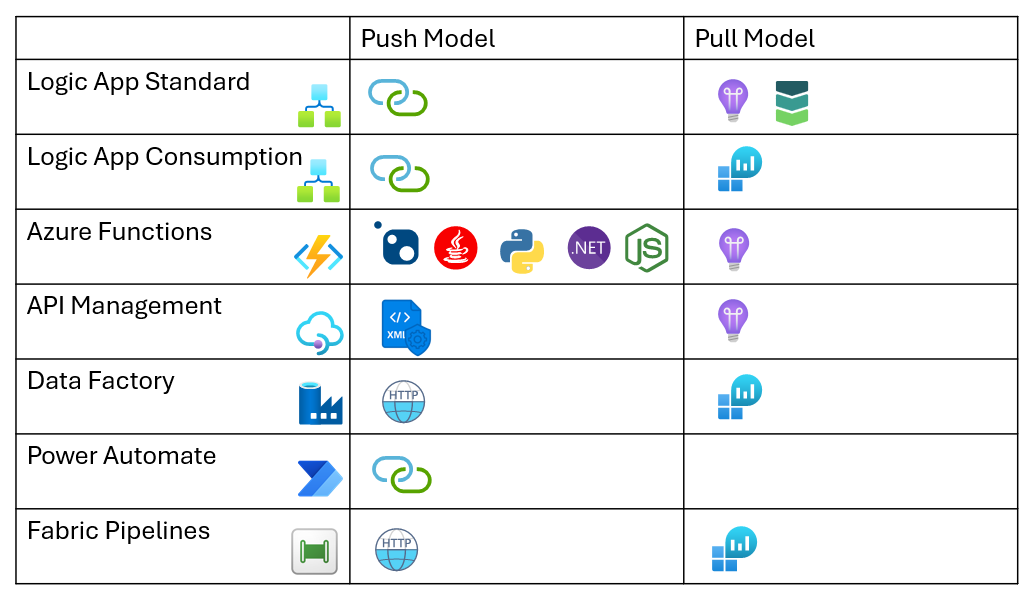
The following diagram shows how common Azure integration services map to the push and pull model approaches:
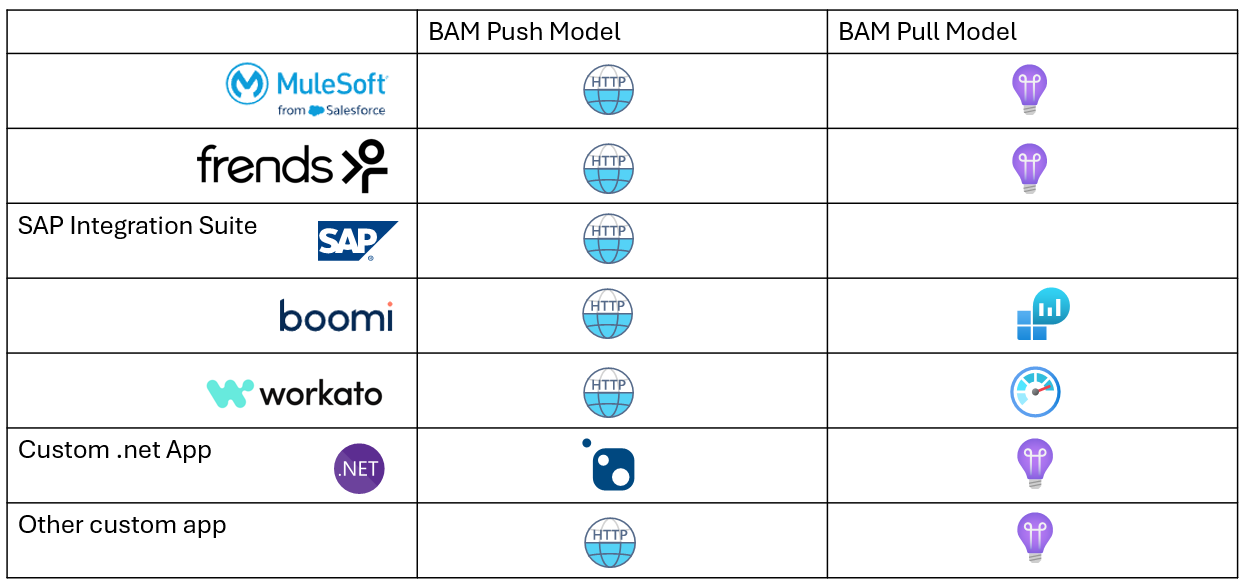
Business Activity Monitoring also integrates with non-Azure technologies through its extensibility model:
Example: cab booking application
To illustrate how Business Activity Monitoring works in practice, consider a cab booking application built on Azure integration services:
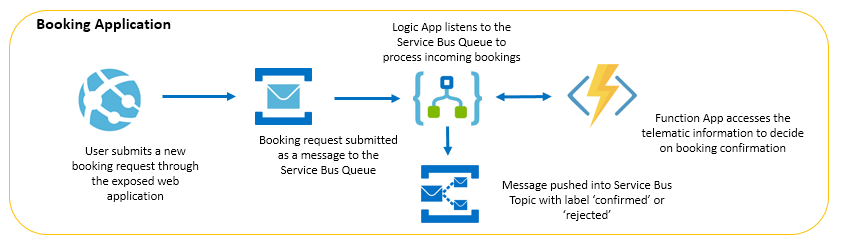
The booking process involves several stages: request, dispatch, pickup, and completion. Each stage is a potential failure point that support teams need to investigate when something goes wrong. In Business Activity Monitoring, you model this as a business process with one stage per milestone. The simplified transaction builder lets you configure these stages without writing code.
The result is a tracked, queryable business flow:
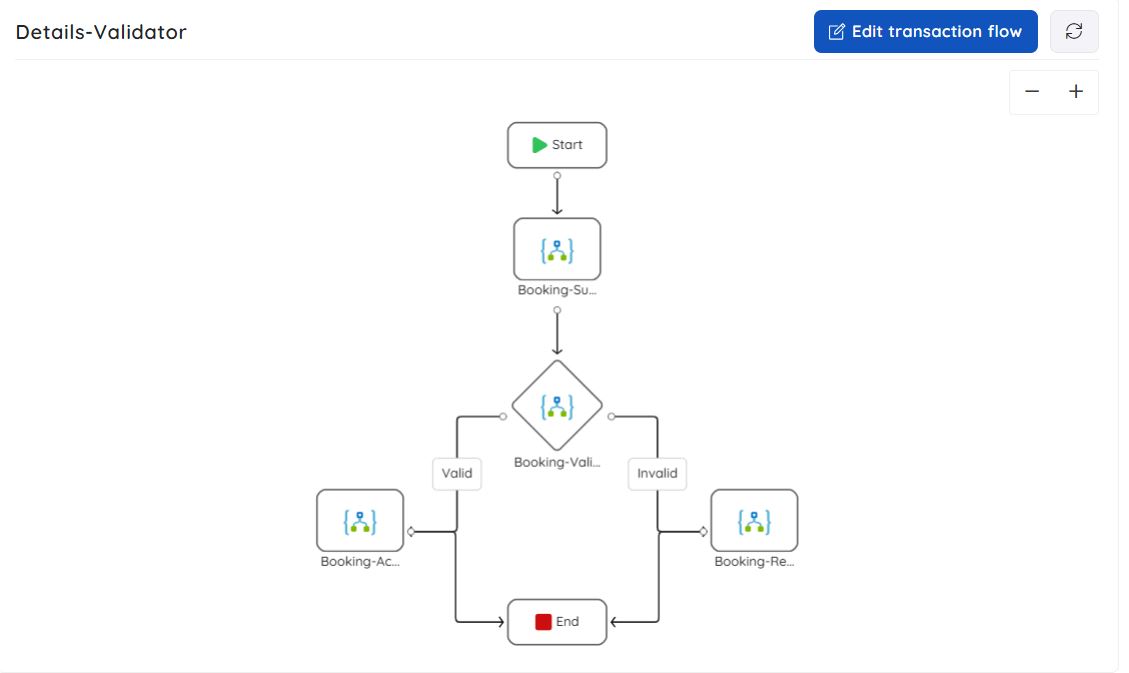
A support agent can now answer "Where is booking #1042?" by querying that transaction instance directly, without escalating to a developer.
End-to-end tracking and message flow
Business Activity Monitoring lets you define business-relevant properties to track at run time (order ID, customer ID, booking reference), making it straightforward to correlate message flow across your system. Transaction instances are visualized in both graphical and tabular form, supporting sequential and parallel execution patterns.
Reliability, performance, and security
Business Activity Monitoring is designed for enterprise integration environments:
- Reliability: the architecture ensures every tracked message is recorded without loss, even under high throughput.
- Performance isolation: each customer's Business Activity Monitoring infrastructure is fully isolated; no shared-tenant performance impact.
- Data security: tracking data is stored in your Azure subscription, encrypted at rest and in transit.