

Analyze AMD vs Intel impact
- 05 Aug 2026
- 4 Minutes to read
- Print
- DarkLight
- Download PDF
Analyze AMD vs Intel impact
- Updated on 05 Aug 2026
- 4 Minutes to read
- Print
- DarkLight
- Download PDF
Article summary
Did you find this summary helpful?
Thank you for your feedback!
Overview
Analyze AMD vs Intel impact is an AI Agent in Cost Analyzer that helps you evaluate the impact of switching an Azure virtual machine between AMD- and Intel-based CPU platforms. It analyzes performance, pricing, compatibility, and availability factors for the resource to support an informed CPU platform decision.
Business value
Evaluating a CPU platform change before making it helps you avoid unplanned performance regressions or compatibility issues, while surfacing potential cost savings from switching to an equivalent AMD or Intel SKU.
Prerequisites
- On Private Hosting deployments, an Azure OpenAI connection must be configured before this AI Agent can generate insights. See OpenAI setup in Turbo360 for setup instructions. SaaS deployments do not need this step.
Required permissions
Access requires both the AI Agents feature to be enabled for the role and Read access to the Analysis feature, since Analyze AMD vs Intel impact is surfaced from the resource-level Cost intelligence view within Analysis.
| Role | Permission level | Access |
|---|---|---|
| Account Owner / Owner / Contributor | Full access | Can use Analyze AMD vs Intel impact on any resource |
| Custom role | AI Agents — Enable, Analysis — Read (or Manage) | When AI Agents is set to Enable and Analysis is toggled on with at least Read access, the user can view Analyze AMD vs Intel impact insights for resources within their assigned scope; if either is missing, the option is not available |
.jpg)
How it works
The AI Agent evaluates the VM's current SKU, CPU architecture, workload characteristics, pricing, and regional availability, then generates a structured analysis across seven panels:
- Quick takeaway — an AI-generated recommendation summarizing whether the switch is worth making, based on cost delta, workload fit, and reservation impact.
- Side-by-side comparison — a table comparing the current SKU against the target SKU across Architecture, vCPUs/Memory, Hourly Rate, Monthly Cost, Vector Extensions, Region Availability, and Reservation Coverage.
- Performance impact — evaluates how the workload will behave after switching, covering single-thread performance, vector workload throughput, memory headroom, and observed utilization signals. Each item is flagged with a pass or warning indicator.
- Pricing differences — a table comparing Hourly Rate, Monthly Cost, Annual Cost, and Reservation Impact between the AMD and Intel SKUs, with a narrative note on whether the cost delta justifies the switch given any active reservation.
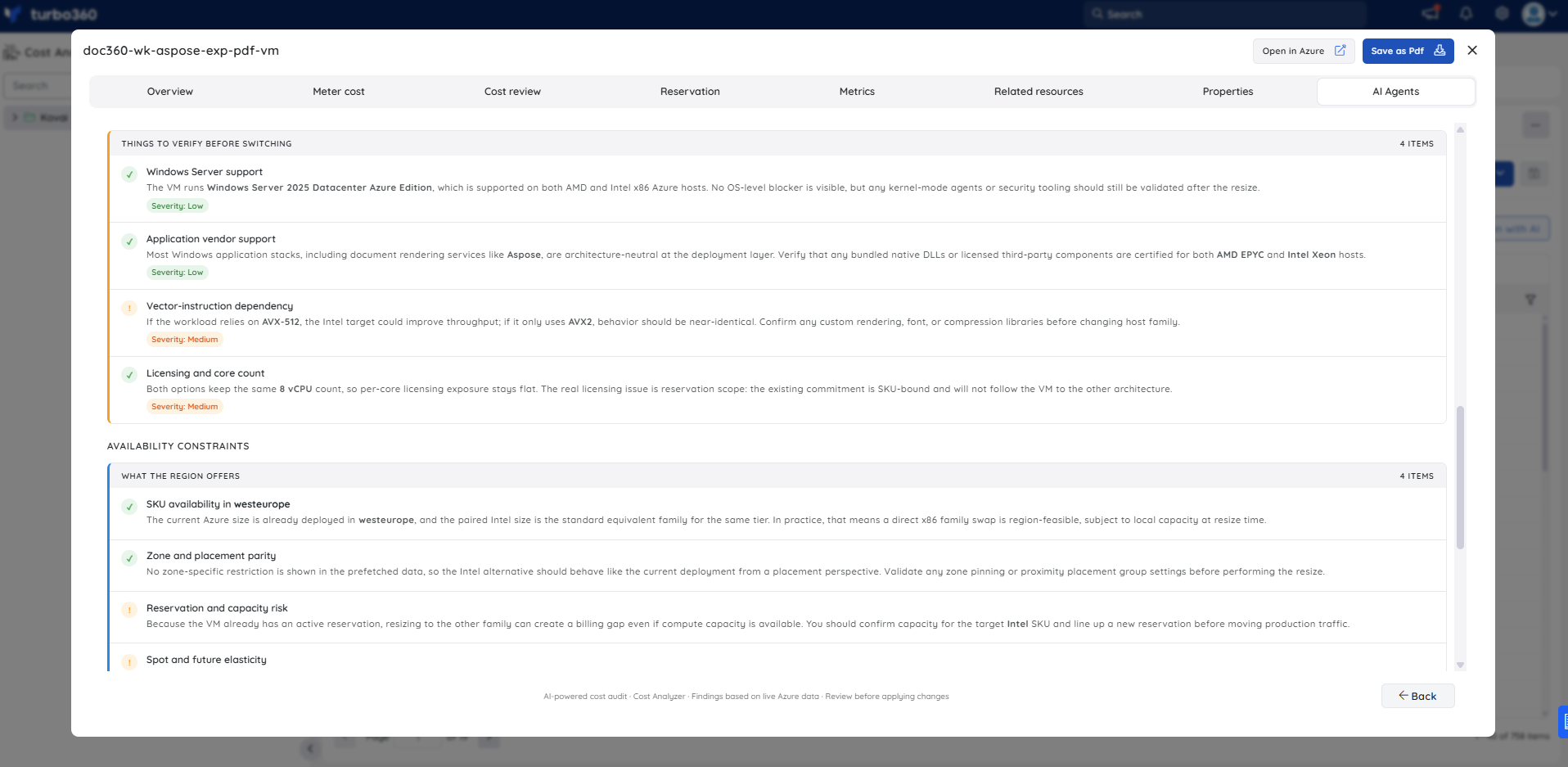
- Compatibility issues — lists things to verify before switching, such as OS support, reservation and savings coverage, vendor or runtime optimization dependencies, and hypervisor behavior. Each item carries a severity rating (Low, Medium, or High).
- Availability constraints — confirms whether both SKUs are available in the resource's current region, including zone and capacity parity and any spot or reserved strategy considerations.
- Migration approach — provides the expected downtime estimate and a numbered migration plan with step-level time estimates, recommended tools, and risk ratings.
Steps
Use the following steps to open Analyze AMD vs Intel impact and generate an analysis for a Virtual Machine. Navigate to Cost Analyzer > Analysis, then open a Cost management group and select a Virtual Machine resource to get started.
- In the Analysis section, expand the relevant Cost management group in the tree view.
- Select the Virtual Machine you want to evaluate.
- In the resource detail view, click AI Agents.
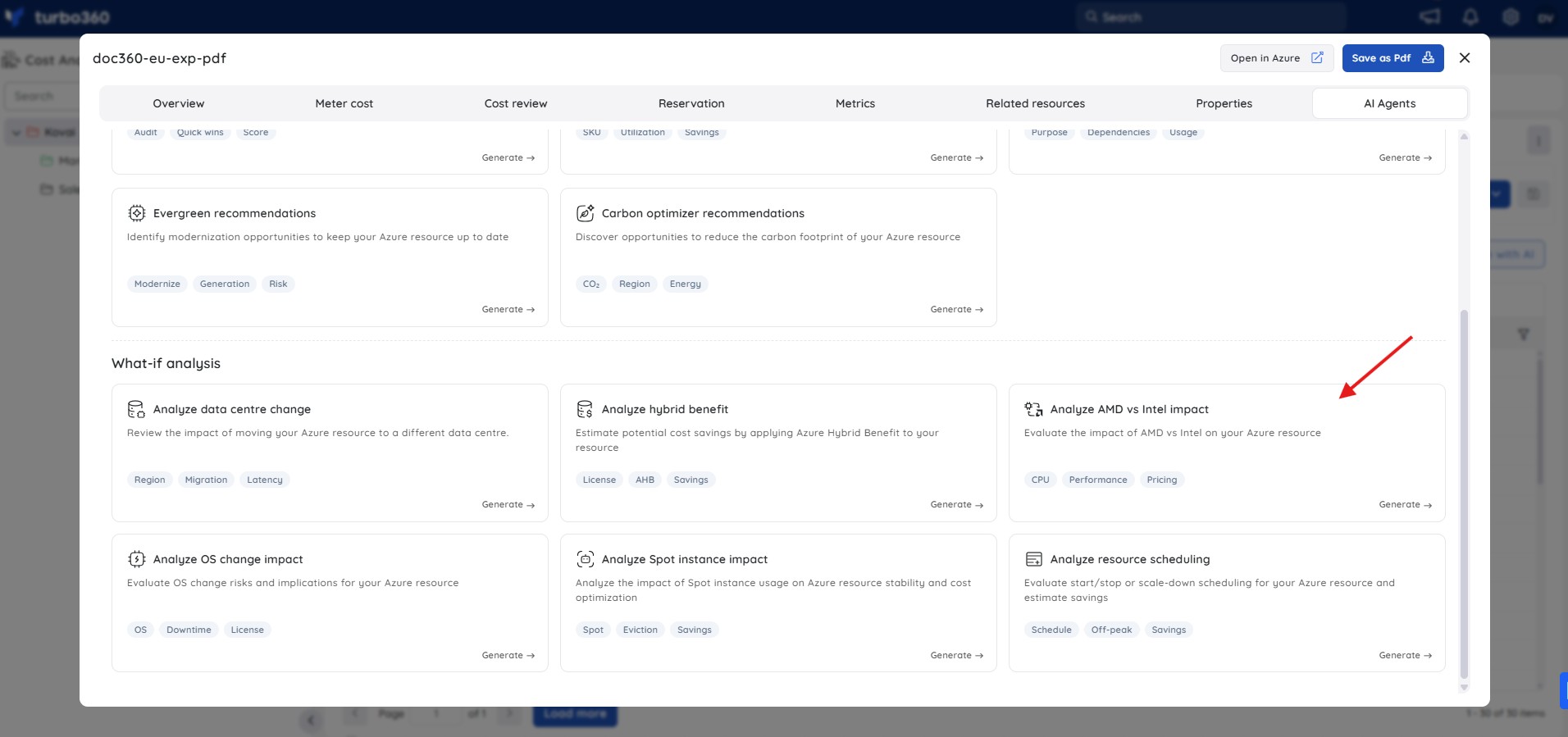
- Select Analyze AMD vs Intel impact from the list of available agents.
- Click Generate to run the analysis.
- Review the generated output across the Quick takeaway, Side-by-side comparison, Performance impact, Pricing differences, Compatibility issues, Availability constraints, and Migration approach panels.
Example scenario
A platform engineer is reviewing a Standard_D8as_v4 Virtual Machine (AMD architecture, 8 vCPU / 32 GiB, West Europe) that runs an Aspose PDF export workload. The VM is already covered by an active reservation and is averaging 1.68% CPU utilization. The engineer opens Analyze AMD vs Intel impact to determine whether switching to the Intel equivalent (Standard_D8s_v4) would reduce costs or improve performance.
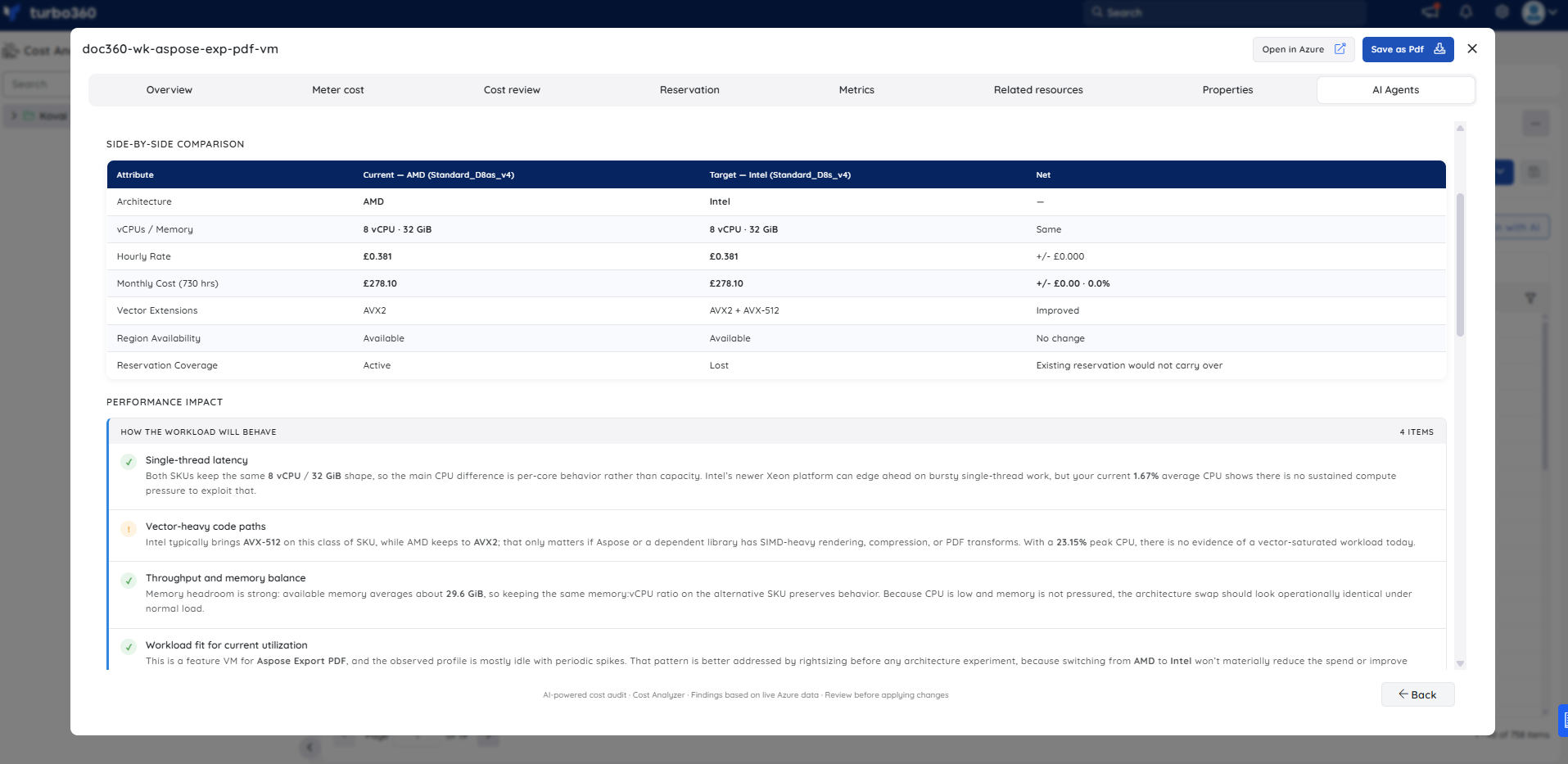
The Quick takeaway recommends against the switch: the Intel SKU offers only a marginal monthly saving (~$3.66/month at list price), but switching would invalidate the existing SKU-scoped reservation, erasing the saving and adding repurchase overhead. The Compatibility issues panel flags the reservation coverage loss as High severity. The Migration approach confirms the change is low-risk technically (a few minutes of downtime via stop/deallocate and resize) but High risk from a cost-commitment perspective.
Troubleshooting
- Analyze AMD vs Intel impact tab is not visible for a resource
Cause: The user's Custom role does not have the AI Agents feature permission enabled.
Fix: Go to User management > Roles, edit the relevant Custom role, and enable the AI Agents toggle under Specify feature permissions. - No analysis is generated for a Virtual Machine
Cause: The OpenAI connection is not configured or has failed validation (Private Hosting only).
Fix: See OpenAI setup in Turbo360 to verify or reconfigure the connection. - The Availability constraints panel shows capacity warnings despite the SKU appearing in the Azure portal
Cause: Zone-level capacity can fluctuate independently of regional SKU availability. The agent flags zone and capacity parity separately from general regional availability.
Fix: Plan the resize during a maintenance window and verify zone-level capacity in the Azure portal at the time of the change.
FAQs
- Does Analyze AMD vs Intel impact perform the CPU switch automatically?
No. It provides an impact analysis only; you plan and perform any VM SKU change yourself. - Can pricing differences shown be treated as exact quotes?
No. Pricing comparisons are indicative and subject to region, availability, and Azure pricing updates at the time of evaluation. - Does the analysis apply to all Azure VM SKU families?
The agent evaluates VMs where both AMD and Intel variants exist for an equivalent SKU family. For VM sizes with no AMD or Intel counterpart in the selected region, the Availability constraints panel will note the limitation rather than provide a full comparison.
Related articles
Was this article helpful?