

Analyze data centre change
- 05 Aug 2026
- 5 Minutes to read
- Print
- DarkLight
- Download PDF
Analyze data centre change
- Updated on 05 Aug 2026
- 5 Minutes to read
- Print
- DarkLight
- Download PDF
Article summary
Did you find this summary helpful?
Thank you for your feedback!
Overview
Analyze data centre change is an AI Agent in Cost Analyzer that evaluates the impact of moving an Azure resource to a different data centre (region). It analyzes technical, operational, and cost-related factors, and summarizes them to support a safe and informed migration decision.
Business value
Reviewing supportability, downtime, cost, and risk before a regional migration helps you avoid unplanned outages and data-movement issues, and gives you a clear basis for choosing the right migration approach.
Prerequisites
- On Private Hosting deployments, an Azure OpenAI connection must be configured before this AI Agent can generate insights. See OpenAI setup in Turbo360 for setup instructions. SaaS deployments do not need this step.
Required permissions
Access requires both the AI Agents feature to be enabled for the role and Read access to the Analysis feature, since Analyze data centre change is surfaced from the resource-level Cost intelligence view within Analysis.
| Role | Permission level | Access |
|---|---|---|
| Account Owner / Owner / Contributor | Full access | Can use Analyze cost drivers on any resource |
| Custom role | AI Agents — Enable, Analysis — Read (or Manage) | When AI Agents is set to Enable and Analysis is toggled on with at least Read access, the user can view Analyze data centre change for resources within their assigned scope; if either is missing, the option is not available |
.jpg)
How it works
The AI Agent evaluates multiple dimensions, including:
- Azure resource type and regional supportability
- Data residency and data movement impact
- Expected downtime and service availability impact
- Cost and performance implications across regions
- Dependency and configuration considerations
It breaks the analysis down into the following insights:
- Supportability analysis — determines whether the selected Azure resource and its configurations are supported in the target data centre.
- Data impact — analyzes data movement requirements, data size, replication needs, and potential data loss or consistency concerns.
- Downtime assessment — estimates potential downtime during migration and highlights options to minimize service disruption.
- Cost & performance implications — provides insights into expected cost differences between regions and performance impact due to latency or regional capabilities.
- Recommended migration approach — suggests the most suitable migration strategy, such as re-deploy and restore, or replication-based/phased migration, based on resource type, data criticality, and availability requirements.
- Risk assessment — identifies potential risks involved in the data centre change, including availability and reliability risks, data integrity risks, and operational and rollback challenges, to help you plan mitigation strategies.
Steps
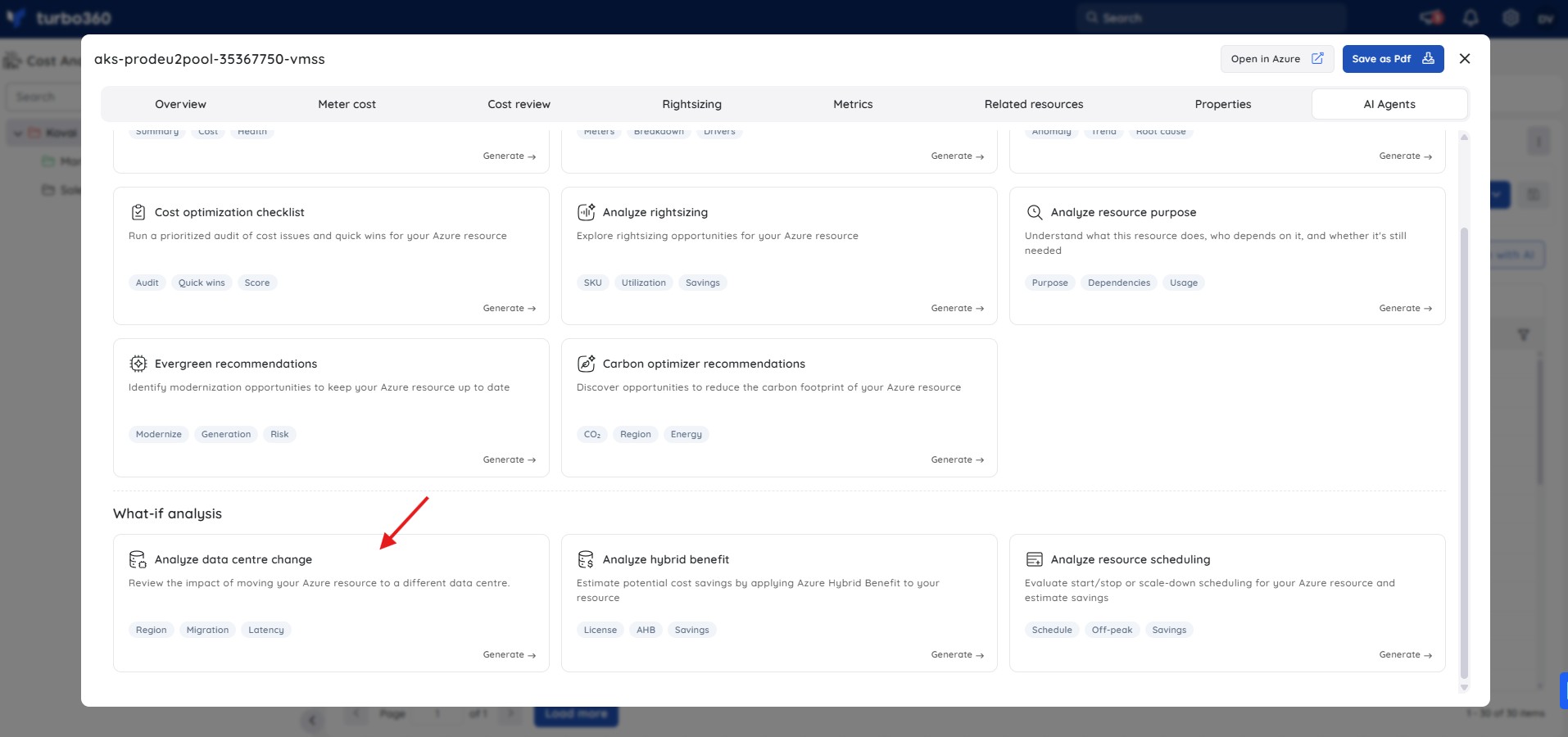
To run an Analyze data centre change analysis, navigate to Cost Analyzer > Analysis, open a Cost management group, and select a resource from the analysis view to open its Cost intelligence panel.
- In the Cost intelligence panel for a resource, select the Analyze data centre change tab.
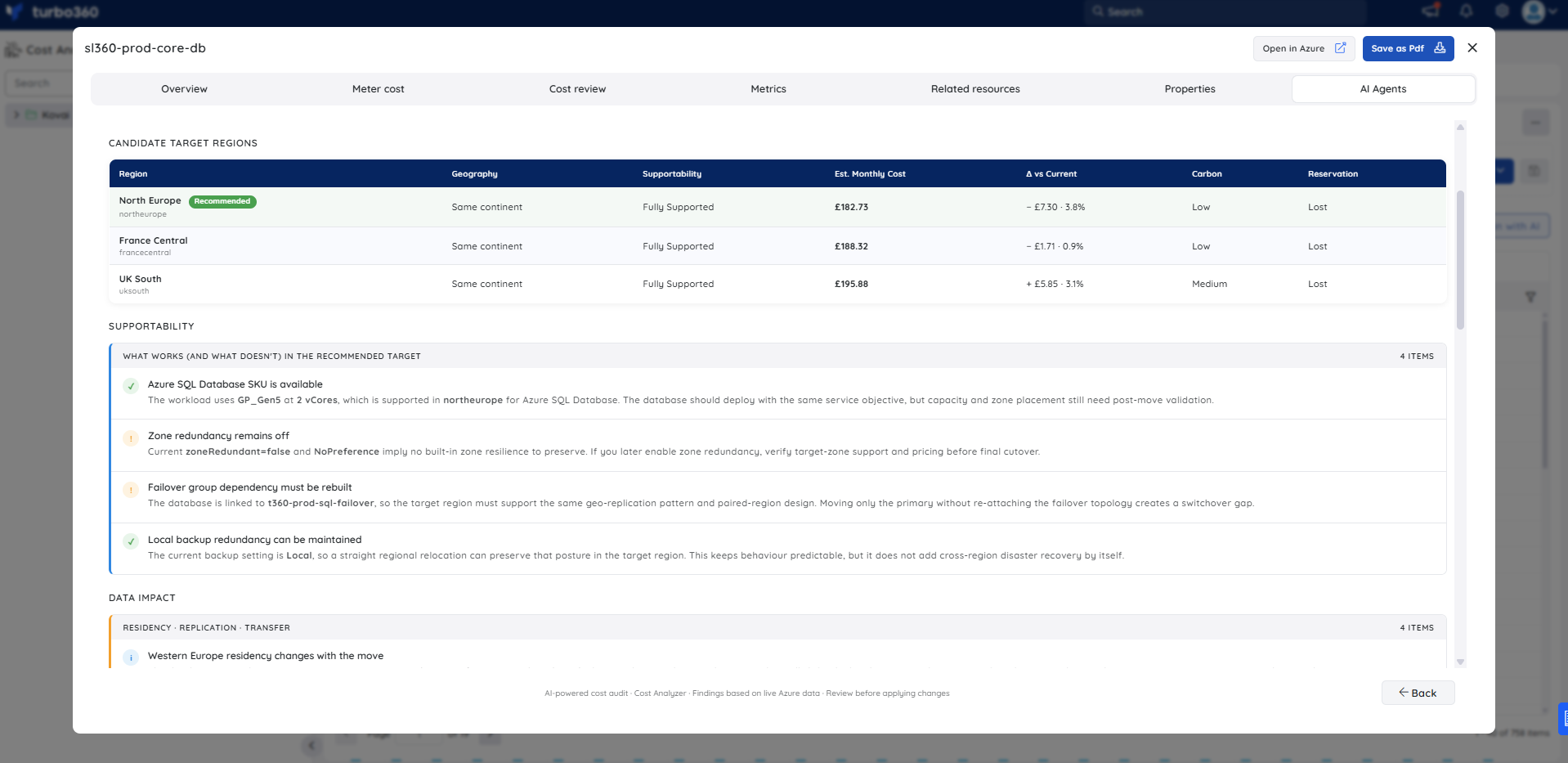
- Review the candidate target regions presented — each entry shows geography, supportability status, estimated monthly cost, cost delta versus the current region, carbon intensity, and reservation impact.
- Select a target region to expand the full analysis, which includes the supportability breakdown, data impact assessment, cost and performance comparison, downtime estimate with migration steps, and risk assessment.
- Use the insights to evaluate whether the migration is viable and to plan the approach, downtime window, and rollback strategy before executing any change.
Example scenario
The example below is based on an Azure SQL Database running in West Europe (westeurope). The agent evaluates moving it to North Europe (northeurope) as the recommended target and produces the following output:
Candidate target regions — the agent surfaces three ranked options (North Europe, UK South, West US 2), each with estimated monthly cost, cost delta, carbon intensity rating, and a note on whether any existing reservation would be lost on migration.
Supportability analysis — four findings are listed for the recommended target. Two are confirmations (the current SKU is available in North Europe; private connectivity and paired-region alignment remain feasible) and two are warnings (backup storage redundancy must be re-validated after the move; maintenance configuration and zone behavior should be checked in the target region).
Data impact — four residency and replication findings cover data sovereignty (moving within the EU keeps residency controls intact), migration copy cost (egress and sync traffic during cutover adds measurable transfer cost), replication latency (latency improves only if consumers also move to the same region), and compliance posture (EU-only handling should be preserved and checked against internal retention rules).
Cost & performance comparison — a table compares current versus recommended values across monthly cost, latency to likely consumers, carbon intensity, reservation/savings plan status, hybrid benefit eligibility, and feature parity.
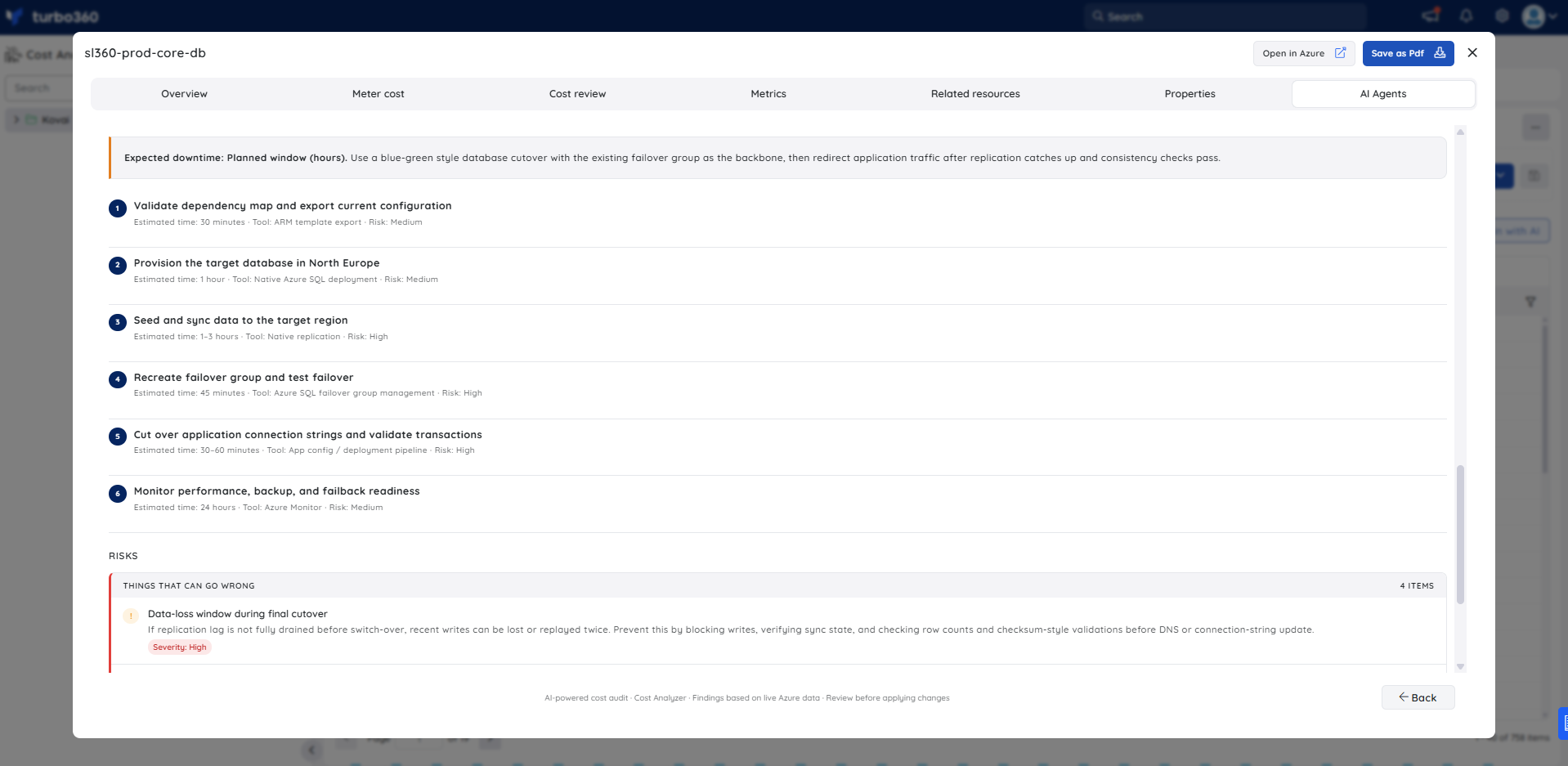
Downtime & migration approach — the agent estimates a planned window of several hours and outlines six steps: validate dependencies and confirm target-region SKU; create the target database; synchronize data and rehearse failover; schedule cutover and freeze writes; switch connection strings and validate application behavior; monitor and retire the old instance.
Risk assessment — four risks are flagged (write-loss during cutover, region-scoped discount collapse, connection or firewall drift after redeployment, and latency regression for any app tier left behind in West Europe), each with a severity rating and a mitigation note.
Troubleshooting
- Analyze data centre change tab is not visible for a resource
Cause: The user's Custom role does not have the AI Agents feature permission enabled.
Fix: Go to User management > Roles, edit the relevant Custom role, and enable the AI Agents toggle under Specify feature permissions. - No analysis is generated for a resource
Cause: The OpenAI connection is not configured or has failed validation (Private Hosting only).
Fix: See OpenAI setup in Turbo360 to verify or reconfigure the connection. - Supportability analysis shows the resource is not supported in the target region
Cause: Not all Azure resource types and configurations are available in every region.
Fix: Review the resource's regional availability in the Azure portal and consider selecting an alternative target region that supports the required configurations.
FAQs
- Does the agent perform the data centre migration automatically?
No. It provides an impact analysis only; you plan and execute the migration yourself. - How accurate are the downtime estimates?
Estimates are indicative and based on typical migration patterns for the resource type. Always validate against your specific configuration, dependencies, and recovery time objectives before scheduling a migration.
Related articles
Was this article helpful?