

Connect Azure subscription
- 05 Aug 2026
- 4 Minutes to read
- Print
- DarkLight
- Download PDF
Connect Azure subscription
- Updated on 05 Aug 2026
- 4 Minutes to read
- Print
- DarkLight
- Download PDF
Article summary
Did you find this summary helpful?
Thank you for your feedback!
Overview
Connecting an Azure subscription is the first step to using Turbo360. Once connected, Turbo360 can access your Azure resources and cost data to power Cost Analyzer, Business Applications, Business Activity Monitoring, and Azure Documenter.
Business value
Connecting your Azure subscription gives Turbo360 the access it needs to monitor resources, analyze costs, and generate documentation — all from a single platform.
Prerequisites
Before you connect an Azure subscription, make sure you have:
- An active Microsoft Azure subscription
- A configured Azure service principal with the required permissions (see Service principal setup and Permission requirements for Turbo360)
- Account owner access to your Turbo360 organization
Required permissions
| Permission | Details |
|---|---|
| Turbo360 role | Account owner access to Turbo360 organization |
| Azure role | Owner or Contributor on the target subscription (required to grant the service principal access) |
Dependencies
- Microsoft Azure subscription
- A service principal configured in Azure Active Directory (Microsoft Entra ID)
- Turbo360 account created and active
How it works
Turbo360 connects to your Azure subscription using a service principal — an identity registered in Microsoft Entra ID that grants Turbo360 delegated access to your Azure resources. The service principal credentials are stored centrally in Turbo360 under Settings > Service principals and shared across all modules.
When you add a service principal, Turbo360 validates the service principal credentials and confirms that the principal has the required permissions on the subscription. A successful validation activates the service principal connection and makes it available across all Turbo360 modules.
You can connect multiple subscriptions, each using the same or a different service principal, depending on your tenant structure.
Steps
Connect an Azure subscription
- Go to Settings > Service principals. The list shows all service principals added under Settings > Service principals.
- Click Add.
.png)
- Provide the service principal details and click Validate to verify the connection.
- Once validation succeeds, click Save.
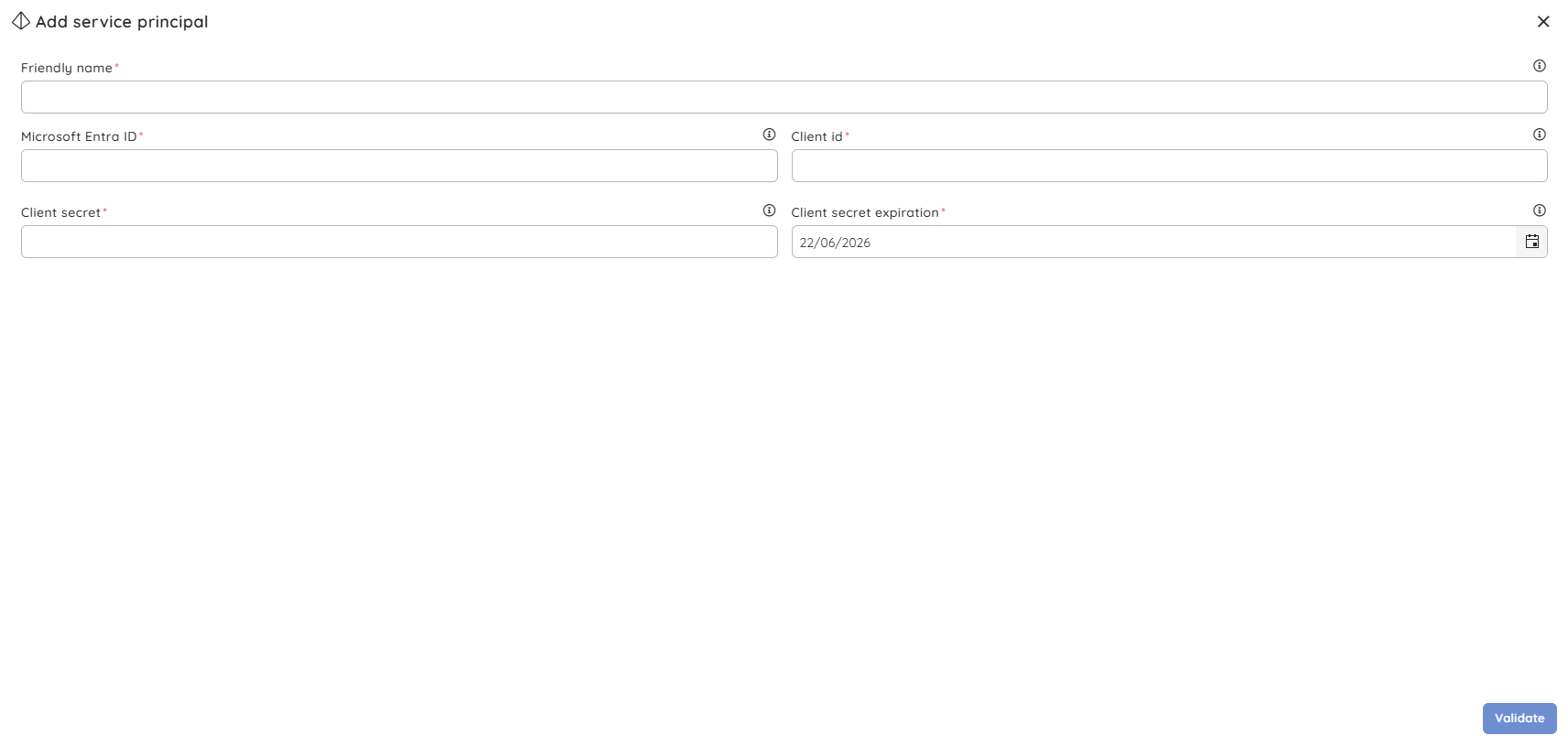
The service principal is now ready to use. When connecting Azure subscriptions, select it in the relevant module to scope access based on your needs.
Configuration
| Option | Type | Required | Description |
|---|---|---|---|
| Friendly name | String | Yes | A display name for the service principal in Turbo360 |
| Microsoft Entra ID | String | Yes | The Directory (tenant) ID from Microsoft Entra ID |
| Client id | String | Yes | The Application (client) ID from Microsoft Entra ID |
| Client secret | String | Yes | The client secret value generated in Entra ID |
| Client secret expiration | Date | Yes | The expiry date of the client secret — triggers an alert 7 days before expiry |
Permission behavior
With access (Account owner): You can add, validate, edit, and remove service principals. You can also reassign the service principal used by a subscription.
Without access: The Settings > Service principals page is not available. Contact your Turbo360 organization administrator to connect or manage service principals.
Example scenario
Your organization runs a production workload on an Azure service principal with ID xxxxxxxx-xxxx-xxxx-xxxx-xxxxxxxxxxxx. You have created a service principal in Microsoft Entra ID and added it to Turbo360 under Settings > Service principals. The service principal is now active and ready to be configured with Cost Analyzer, Business Applications, Business Activity Monitoring, and Azure Documenter.
Limitations
- Turbo360 does not support connecting Azure Management Groups directly — connect individual subscriptions instead.
- Removing a service principal from Turbo360 does not delete any Azure resources or modify Azure RBAC assignments.
Troubleshooting
Validation fails with an authentication error.
Cause: The service principal credentials may be incorrect or expired.
Fix: Go to Settings > Service principals, verify the client ID and client secret, and retry validation. If the client secret has expired, rotate it in Azure and update it in Turbo360.Microsoft Entra ID not recognised.
Cause: The tenant ID may have been entered with leading or trailing spaces, or the value was copied incorrectly.
Fix: Confirm the Microsoft Entra ID in the Azure portal. Ensure there are no leading or trailing spaces when entering the value in Turbo360.Service principal dropdown is empty.
Cause: No service principals have been added to Turbo360 yet.
Fix: Go to Settings > Service principals and add one before connecting a subscription.Service principal connects but modules show no data.
Cause: The service principal may lack the required Azure RBAC role on the subscription.
Fix: Verify the principal has at least Reader access on the subscription in the Azure portal.Service principal validation passes but the subscription does not appear in modules.
Cause: Initial data sync has not completed after connection.
Fix: Allow a few minutes for Turbo360 to complete the initial data sync. If the subscription still does not appear, refresh the page or contact support.
FAQs
Can I connect subscriptions from multiple Azure tenants?
Yes. Turbo360 supports service principals from multiple Microsoft Entra tenants. Add a service principal for each tenant under Settings > Service principals, then associate the appropriate principal when connecting each subscription.Can I change the service principal assigned to a subscription after connecting?
Service principals can only be added or removed centrally from Settings > Service principals. Subscription scoping is managed at the individual module level, not from the Service principals page. To change the principal used for a subscription, update the association within the relevant module.Does connecting a subscription affect my Azure resources or billing?
No. Connecting a subscription grants Turbo360 read access only (subject to the roles assigned to the service principal). It does not create, modify, or delete any Azure resources.
Related articles
Was this article helpful?