

Evergreen recommendations
- 05 Aug 2026
- 5 Minutes to read
- Print
- DarkLight
- Download PDF
Evergreen recommendations
- Updated on 05 Aug 2026
- 5 Minutes to read
- Print
- DarkLight
- Download PDF
Article summary
Did you find this summary helpful?
Thank you for your feedback!
Overview
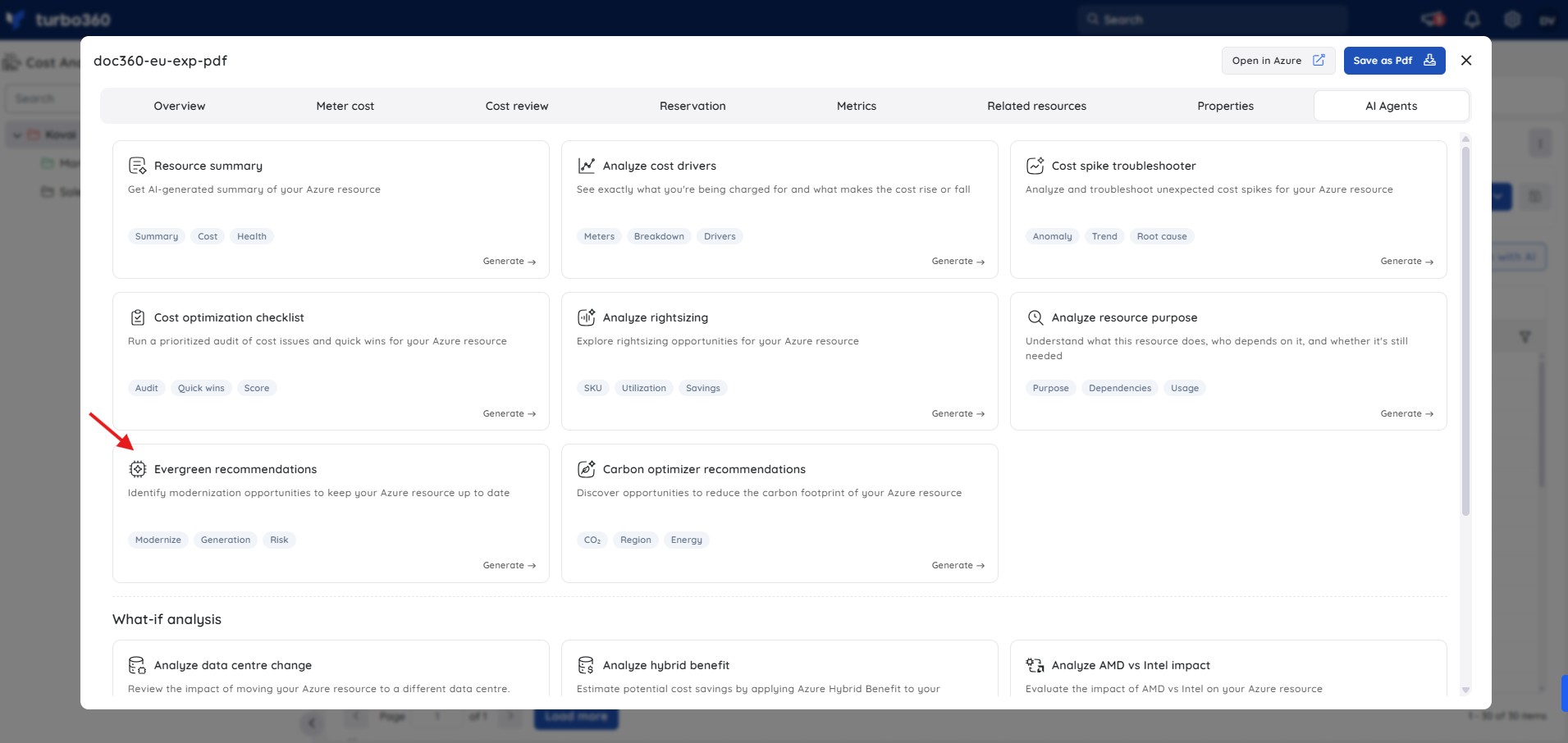
Evergreen recommendations is an AI Agent in Cost Analyzer that analyzes Azure resources and identifies modernization opportunities to keep them secure, supported, and aligned with the latest platform capabilities. It helps reduce technical debt and improve long-term maintainability.
Business value
Surfacing obsolescence risks and modernization paths in one view helps you plan upgrades proactively, reducing security and support exposure before they become incidents.
Prerequisites
- On Private Hosting deployments, an Azure OpenAI connection must be configured before this AI Agent can generate insights. See OpenAI setup in Turbo360 for setup instructions. SaaS deployments do not need this step.
Required permissions
Access requires both the AI Agents feature to be enabled for the role and Read access to the Analysis feature, since Evergreen recommendations is surfaced from the resource-level Cost intelligence view within Analysis.
| Role | Permission level | Access |
|---|---|---|
| Account Owner / Owner / Contributor | Full access | Can use Analyze cost drivers on any resource |
| Custom role | AI Agents — Enable, Analysis — Read (or Manage) | When AI Agents is set to Enable and Analysis is toggled on with at least Read access, the user can view Evergreen recommendations for resources within their assigned scope; if either is missing, the option is not available |
.jpg)
How it works
The AI Agent generates a modernization summary containing the following insights:
- Current state assessment — a summary of the resource's current configuration, version, SKU/tier, region, and enabled features to establish its modernization baseline.
- Obsolescence and support risks — identification of outdated versions, aging SKUs, deprecated features, or configurations nearing end-of-support that may introduce security, compliance, or performance risks.
- Evergreen opportunities — actionable recommendations such as upgrading to newer SKUs or tiers, moving to latest supported versions, enabling modern platform features, and improving resilience and scalability.
- Cost and performance impact — a comparison of current vs recommended configurations, highlighting estimated cost changes, performance and scalability improvements, and operational trade-offs.
- Migration considerations — high-level guidance on upgrade or migration steps, including potential downtime, validation requirements, and dependency checks.
Steps
To run an Evergreen recommendations analysis, navigate to Cost Analyzer > Analysis, open a Cost management group, and select a resource from the analysis view to open its Cost intelligence panel.
- In the Cost intelligence panel for a resource, select the Evergreen recommendations tab.
- Review the current state assessment, which summarizes the resource's SKU, generation, region, deployment model, key configuration, and usage pattern.
- Review the obsolescence and support risks — each finding is marked with a severity level and describes why staying on the current configuration introduces risk.
- Review the evergreen opportunities table, which lists candidate SKUs or configurations with estimated monthly cost, new features, carbon impact, reservation impact, and risk rating.
- Review the platform feature opportunities section for configuration-level actions (such as security posture preservation or patching settings) that should accompany any SKU upgrade.
- Use the cost and performance impact comparison and the migration considerations to plan the upgrade window, validate dependencies, and confirm reservation coverage before executing any change.
Example scenario
The example below is based on a Windows Virtual Machine running Standard_D4s_v3 in eastus. The agent identifies the VM as running on an older host generation and recommends upgrading to Standard_D4s_v5.
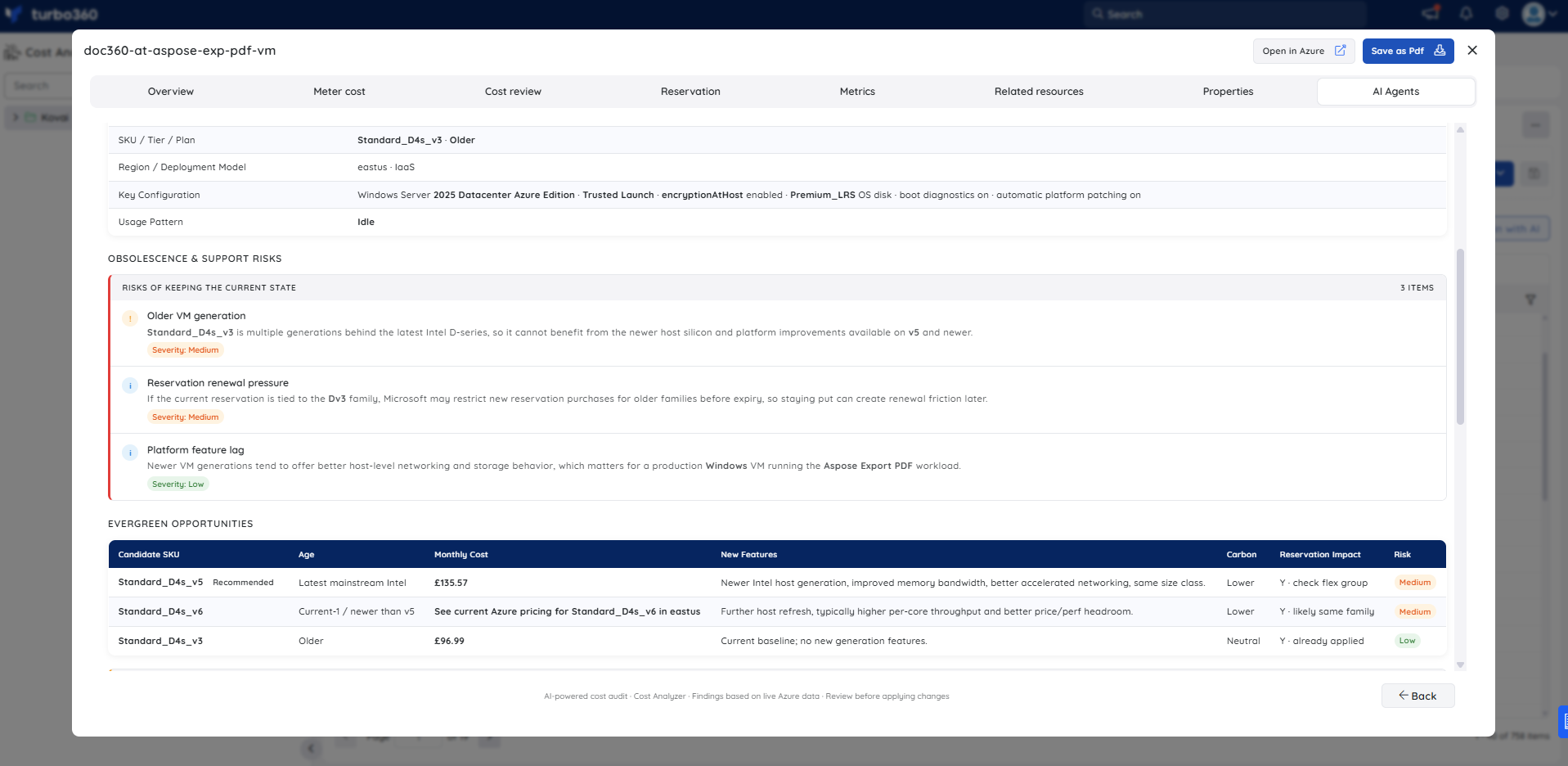
Current state assessment — the agent summarizes the VM as a Standard_D4s_v3 in eastus, running Windows Server 2025 Datacenter Azure Edition with Trusted Launch, encryption at host, Premium_LRS OS disk, boot diagnostics, and automatic platform patching enabled. The usage pattern is idle. The evergreen status is shown as Upgrade Recommended.
Obsolescence and support risks — three findings are listed. The first (Medium severity) is that Standard_D4s_v3 is multiple generations behind the latest Intel D-series and cannot benefit from newer host silicon available on v5. The second (Medium severity) is reservation renewal pressure: if the current reservation is tied to the Dv3 family, staying put can create renewal friction when the term expires. The third (Low severity) is a platform feature lag note: newer VM generations offer better host-level networking and storage behavior, which matters for a production Windows workload.
Evergreen opportunities — a candidate SKU table lists three options. Standard_D4s_v5 is marked as the recommended option (latest mainstream Intel generation, improved memory bandwidth, better accelerated networking, same size class, lower carbon, reservation flexibility check required). Standard_D4s_v6 is listed as an additional newer option. Standard_D4s_v3 is shown as the current baseline for reference.
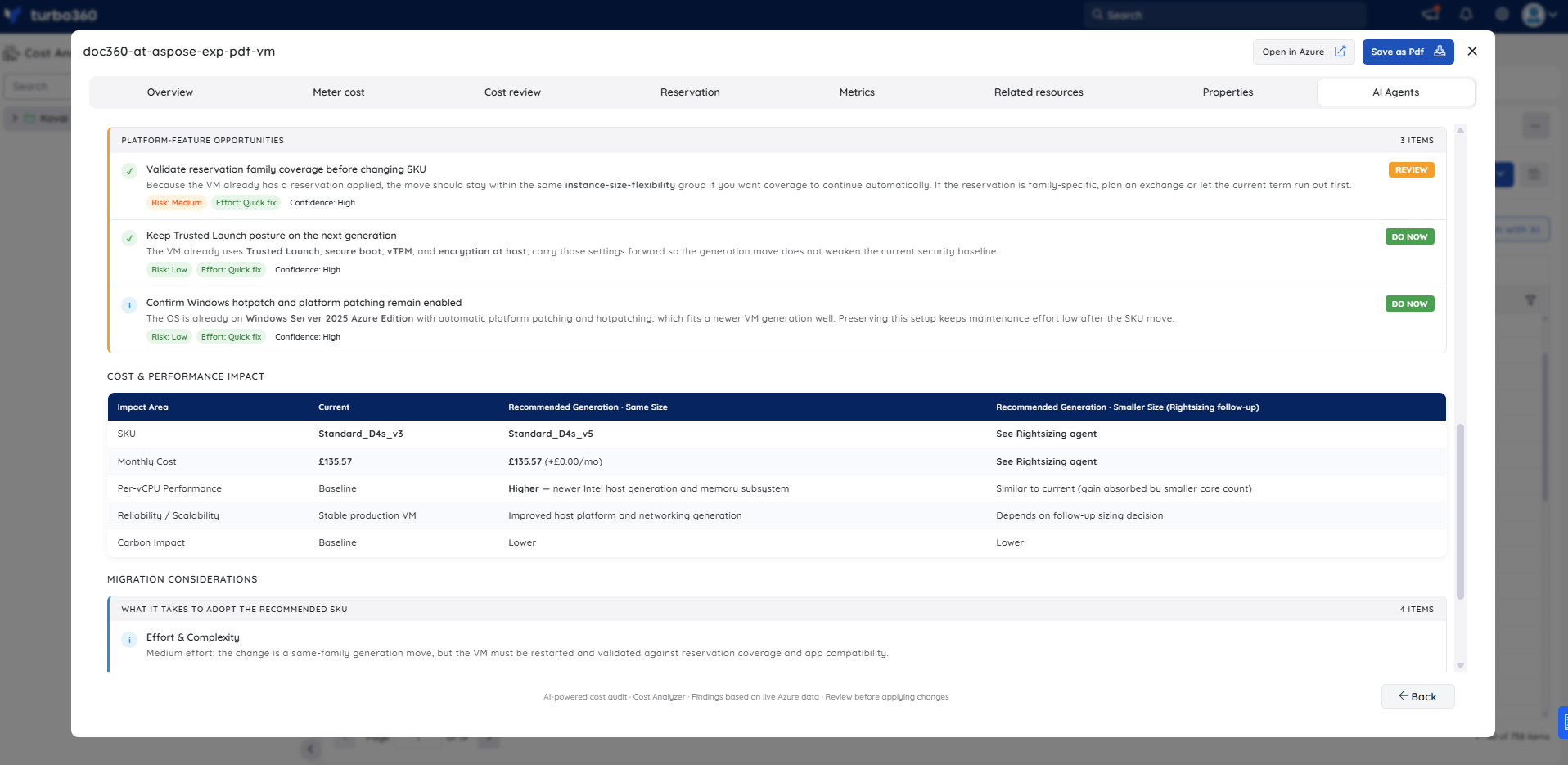
Platform feature opportunities — three configuration-level actions accompany the SKU recommendation: validate reservation family coverage before changing SKU (Medium risk, Quick fix); keep Trusted Launch posture on the next generation (Low risk, Do now); and confirm Windows hotpatch and platform patching remain enabled after the move (Low risk, Do now).
Cost & performance impact — a comparison table shows current vs recommended-generation-same-size vs recommended-generation-smaller-size. At the same size, monthly cost is unchanged while per-vCPU performance improves, host platform reliability improves, and carbon impact is lower.
Migration considerations — the agent outlines four considerations: medium effort (same-family generation move but requires a restart and validation); a planned downtime window of minutes for Azure to reallocate the VM to new hardware; a reservation dependency (if the discount is not size-flexible across Dsv3 to Dsv5, billing coverage changes until the commitment is exchanged or repurchased); and five implementation steps (verify reservation scope and size-flexibility group → confirm image, extension, and application readiness → schedule a maintenance window → change the VM size → validate boot, patching, and workload output).
Troubleshooting
- Evergreen recommendations tab is not visible for a resource
Cause: The user's Custom role does not have the AI Agents feature permission enabled.
Fix: Go to User management > Roles, edit the relevant Custom role, and enable the AI Agents toggle under Specify feature permissions. - No analysis is generated for a resource
Cause: The OpenAI connection is not configured or has failed validation (Private Hosting only).
Fix: See OpenAI setup in Turbo360 to verify or reconfigure the connection. - No obsolescence risks or evergreen opportunities are shown
Cause: The resource may already be on a current, supported SKU and version with no available upgrade paths identified at the time of analysis.
Fix: Re-run the analysis periodically, as new upgrade paths and deprecation notices are factored in as the platform updates its knowledge.
FAQs
- Does the agent apply the modernization changes automatically?
No. It provides recommendations only; you review and execute any upgrades yourself. - How often should I run Evergreen recommendations?
Run it periodically — especially before planning maintenance windows or capacity reviews — to catch newly deprecated configurations or newly available upgrade paths.
Related articles
Was this article helpful?