

Hybrid benefits
- 05 Aug 2026
- 4 Minutes to read
- Print
- DarkLight
- Download PDF
Hybrid benefits
- Updated on 05 Aug 2026
- 4 Minutes to read
- Print
- DarkLight
- Download PDF
Article summary
Did you find this summary helpful?
Thank you for your feedback!
Overview
Azure Hybrid Benefit (AHB) is a cost-saving feature provided by Microsoft Azure that allows you to apply your existing on-premises Windows Server or SQL Server licenses with Software Assurance to workloads running in Azure, reducing overall cloud costs.
The Hybrid benefits feature in Cost Analyzer extends this to virtual machines (VMs) and virtual machine scale sets (VMSS), giving you visibility into resources that already have a license applied and resources that are eligible but haven't applied one yet — helping you optimize license usage and manage costs efficiently.
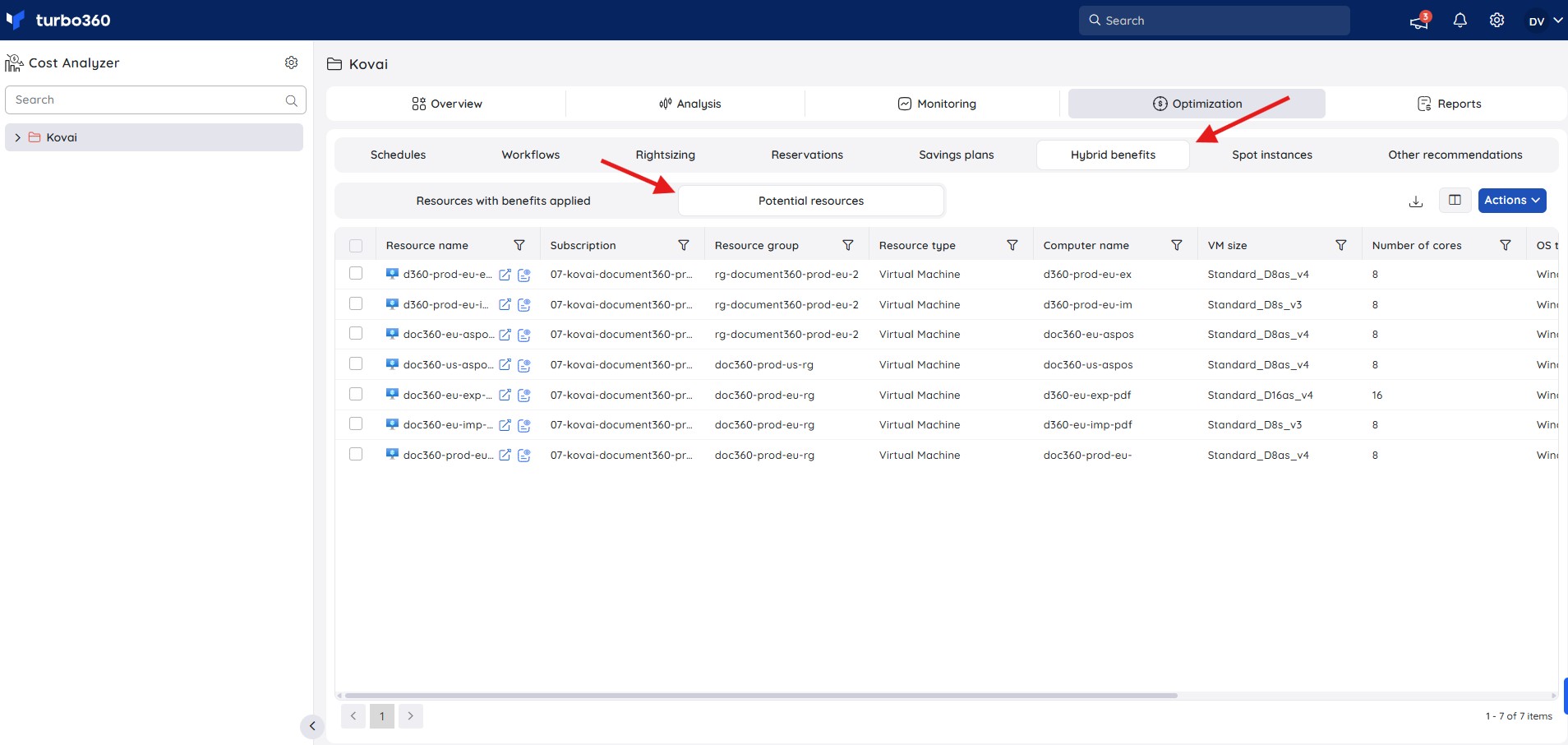
You can access Hybrid benefits by navigating to a cost management group and selecting Optimization > Hybrid benefits.
Business value
Hybrid benefits surfaces both realized and unclaimed Azure Hybrid Benefit savings in one place, so you can confirm existing license usage and act on missed opportunities without manually cross-referencing Azure Advisor or the Azure portal.
Prerequisites
Required permissions
| Role | Permission level | Access |
|---|---|---|
| Account owner, Owner, Contributor | — | Full access to Hybrid benefits |
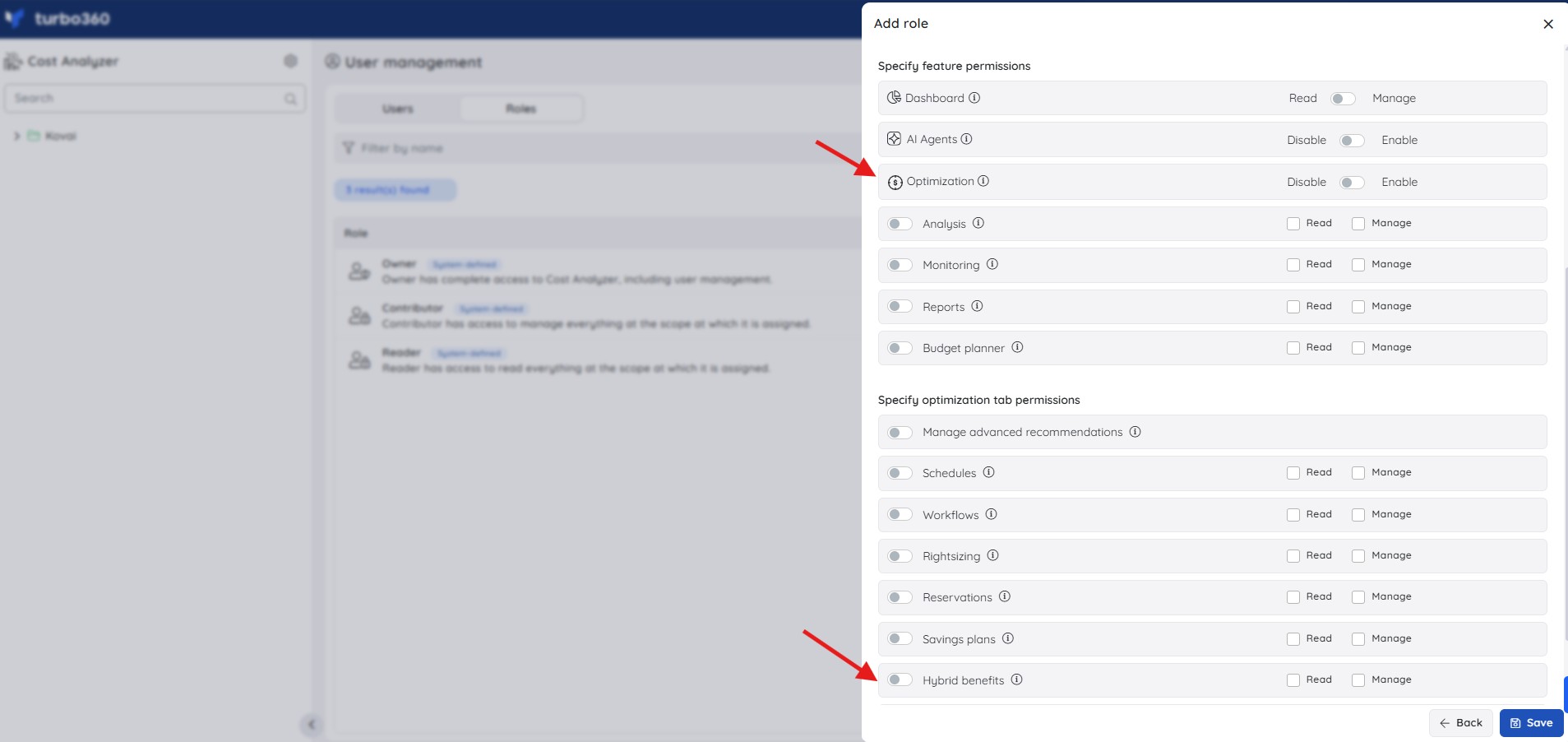
| Custom role | Optimization enabled + Hybrid benefits: Read | View Hybrid benefits |
| Custom role | Optimization enabled + Hybrid benefits: Manage | Full access to Hybrid benefits, including ignoring potential resources |
To view or manage Hybrid benefits, a role needs Optimization tab permission enabled, and the Hybrid benefits toggle enabled with Read or Manage checked. Roles are created under Cost Analyzer > User management > Roles > Add role.
How it works
Resources with benefits applied
The Resources with benefits applied tab provides a consolidated view of all VMs and VMSS leveraging Azure Hybrid Benefit. Listed resources are linked to eligible existing Windows Server or SQL Server licenses, applied either at deployment or subsequently.
- The tab displays the actual cost incurred by each resource during the previous month and the license type applied, so you can track license usage and its cost impact.
- The full dataset can be exported in Excel format for offline analysis, reporting, and compliance reviews.
.jpg)
Potential resources
The Potential resources tab lists VMs and VMSS that are not currently using Azure Hybrid Benefit but may be eligible to leverage existing Windows Server or SQL Server licenses to reduce costs.
- This view helps you identify cost optimization opportunities and address licensing gaps proactively.
- The complete dataset can be exported in Excel format for offline analysis, reporting, and governance activities.
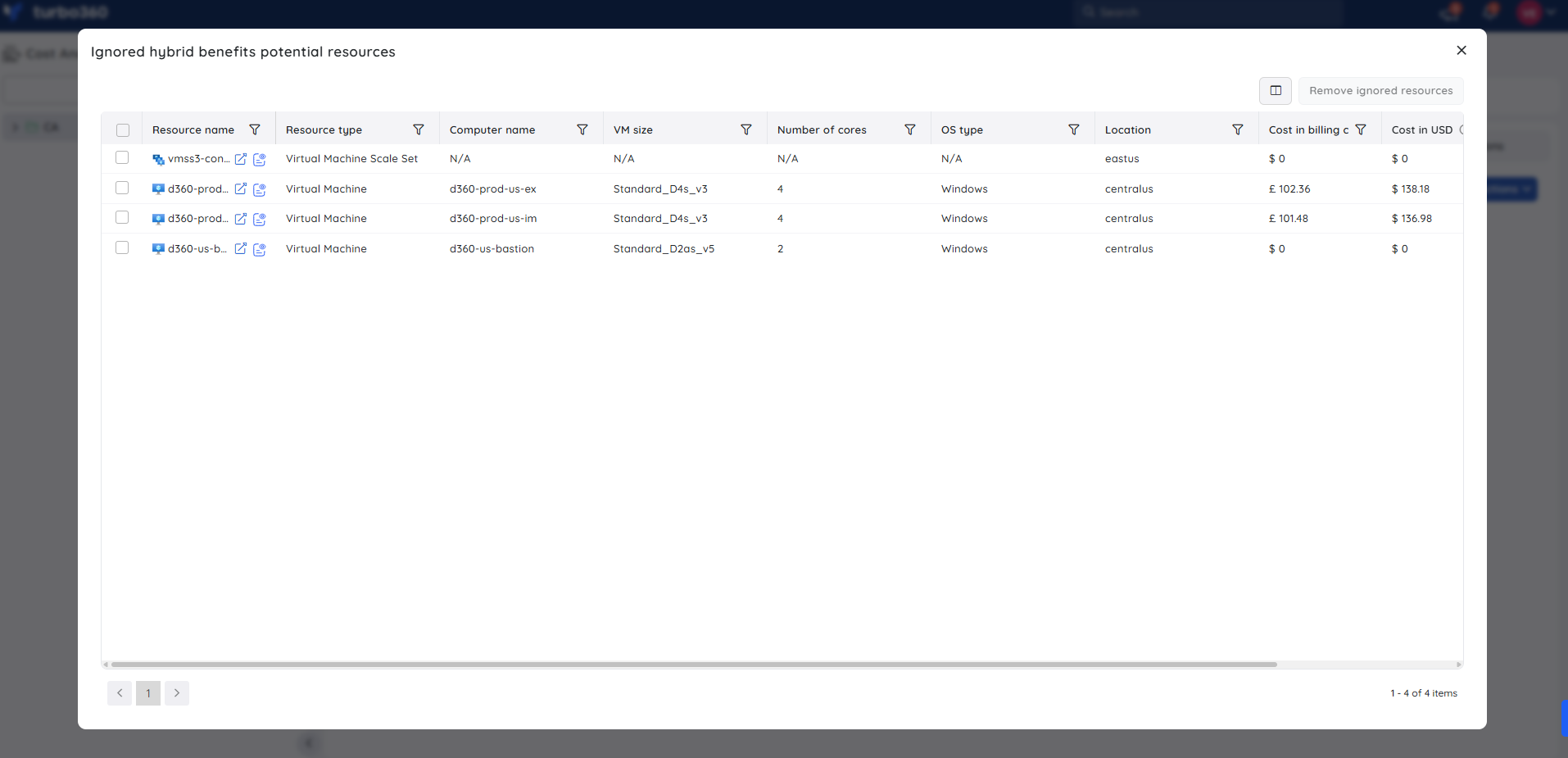
While a resource is marked as ignored, it's excluded from the Potential resources tab. It remains available under the Ignored hybrid benefits potential resources list and can be accessed from Actions > View ignored, so you retain visibility and can reassess it at any time.
Cost intelligence view
The Cost intelligence view structures resource data into distinct categories and visual sections, giving you a detailed overview of cost distribution and utilization, and highlighting key optimization opportunities by identifying areas of high or low resource efficiency.
Through these categorized insights, you can monitor spending patterns, evaluate cost performance, and take data-driven action to optimize resource usage and reduce overall expenses.
Click this link to know more about its capabilities.
To access this view, navigate to Optimization > Hybrid benefits > Resources with benefits applied / Potential resources within a cost management group, then click the View resource details icon next to a resource to open its Cost intelligence view.
.jpg)
Steps
Use the following steps to ignore a potential resource. Navigate to Optimization > Hybrid benefits > Potential resources within a cost management group to get started.
Ignore a potential resource
Ignoring a potential resource lets you defer a licensing decision, either indefinitely or until a specified date, when immediate action isn't required.
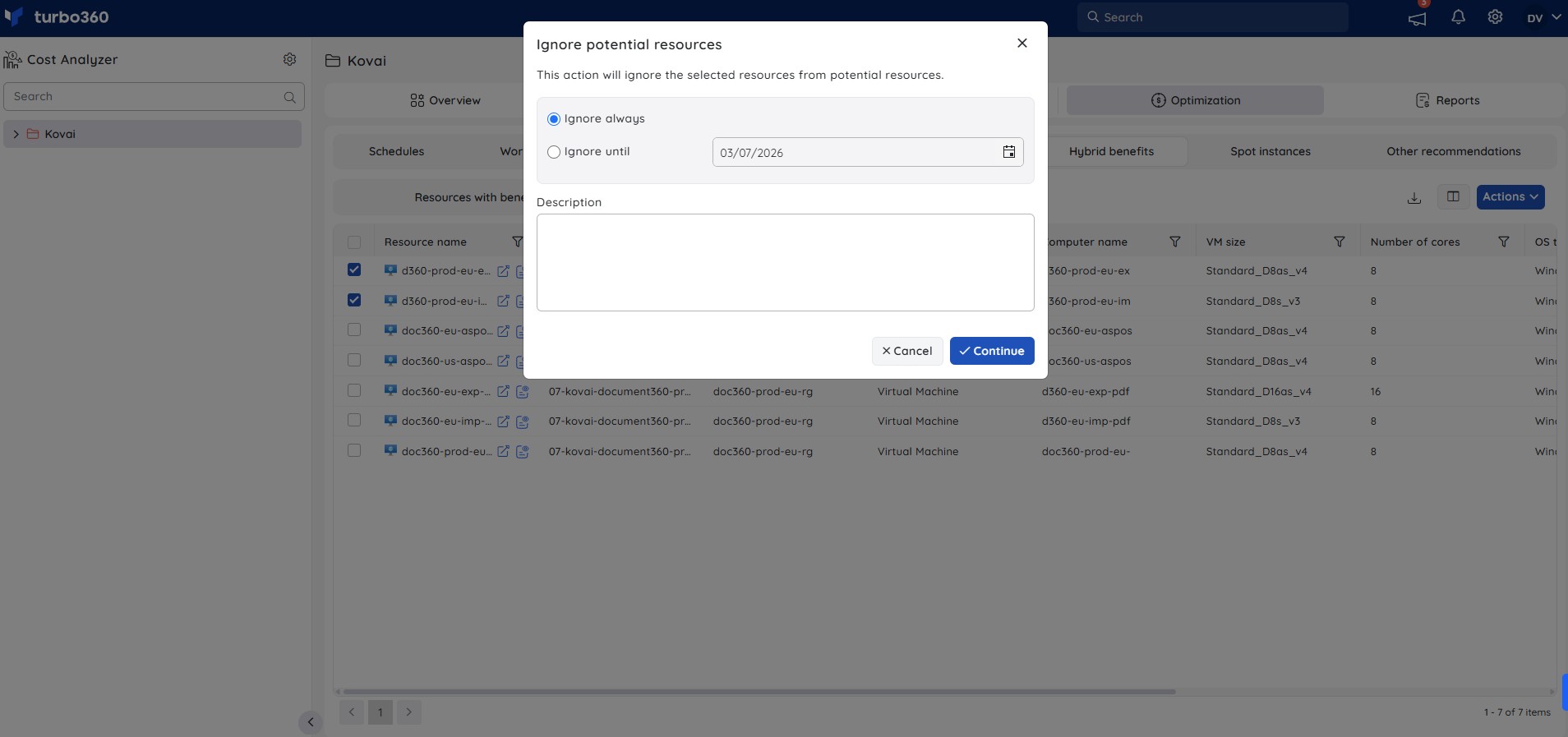
- In the Potential resources tab, select the resource to exclude, then click Actions > Ignore.
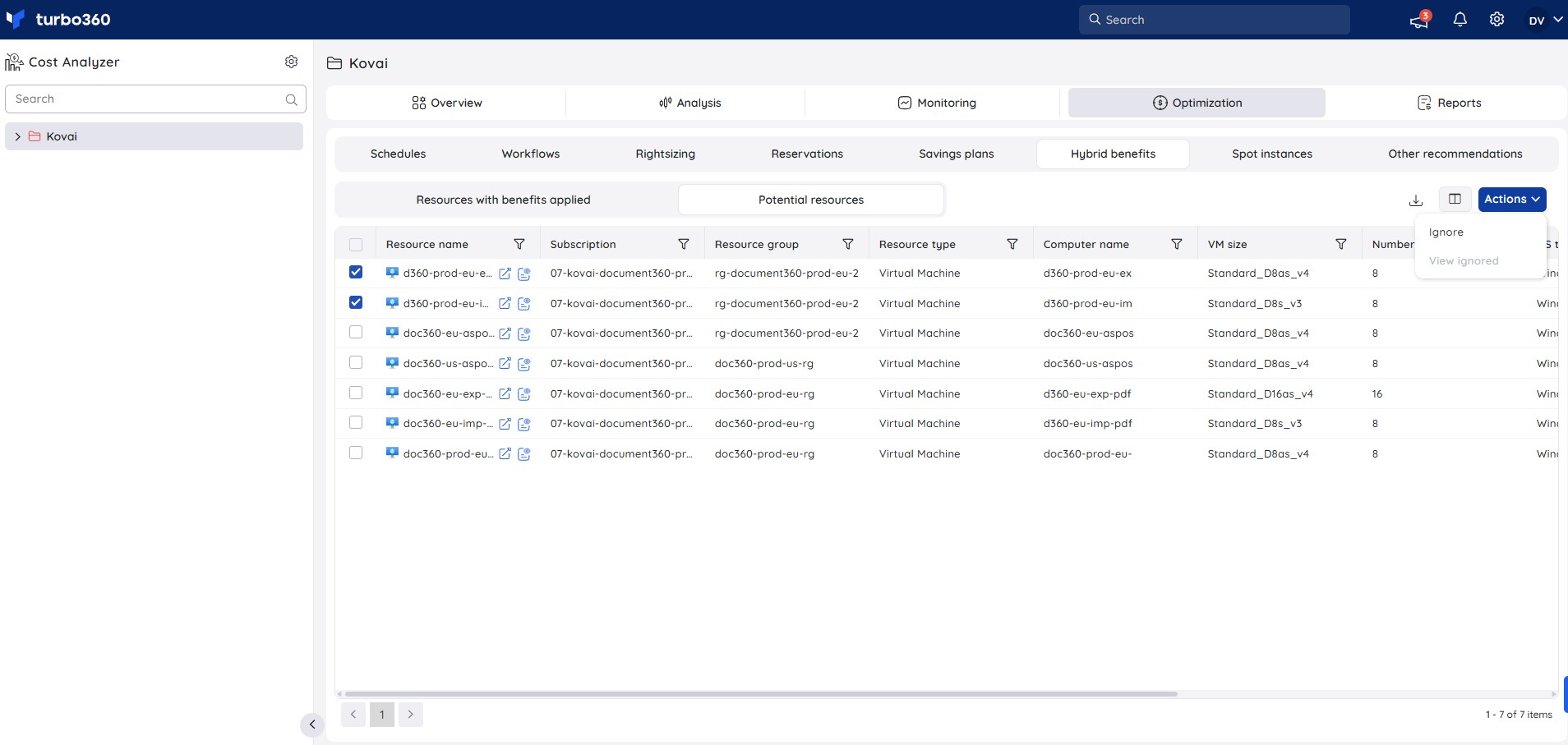
- Choose one of the following options:
- Ignore always to exclude the resource indefinitely.
- Ignore until to exclude the resource until a specified date.
- (Optional) Enter a justification to document the reason for ignoring the resource. This is visible to other team members for transparency and tracking.
- Click Continue to confirm the selection.
Example scenario
An administrator reviews the Potential resources tab and finds a VM eligible for Azure Hybrid Benefit that isn't yet using it. Since the license renewal decision is scheduled for next quarter, the administrator selects Ignore until and sets the date to the renewal review, adding a justification note for the team. The resource is suppressed from Potential resources until that date, while remaining visible under Ignored hybrid benefits potential resources for ongoing tracking.
Troubleshooting
The Hybrid benefits tab isn't visible
Cause: The Optimization feature permission is disabled for your role, or the Hybrid benefits permission isn't set.
Fix: Ask your administrator to enable Optimization and grant at least Read on Hybrid benefits in Roles.Can't ignore a potential resource
Cause: Your role only has Read permission on Hybrid benefits.
Fix: Request Manage permission on Hybrid benefits from your administrator.A resource doesn't appear in either tab
Cause: The resource may not be a VM or VMSS, or the subscription data hasn't refreshed since the resource was provisioned.
Fix: Confirm the resource type is a virtual machine or VMSS. If the resource was recently provisioned, wait for the next data refresh cycle before rechecking.
FAQs
What's the difference between "Ignore always" and "Ignore until"?
Ignore always excludes the resource from Potential resources indefinitely. Ignore until excludes it up to a specified date.Who can ignore a potential resource?
A role with Manage permission on Hybrid benefits (with Optimization enabled).Can I see a resource after I've ignored it?
Yes. Ignored resources remain visible under Ignored hybrid benefits potential resources, accessible from Actions > View ignored.
Related articles
Was this article helpful?