

Licensing FAQs
- 05 Aug 2026
- 5 Minutes to read
- Print
- DarkLight
- Download PDF
Licensing FAQs
- Updated on 05 Aug 2026
- 5 Minutes to read
- Print
- DarkLight
- Download PDF
Article summary
Did you find this summary helpful?
Thank you for your feedback!
Overview
This article answers common questions about Turbo360 licensing — including plan types, usage metering, module access, and how to manage your subscription. If you are evaluating Turbo360 or managing licenses for your team, this is the right place to start.
Business value
Understanding how Turbo360 licensing works helps administrators provision the right plan, avoid unexpected overage, and ensure users have access to the modules they need without delay.
Prerequisites
- You have an Account owner role in Turbo360, or you are evaluating Turbo360 for your organization.
Required permissions
- Viewing license details: Account owner role
- Managing or upgrading a license: Account owner role
Dependencies
- Access to the Turbo360 application
- A valid organizational billing contact
How it works
Turbo360 licenses are scoped per module — Cost Analyzer, Business Applications, Business Activity Monitoring, and Azure Documenter can each be on a different plan. Each module tracks usage across two dimensions:
- Cost usage — the dollar spend processed through Turbo360 against a monthly cost limit.
- Limit usage — unit-based consumption of specific module features, such as the number of monitored resources, automated tasks, BAM events, or document generations.
Plans available include Free, Azure Beginner, Azure Lite, Azure Growth, Azure Pro and Azure Enterprise each carrying different cost and unit limits per module. You can view current consumption, configure consumption alerts, and change your plan directly from Settings > License consumption.
Steps
To review or manage your organization's license:
- Sign in to Turbo360 and navigate to Settings.
- Select License consumption.
- Review the plan, cost usage, and limit usage for each module.
- To set up alerts for approaching limits, click Configure in the Consumption alerts section and assign a notification channel.
- To upgrade or change your plan, click Change Plan at the bottom of the page.
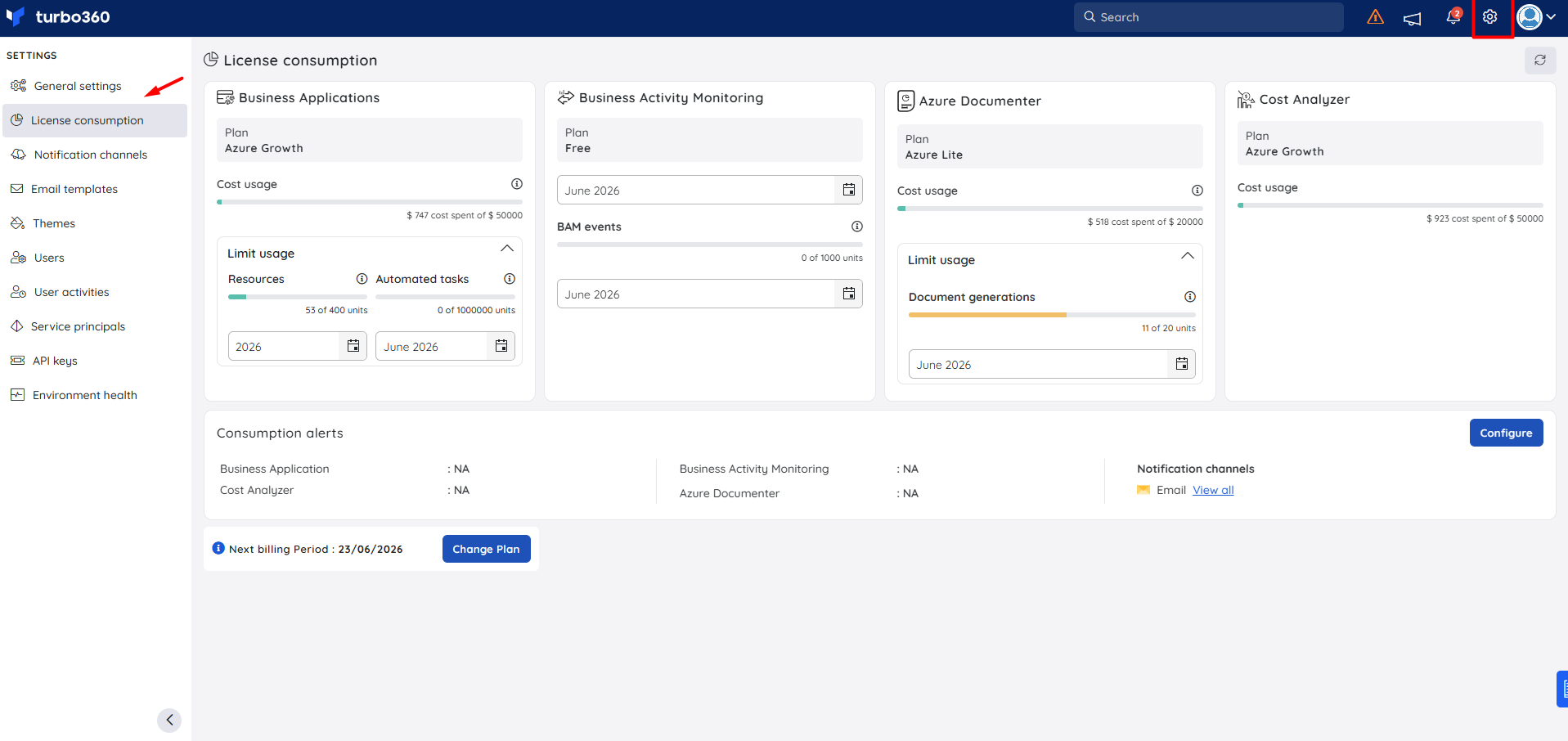
Configuration
| Setting | Type | Default | Required | Description |
|---|---|---|---|---|
| Entry point | — | — | — | Settings > License consumption |
| Plan (per module) | Dropdown | Free | N/A | Plan tier for each module. |
| Cost usage limit | Number | Per plan | N/A | Maximum Azure spend (in USD) that Turbo360 will process for the module per billing period. |
| Resources limit (Business Applications) | Number | Per plan | N/A | Maximum number of Azure resources monitored. Example: 400 units on Azure Growth. |
| Automated tasks limit (Business Applications) | Number | Per plan | N/A | Maximum automated task executions per billing period. Example: 1,000,000 units on Azure Growth. |
| BAM events limit (Business Activity Monitoring) | Number | Per plan | N/A | Maximum BAM events tracked per billing period. Example: 1,000 units on Free. |
| Document generations limit (Azure Documenter) | Number | Per plan | N/A | Maximum document generation runs per billing period. Example: 20 units on Azure Lite. |
| Consumption alert threshold | Number | None | No | Percentage of usage at which a consumption alert notification is sent. Configurable per module. |
| Notification channel | Selection | None | No | Channel used to deliver consumption alert notifications (for example, Email). |
| Billing contact | Owner email | Yes | Receives invoices and renewal notifications. |
Permission behavior
With Account owner role: You can view full license consumption details, change the plan, and configure consumption alerts and notification channels.
With standard user role: License consumption settings are not visible.
Example scenario
A platform administrator opens Settings > License consumption and notices that Azure Documenter is on the Azure Lite plan with 11 of 20 document generation units used for the month. Expecting higher volume in the next billing period, she clicks Change Plan to upgrade Azure Documenter to Azure Growth before the limit is reached, preventing generation failures at month end.
Limitations
- Plans are managed per module, not as a single organization-wide license. Each module — Cost Analyzer, Business Applications, Business Activity Monitoring, and Azure Documenter — can be on a separate plan tier.
- The Free plan provides limited unit allocations and is intended for evaluation or low-volume use.
- Module access cannot be partially licensed at the feature level; access is granted at the module level.
- Trial licenses are time-limited and convert to a paid plan or expire — data is not retained after expiry unless a paid plan is activated.
Troubleshooting
I cannot see the License consumption section in Settings.
Cause: The License consumption section is visible only to Account owner roles.
Fix: Ask your administrator to review your role assignment in Settings > Users.A user cannot access a module even though we have the module licensed.
Cause: Module access is controlled by role assignment, not just license entitlement.
Fix: Go to Settings > Users, select the user, and assign the appropriate module role.We have reached a unit limit and a feature is no longer working.
Cause: The module's unit limit for the current billing period has been exhausted.
Fix: Open Settings > License consumption, confirm which limit has been exhausted, and click Change Plan to upgrade the affected module. Limits reset at the start of the next billing period.Our trial has expired and we cannot access our data.
Cause: Trial licenses expire and access is suspended until a paid plan is activated.
Fix: Contact Turbo360 support immediately. Activating a paid plan typically restores access. Data retention after trial expiry is subject to your trial agreement.I need a copy of our invoice or contract.
Cause: Invoices are sent only to the billing contact on record.
Fix: For additional copies or contract documents, contact Turbo360 support or your account manager.
FAQs
Is Turbo360 licensed per user or per organization?
Turbo360 is licensed per module at the organization level. Each module — Cost Analyzer, Business Applications, Business Activity Monitoring, and Azure Documenter — has its own plan, cost usage limit, and unit-based feature limits. User access within those modules is managed through role assignment.Can we license individual modules without the full platform?
Yes. Each module carries its own plan independently. You can run some modules on a paid plan and others on Free, or upgrade individual modules as your usage grows — all from Settings > License consumption.Why is Azure spend calculated in USD for licensing purposes?
The Cost Analyzer license tier is based on your total Azure spend across all connected subscriptions. Because your subscriptions may use different local currencies, Turbo360 uses the USD equivalent of each subscription's spend to produce a single, consistent total. Azure always provides a USD amount alongside the local currency amount, regardless of the subscription's billing currency. Your combined Azure spend in USD is then mapped to the applicable Turbo360 pricing tier.
Related articles
Was this article helpful?