

Product overview
- 05 Aug 2026
- 4 Minutes to read
- Print
- DarkLight
- Download PDF
Product overview
- Updated on 05 Aug 2026
- 4 Minutes to read
- Print
- DarkLight
- Download PDF
Article summary
Did you find this summary helpful?
Thank you for your feedback!
Overview
Turbo360 is a cloud operations platform built specifically for Azure. It consolidates cost management, application monitoring, business activity tracking, and infrastructure documentation into a single, integrated experience.
This article provides a high-level overview of what Turbo360 offers, how it is structured, and which teams benefit most from using it.
Business value
Managing Azure at scale typically requires separate tools for cost visibility, health monitoring, transaction tracking, and documentation. Turbo360 replaces that fragmented toolset with a unified platform, reducing context-switching and giving operations and engineering teams a shared view of their Azure environment.
Prerequisites
- A Turbo360 account
- At least one Azure subscription connected via service principal
Required permissions
All authenticated Turbo360 users can view this content. No elevated permissions are required.
Dependencies
- Azure subscription connected to Turbo360
- Service principal configured with appropriate Azure permissions
How it works
Turbo360 is organized into four modules, each addressing a distinct operational domain. All modules share a common authentication model and connect to Azure through service principals registered in your Turbo360 organization.
Cost Analyzer provides visibility into Azure spending. It imports billing data, organizes costs by resource group, subscription, or custom cost group, and surfaces recommendations for optimization. Teams use it to set budgets, detect anomalies, and track savings over time.
Business Applications lets you group Azure resources into logical applications and monitor them as a unit. Rather than monitoring individual resources in isolation, you define what constitutes an application — Logic Apps, Service Bus, Functions, and so on — and monitor the group holistically.
Business Activity Monitoring (BAM) tracks business transactions flowing through your Azure integrations. It supports both push and pull models for data ingestion, enabling end-to-end transaction visibility across processes.
Azure Documenter generates structured documentation of your Azure subscriptions on demand or on a schedule. It supports multiple output formats and can publish directly to Document360 or export as PDF.
All four modules are accessible from the Turbo360 navigation after sign-in. You can use them independently or together.
Steps
- Sign in to Turbo360.
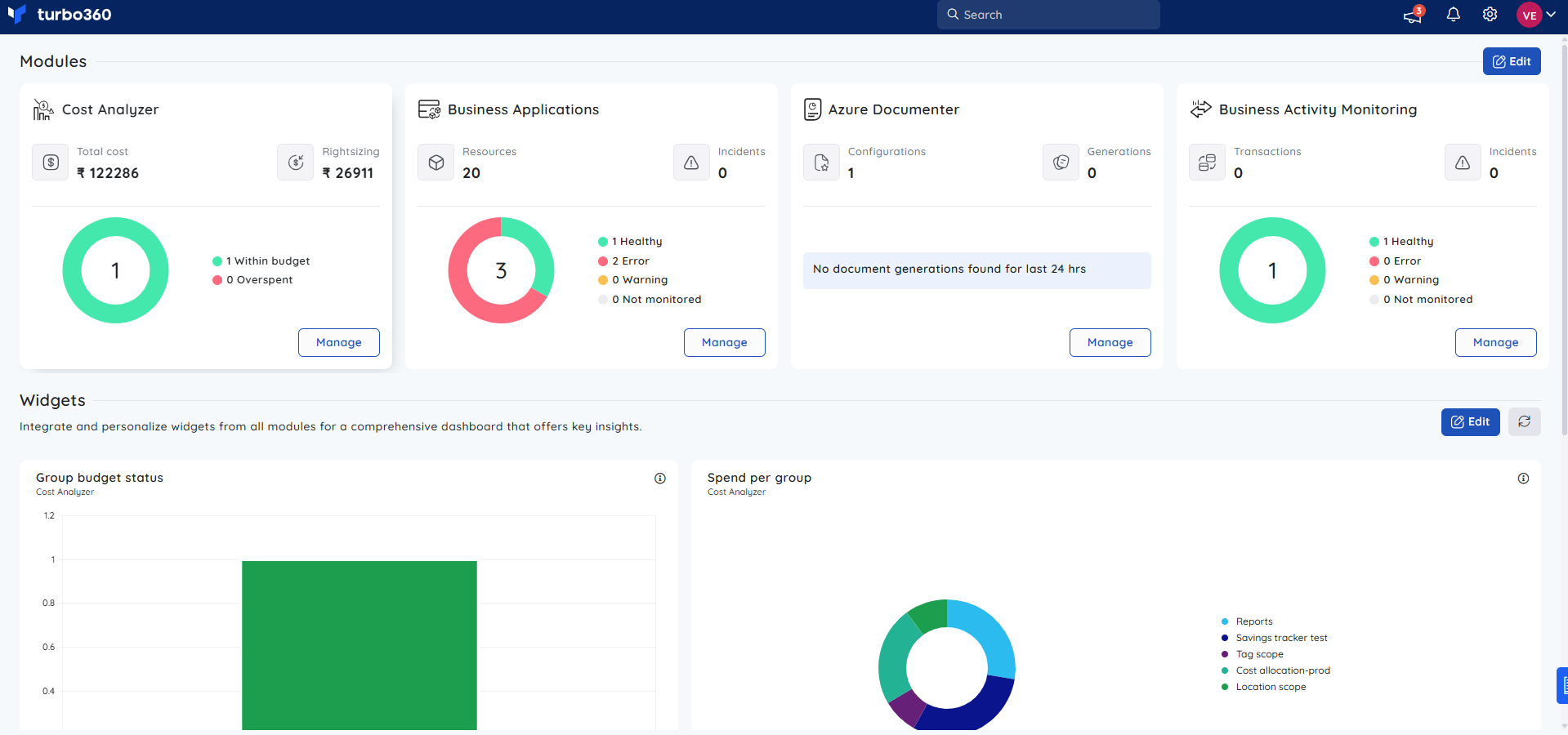
- Review the Turbo360 Home screen to see the status of configured modules.
- Access the module relevant to your task from the Turbo360 logo in the top-left corner or by clicking Manage on the respective module card.
- Configure the module using the Get started button before first use.
Configuration
Turbo360 platform-level settings are managed at the global level by Administrators/Account owners.
| Option | Type | Default | Required | Description |
|---|---|---|---|---|
| Organization name | String | — | Yes | Display name for your Turbo360 organization |
| Service principals | String | — | Yes | Azure subscriptions connected via service principal |
| User roles | Role assignment | Viewer | Yes | Controls which modules and actions each user can access |
Permission behavior
With access: Authenticated users see the Turbo360 dashboard and any modules their role permits.
Without access: Unauthenticated users are displayed with You are not authorized screen along with Logout button. Users with restricted roles see only the modules and data their role grants.
Example scenario
A platform engineering team uses Turbo360 across all four modules: Cost Analyzer to govern Azure spend across five subscriptions, Business Applications to monitor their Azure integration platform, BAM to trace order-processing transactions end to end, and Azure Documenter to auto-generate monthly infrastructure reports for compliance.
Limitations
- Turbo360 requires an active Azure connection. Disconnected subscriptions produce no data.
- Module availability depends on your Turbo360 licensing
- Real-time data availability varies per module and is subject to Azure API rate limits.
Troubleshooting
Connected subscription shows stale data in Cost Analyzer
Cause: The import job has not run or failed silently.
Fix: Trigger a manual import for the relevant subscription from the Cost import settings panel in Cost Analyzer module and check the import status for errors.Organization settings are not accessible.
Cause: You do not have an Administrator role.
Fix: Ask an existing Administrator/Account owner to grant you the required role.Multiple subscriptions are connected but only one appears in modules.
Cause: Module-level subscription filtering may be active.
Fix: Review the module's subscription filter settings and ensure all required subscriptions are selected.Sign-in fails after password reset.
Cause: Browser session cache may still hold the previous token.
Fix: Clear browser cookies and cache, then sign in again.
FAQs
Is Turbo360 a SaaS product or self-hosted?
Turbo360 can be deployed as a SaaS solution or through private hosting in Azure Global Cloud, Azure China Cloud, and Azure US Government Cloud environments.How many Azure subscriptions can I connect?
There is no limitations to Azure subscriptions connected via a service principal in Turbo360.Can different teams use different modules within the same organization?
Yes. Role-based access control lets you assign module-specific access to different users and teams within a single Turbo360 organization.Can I access a module that is not included in my Turbo360 license?
Yes. Modules that are not included in your license remain accessible under the Free plan, with limited functionality.
Related articles
Was this article helpful?