

Spot instances
- 05 Aug 2026
- 3 Minutes to read
- Print
- DarkLight
- Download PDF
Spot instances
- Updated on 05 Aug 2026
- 3 Minutes to read
- Print
- DarkLight
- Download PDF
Article summary
Did you find this summary helpful?
Thank you for your feedback!
Overview
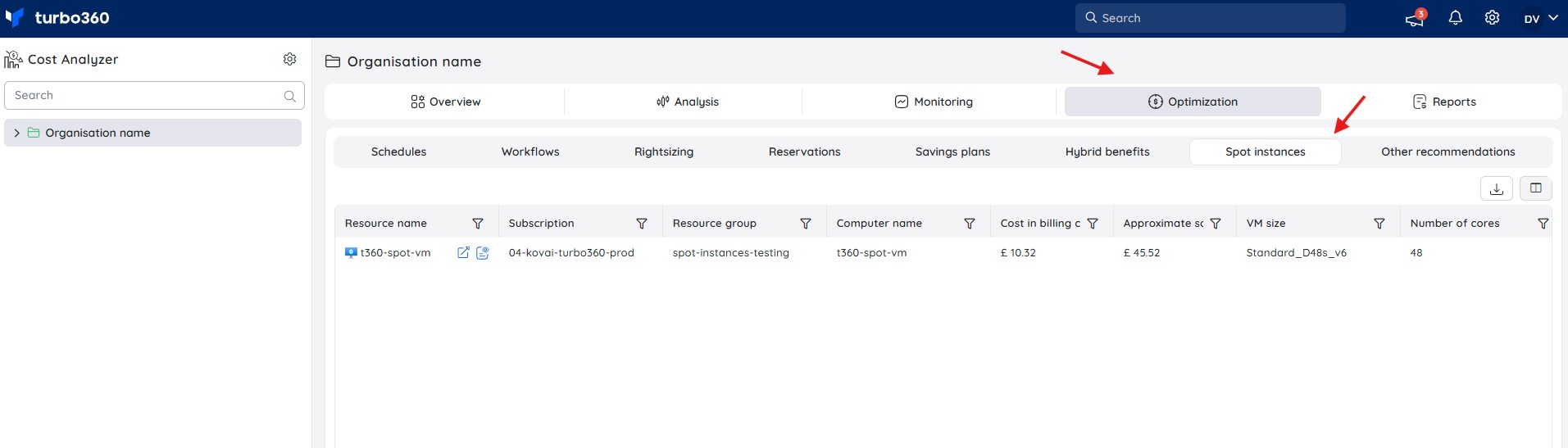
The Spot instances view lists all Spot virtual machines across your connected Azure subscriptions, showing the cost incurred in the previous month alongside the estimated savings compared to equivalent on-demand pricing.
You can access it by navigating to a cost management group and selecting Optimization > Spot instances.
Business value
Spot instances surfaces Spot VM cost and savings in one place, so you can validate the financial benefit of Spot adoption without manually cross-referencing on-demand pricing.
Prerequisites
Required permissions
| Role | Permission level | Access |
|---|---|---|
| Account owner, Owner, Contributor | — | Full access to Spot instances |
| Custom role | Optimization feature enabled + Spot instances: Read | View Spot instances |
| Custom role | Optimization feature enabled + Spot instances: Manage | Full access to Spot instances, including export |
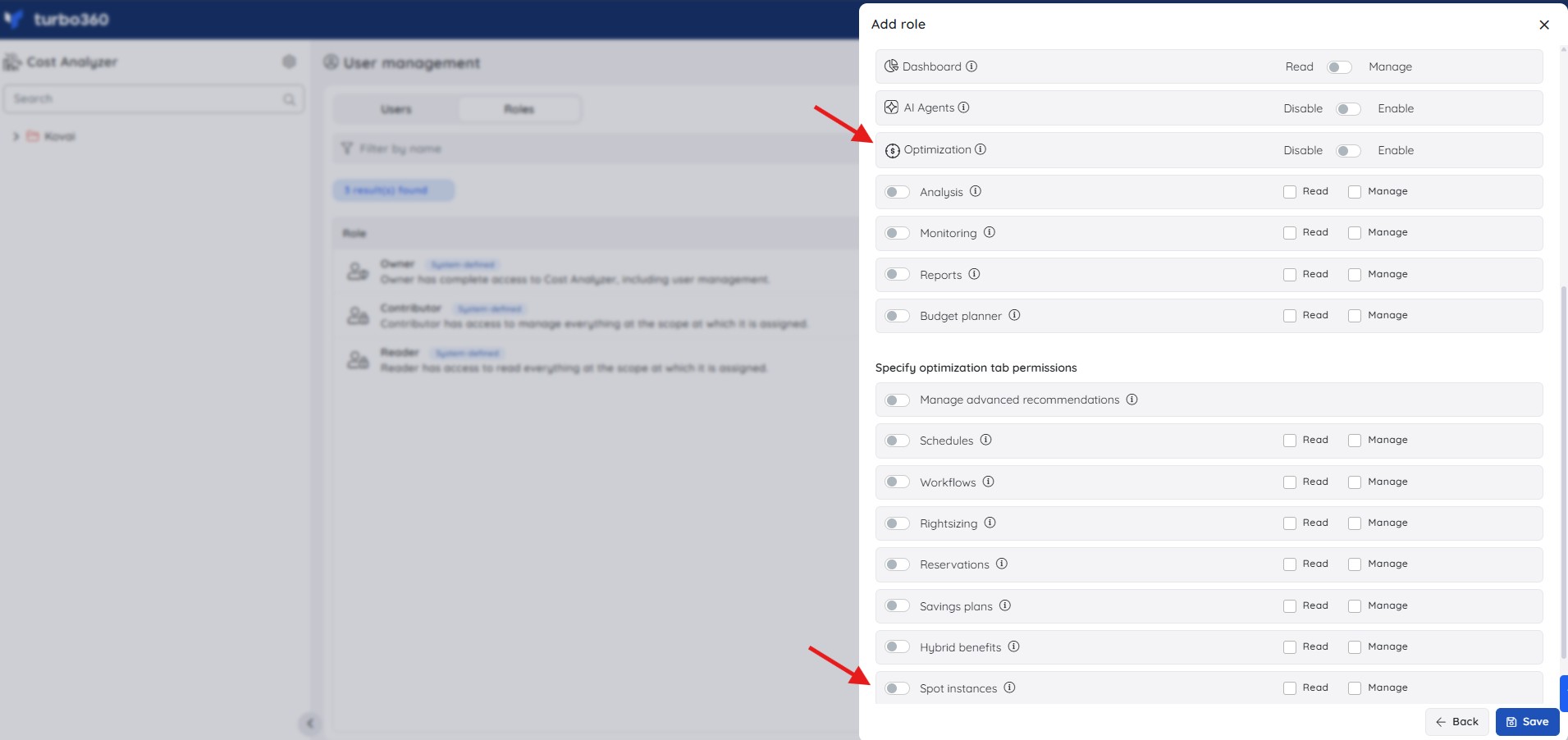
To view or export Spot instances data, a role needs the Optimization tab permission enabled, plus Read or Manage on the Spot instances feature. Roles are created under Cost Analyzer > User management > Roles > Add role, and can be scoped to specific cost management groups or subscriptions.
How it works
Each row in the Spot instances table represents an individual Spot VM, with cost and configuration details for the previous billing cycle.
- Resource inventory — resource name, subscription, resource group, and computer (VM) name, tying every cost insight back to a specific workload.
- Cost in billing currency — the actual cost incurred for the Spot VM during the previous billing cycle.
- Approximate savings — the estimated savings from using a Spot instance instead of an equivalent on-demand VM, calculated by comparing actual Spot spend against the corresponding on-demand price for the same configuration.
- VM configuration insights — VM size (for example,
Standard_D48s_v6) and core count, so you can correlate cost and savings with workload scale.
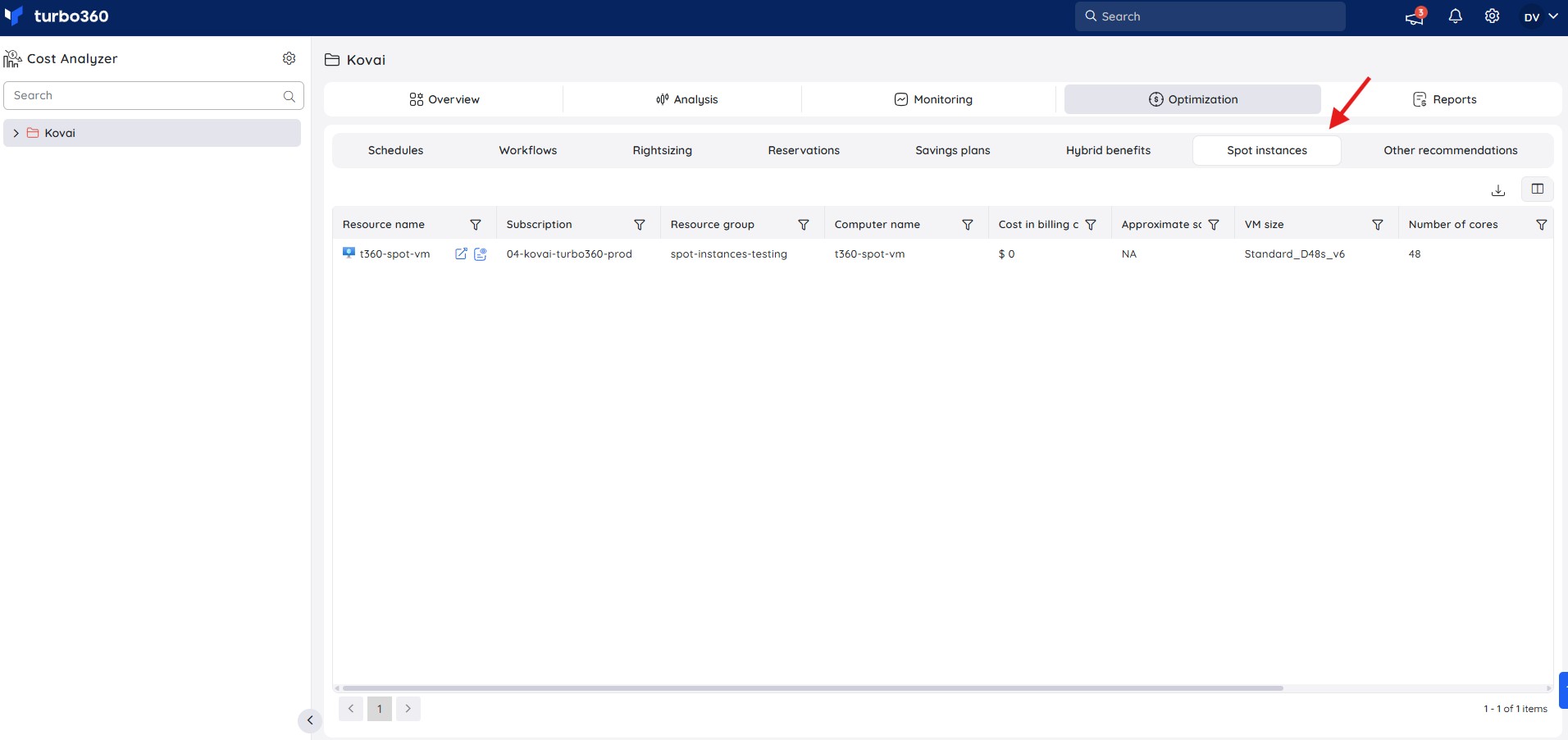
Use the download icon at the top-right of the table to export the Spot instances data for offline analysis.
Savings calculation
- The system analyzes Spot VM usage from the previous month.
- It determines the equivalent on-demand price for the same VM size and configuration.
- The difference between the on-demand cost and the actual Spot cost is shown as Approximate savings.
Example scenario
A team running batch workloads on Spot VMs reviews the Spot instances view each month to confirm the resources still qualify for Spot pricing and to quantify the savings achieved against on-demand rates, before deciding whether to expand Spot adoption to additional workloads.
Limitations
The view reflects data from the previous billing cycle rather than real time, so recently provisioned or deallocated Spot VMs may not appear immediately.
Troubleshooting
The Spot instances view isn't visible
Cause: The Optimization feature permission is disabled for your role, or the Spot instances tab permission isn't set.
Fix: Ask your administrator to enable Optimization and grant at least Read on Spot instances in Roles.No resources appear in the Spot instances view
Cause: No Spot VMs were used in the previous billing cycle, or the connected subscriptions don't contain Spot VM usage.
Fix: Confirm Spot VMs were provisioned in the relevant subscriptions during the previous month.The export file is empty
Cause: No Spot VM data exists for the previous billing cycle in the selected cost management group.
Fix: Confirm Spot VMs were active during the period and that the correct cost management group is selected before exporting.
FAQs
How is Approximate savings calculated?
It's the difference between the actual Spot VM cost and the equivalent on-demand price for the same VM size and configuration, both drawn from the previous month's usage.Does the Spot instances view update in real time?
No. It reflects cost and usage data from the previous billing cycle.Who can access the Spot instances view?
Any role with Read or Manage permission on Spot instances, with the Optimization feature enabled.
Related articles
Was this article helpful?