

What is a service principal?
- 05 Aug 2026
- 5 Minutes to read
- Print
- DarkLight
- Download PDF
What is a service principal?
- Updated on 05 Aug 2026
- 5 Minutes to read
- Print
- DarkLight
- Download PDF
Article summary
Did you find this summary helpful?
Thank you for your feedback!
Overview
A service principal is an application identity registered in Microsoft Entra ID. It represents an application — such as Turbo360 — that needs to access and manage resources in Azure.
When you associate a service principal with Turbo360, Turbo360 uses its authentication tokens to perform operations on Azure resources within your subscription. Access is controlled by the roles you assign to the service principal, so you determine exactly which resources Turbo360 can interact with and at what level.
Business value
Connecting Turbo360 through a service principal provides secure, auditable, and least-privilege access to your Azure environment. You avoid sharing user credentials, maintain full control over the scope of access, and can revoke or rotate credentials independently of any user account.
How it works
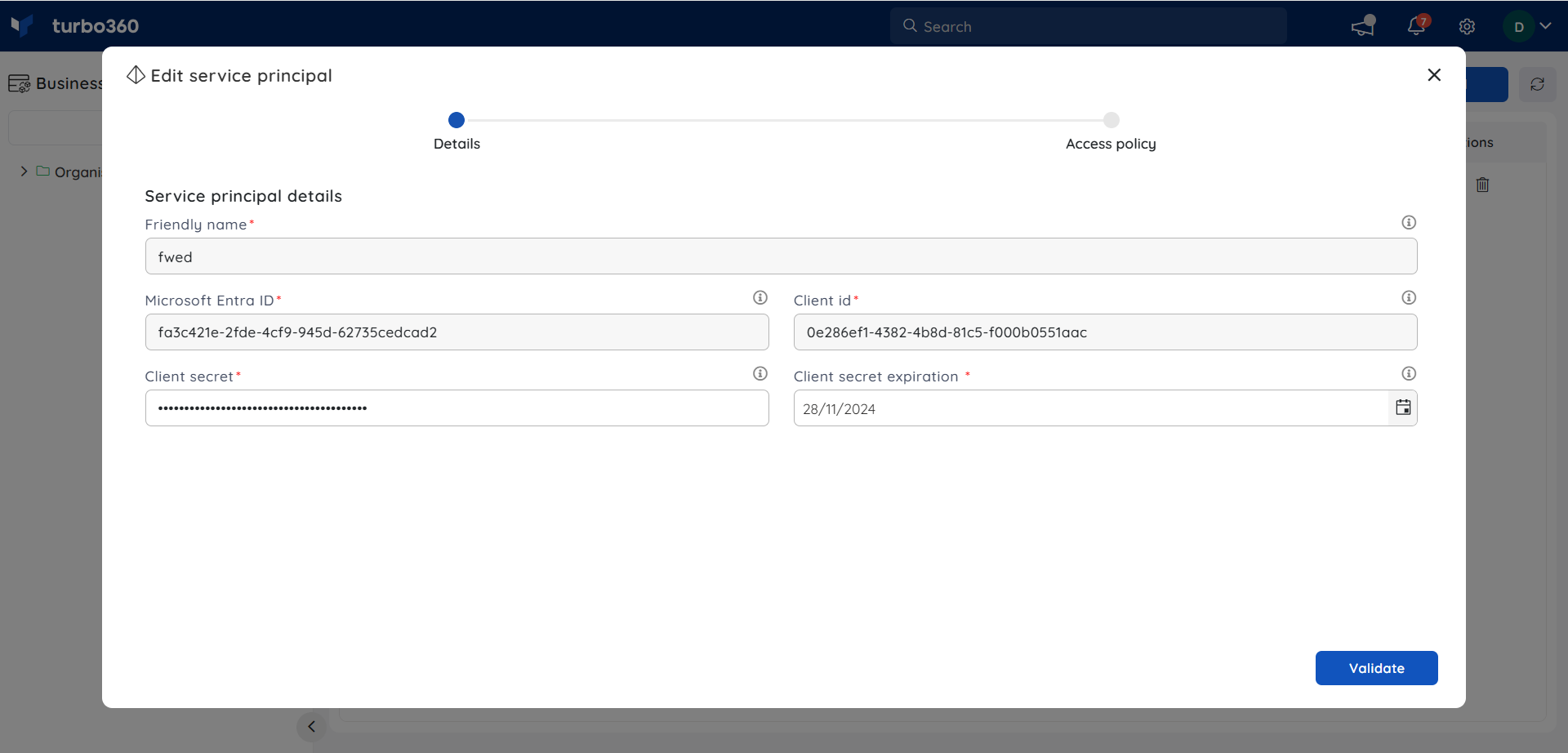
To connect Turbo360 to an Azure subscription, a service principal must be created in Microsoft Entra ID, assigned the Contributor role on the target subscription, and its credentials provided to Turbo360.
Turbo360 requires four values from the service principal:
| Value | Description |
|---|---|
| Microsoft Entra ID (Tenant ID) | The directory ID of your Microsoft Entra ID tenant |
| Subscription ID | The ID of the Azure subscription containing the resources |
| Client ID | The application (client) ID of the registered app in Microsoft Entra ID |
| Client Secret | The application password used to authenticate token requests |
The sections below describe how to create the service principal and retrieve each value from the Azure portal.
Create a service principal
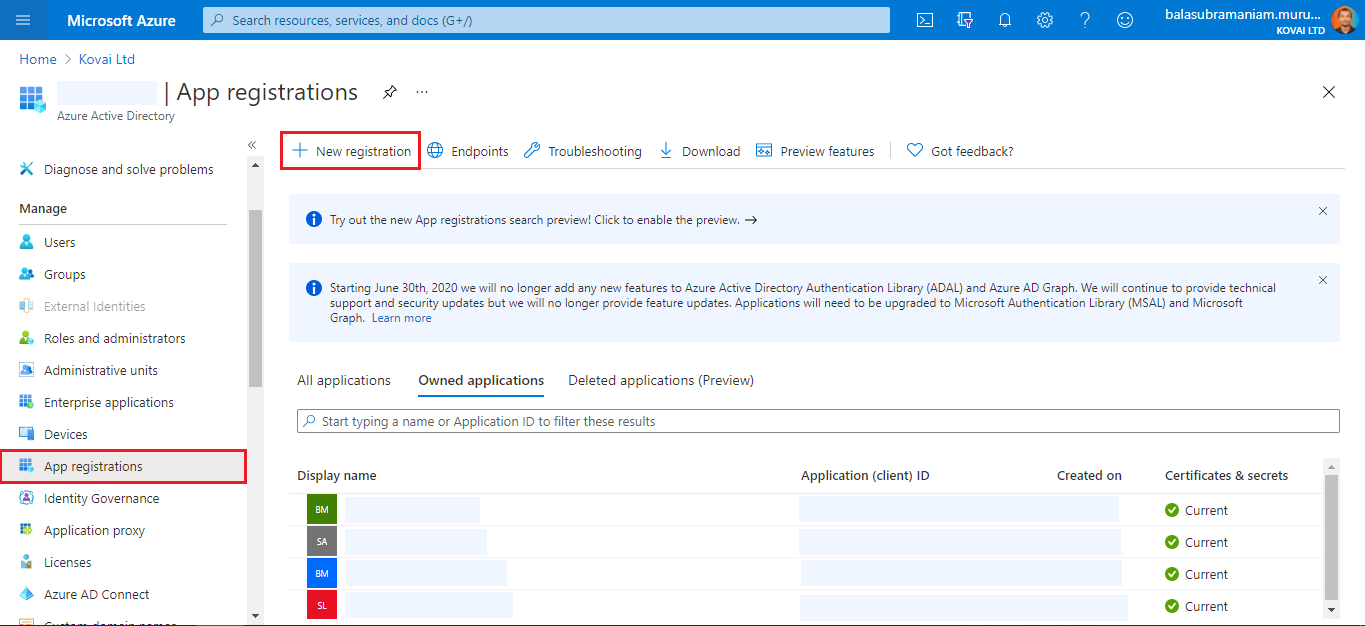
- In the Azure portal, navigate to Microsoft Entra ID in the left menu and select App registrations.
- Click New registration.
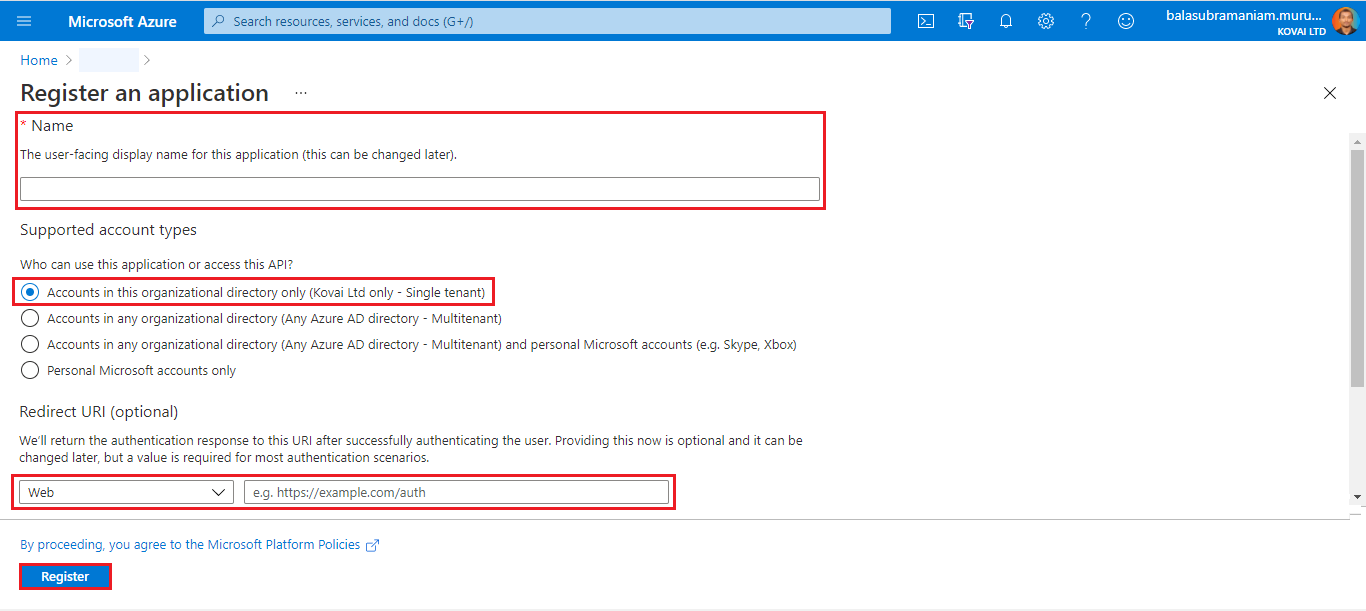
- Enter a Name for the service principal. Select a supported account type. Under Redirect URI, select Web and enter the URI to which the access token will be sent. Click Register.
- Once registered, the service principal appears in the App registrations grid.
Get the Tenant ID
A tenant is a dedicated instance of Microsoft Entra ID that represents your organization. Each tenant is distinct and separate from all others.
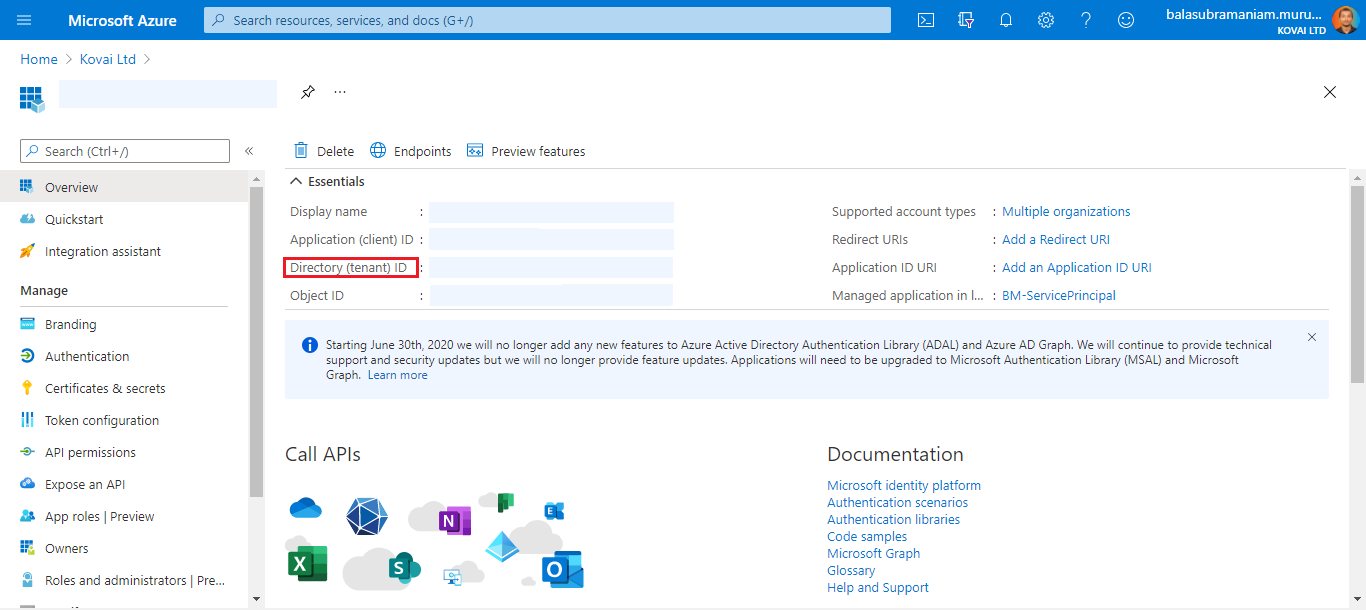
- Click the name of your service principal in App registrations.
- In the Essentials section, copy the Directory (tenant) ID.
Get the Subscription ID
A subscription ID is a GUID that uniquely identifies an Azure subscription.
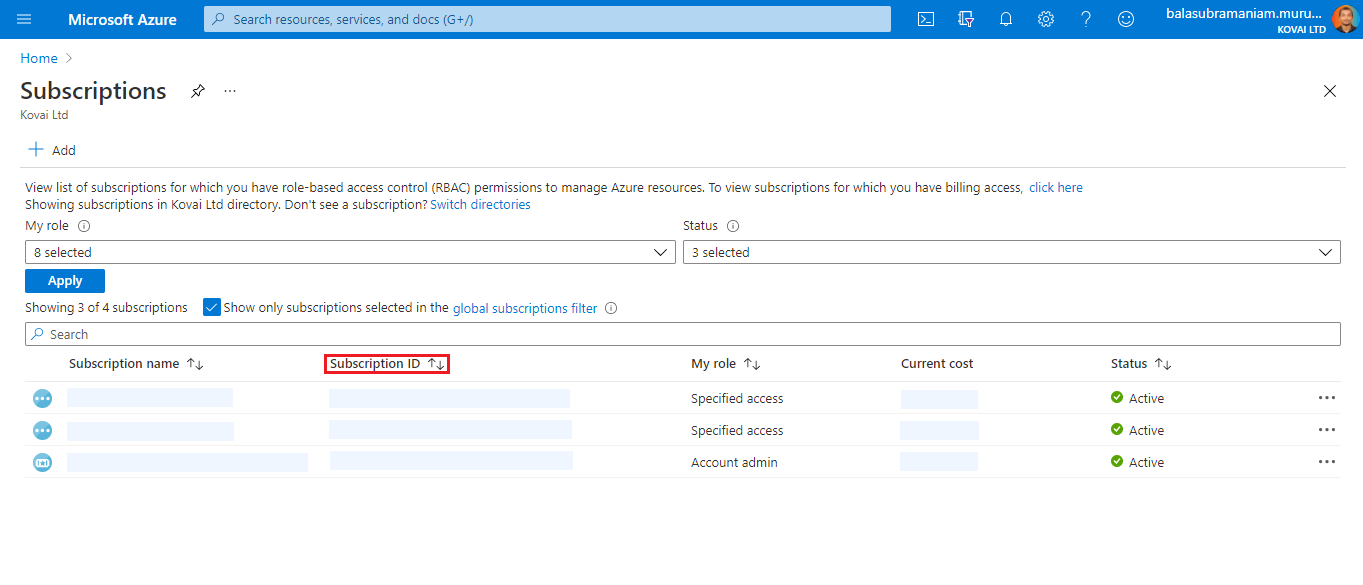
- Navigate to Subscriptions in the left menu.
- Locate your subscription in the list and copy the value from the Subscription ID column.
Get the Client ID and Client Secret
- Click the name of your service principal in App registrations.
- In the Essentials section, copy the Application (client) ID.
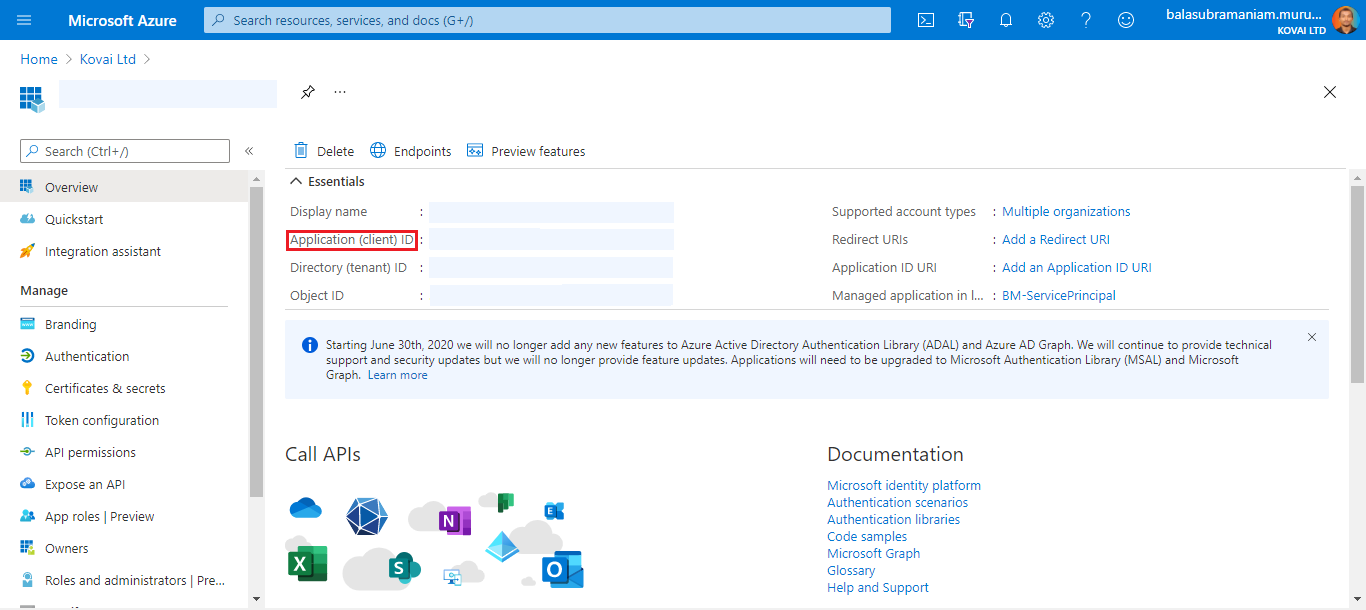
- In the left pane under Manage, click Certificates & secrets.
- Click New client secret. Enter a Description and set an Expiry date. Click Add.
- Copy the secret value immediately. It is only displayed once.
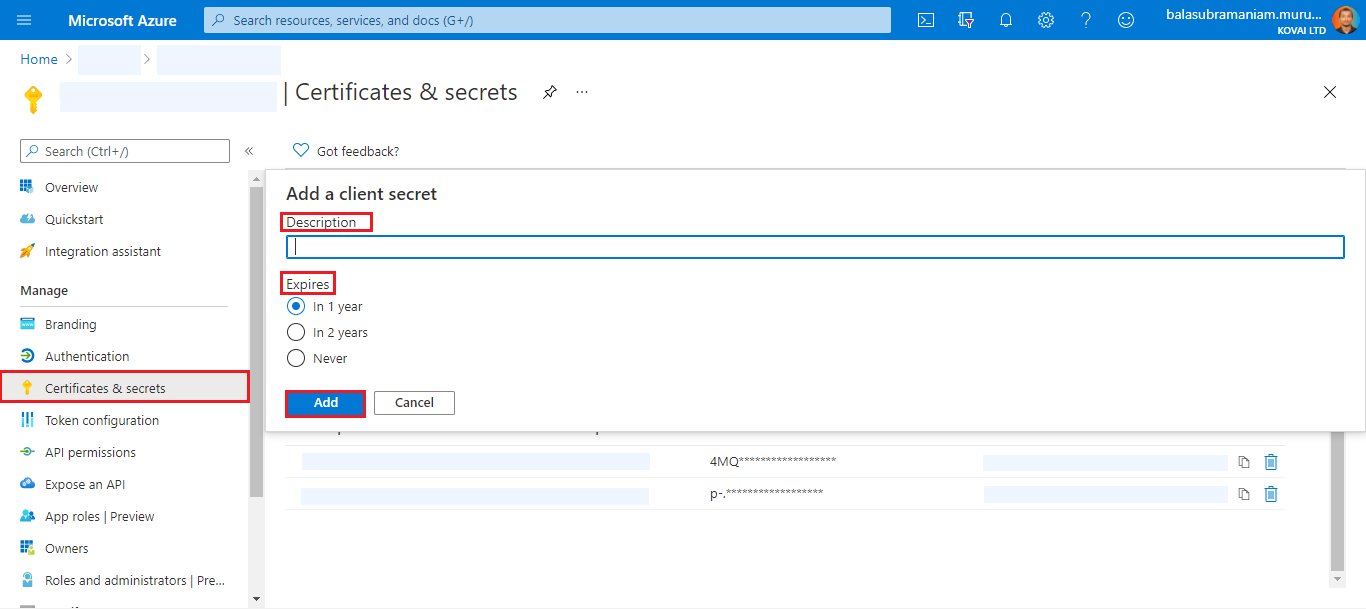
Copy and save the client secret value before navigating away. It cannot be retrieved after you leave the page.
Assign the Contributor role
To allow Turbo360 to manage resources in a subscription, the service principal must be assigned the Contributor role on that subscription.
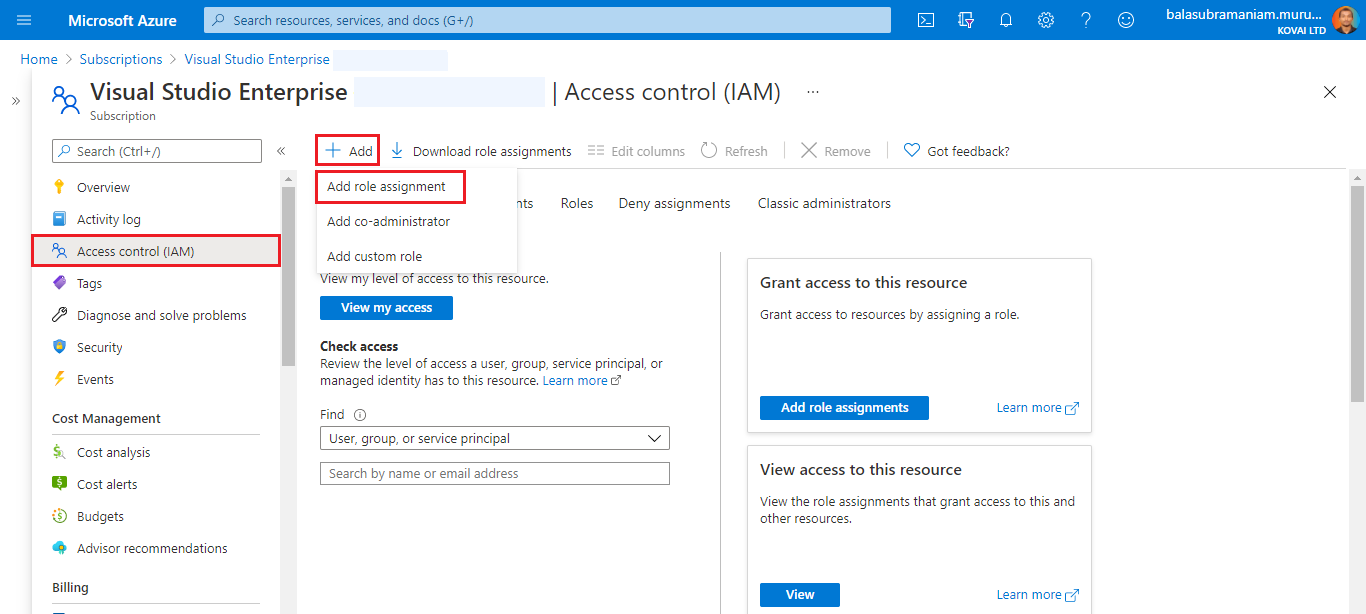
- Navigate to the target subscription. Click Access control (IAM).
- Click Add > Add role assignment.
- Switch to the Privileged administrator roles tab and select Contributor.
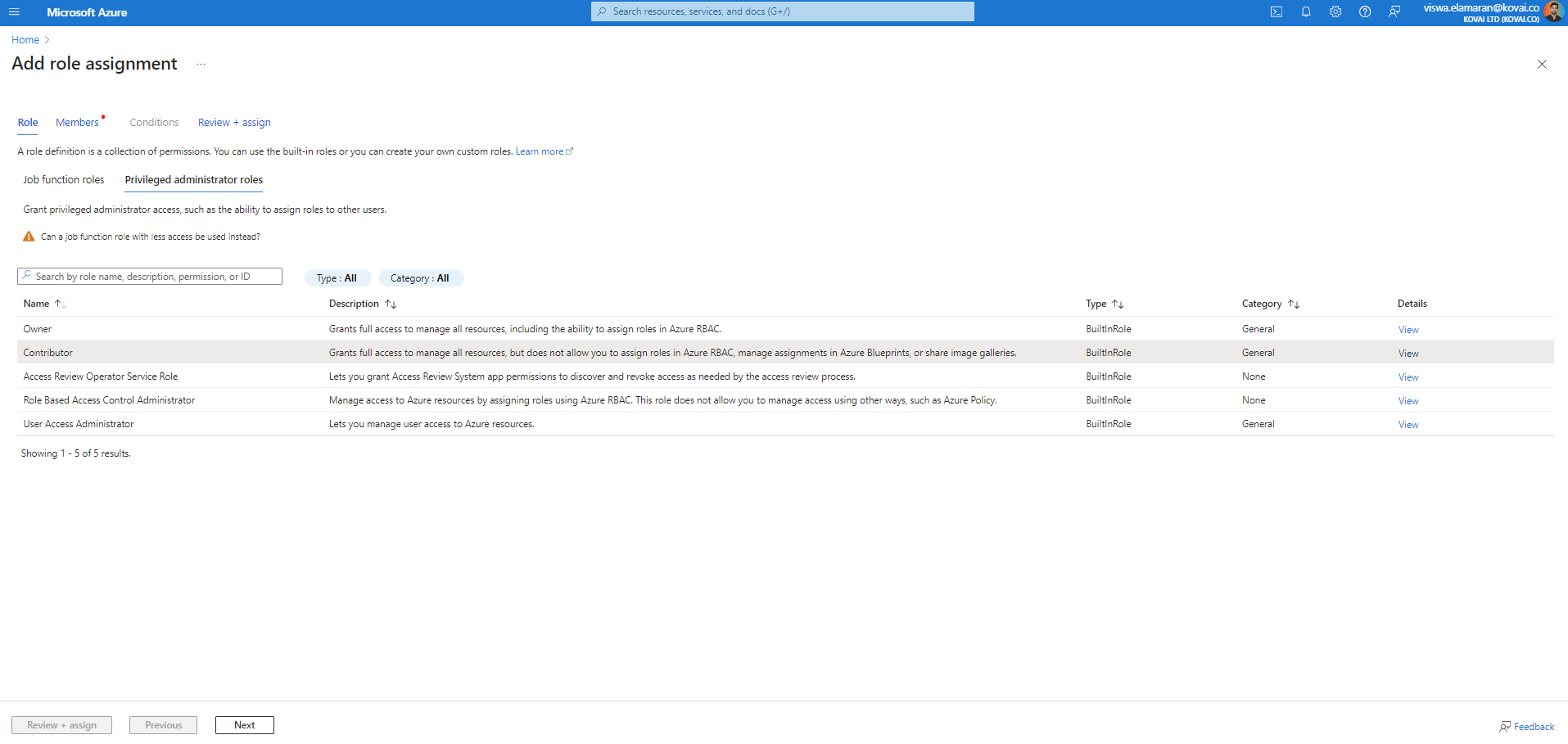
- Click Next. For Assign access to, select User, group, or service principal.
- Click Select members and select the service principal you created.
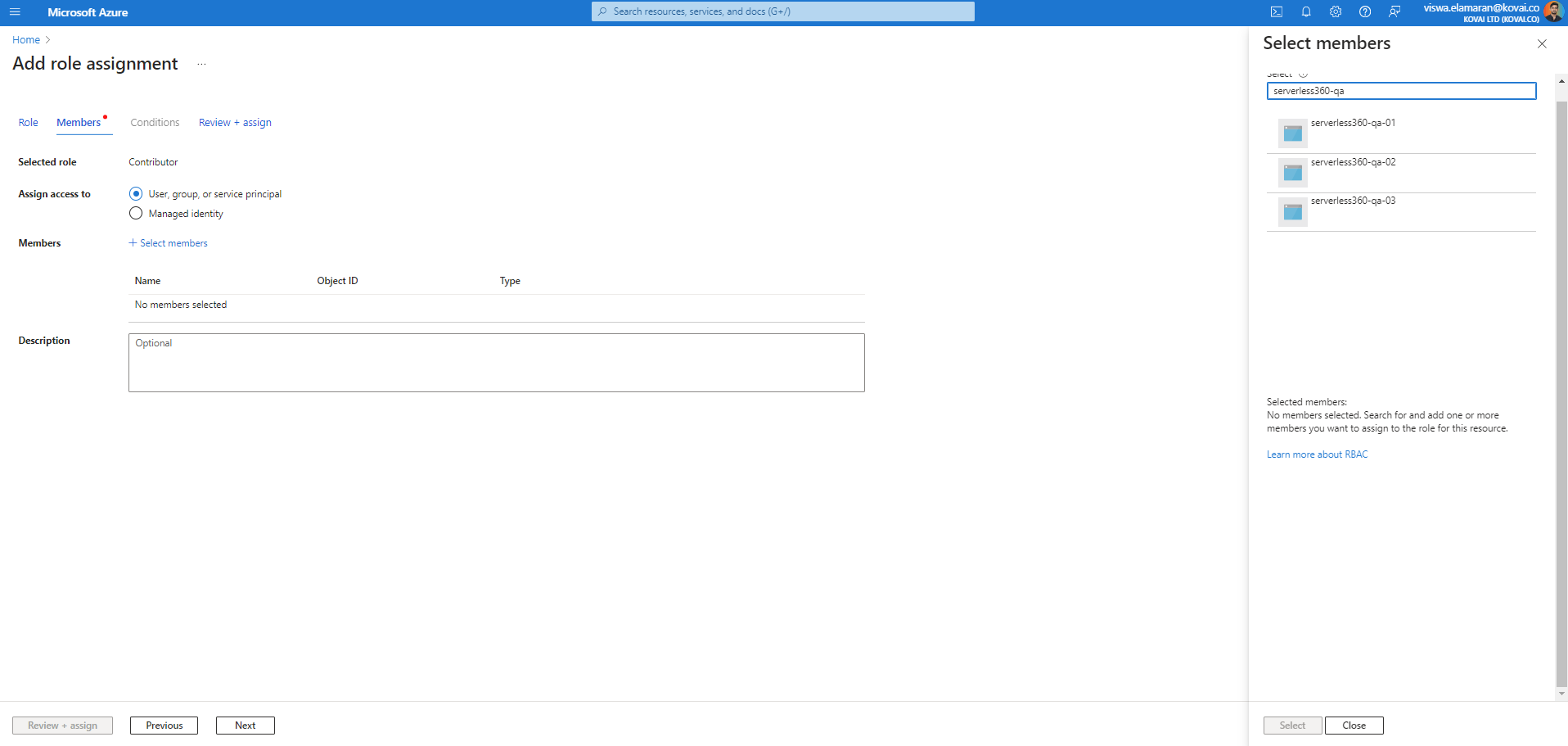
- Click Review + assign to save the role assignment.
Role assignments can take a few minutes to propagate before they take effect.
Once the role is assigned, the service principal is ready to be added to Turbo360.
Example scenario
A team managing Azure resources across three subscriptions creates a service principal named Turbo360-Prod in Microsoft Entra ID. They assign the Contributor role on each subscription, set a 12-month client secret expiry, and record the Tenant ID, Subscription IDs, Client ID, and Client Secret. They then add this service principal to Turbo360, enabling full resource monitoring and management across all three subscriptions from a single Business Application.
Required permissions
You must have one of the following roles in Azure to complete this setup:
- Owner on the target subscription (to create the service principal and assign roles)
- Application Administrator in Microsoft Entra ID (to register the app) plus User Access Administrator on the subscription (to assign the Contributor role)
Permission behavior
Turbo360 requires Contributor access on the service principal to manage and monitor Azure resources. Without Contributor access, resources will be visible in Turbo360 but no operations or monitoring actions can be performed on them. Permissions are inherited down the scope hierarchy — Contributor access at the subscription level applies to all resource groups and resources within it.
Troubleshooting
Role assignment does not appear to take effect
Cause: Role assignments can take several minutes to propagate in Azure.
Fix: Wait 5–10 minutes and retry the operation in Turbo360. If the issue persists, verify the assignment is visible under Access control (IAM) > Role assignments on the subscription.Client secret is invalid or expired
Cause: The secret was copied incorrectly, has expired, or was rotated in Azure after being added to Turbo360.
Fix: Generate a new client secret under Certificates & secrets in the app registration. Update the secret in Turbo360 and set a new expiry date that matches the Azure portal value.Service principal does not appear in the Members search during role assignment
Cause: The app registration may not yet have propagated across the directory, or the name was entered incorrectly.
Fix: Search by the exact application (client) ID instead of the display name. Allow a few minutes after registration before assigning roles.Tenant ID or Client ID cannot be located
Cause: The user does not have sufficient permissions to view app registration details, or is searching the wrong directory.
Fix: Confirm you are in the correct Microsoft Entra ID tenant. Request read access to app registrations from your Azure administrator if the Essentials section is not visible.Turbo360 cannot validate credentials after entry
Cause: One or more of the four required values (Tenant ID, Subscription ID, Client ID, Client Secret) was entered incorrectly, or the Contributor role has not yet been assigned.
Fix: Verify all four values against the Azure portal. Confirm the Contributor role assignment on the subscription before retrying validation.
Related articles
- Service principal setup
- Creating your first Business Application
- Roles and permissions in Business Applications
For further reading on service principals in Azure, refer to the following Microsoft documentation:
Was this article helpful?