Overview
This article describes the architecture of the Turbo360 platform and explains how its modules connect to your Azure environment and, for Tenant Manager, your Microsoft 365 tenants. Use this reference when planning a Turbo360 deployment, onboarding new subscriptions, or troubleshooting connectivity and data flow issues.
Business value
Understanding how Turbo360 is structured helps you deploy it correctly, configure service principals with the right permissions, and anticipate how data flows between Azure and each module. This reduces setup errors and gives your team confidence in the reliability of the data Turbo360 surfaces.
Prerequisites
- Familiarity with core Azure concepts: subscriptions, resource groups, Azure Active Directory, and service principals
- An active Turbo360 organization
Dependencies
- Active Azure subscription
- Microsoft Entra ID tenant with permission to register applications and assign roles
- A Microsoft 365 tenant and an app registration with Microsoft Graph application permissions, if you use Tenant Manager. Tenant Manager does not use Azure subscriptions.
How it works
Turbo360 is a SaaS platform hosted on Azure. It connects to your Azure environment through service principals and retrieves data using Azure APIs. Tenant Manager connects to your Microsoft 365 tenants instead, through an app registration that you create, and reads license, user, and Microsoft Entra ID group data through Microsoft Graph. Each module processes a different category of data and exposes it through the Turbo360 UI.
The platform is organized into four layers:
- Data ingestion: Turbo360 connects to Azure subscriptions via service principals and retrieves cost, resource, activity, and infrastructure data using Azure APIs (Azure Cost Management, Azure Resource Manager, Application Insights, and others). Tenant Manager instead reads Microsoft 365 license, user, and Microsoft Entra ID group data through Microsoft Graph
- Data processing: retrieved data is normalized, stored, and made available to modules for analysis, monitoring, and reporting
- Module layer: each Turbo360 module (Cost Analyzer, Business Applications, BAM, Azure Documenter, Tenant Manager) consumes processed data and provides its own feature set
- Presentation layer: users interact with modules through the Turbo360 web portal; output can also be delivered via reports, notifications, and integrations
Platform architecture
Multi-subscription support
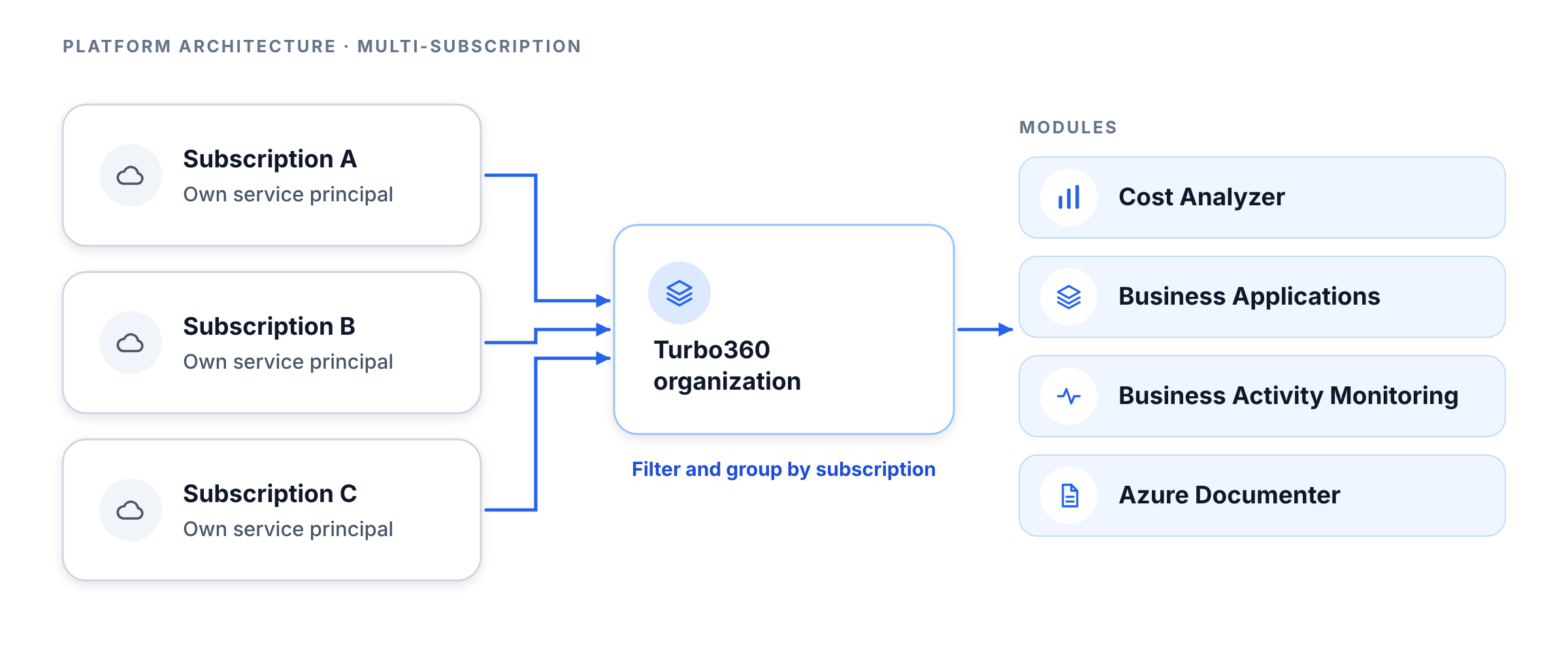
Turbo360 supports connecting multiple Azure subscriptions to a single organization. Each subscription requires its own service principal. Data from all connected subscriptions is available within the platform, and most modules allow filtering and grouping by subscription.
Service principal model
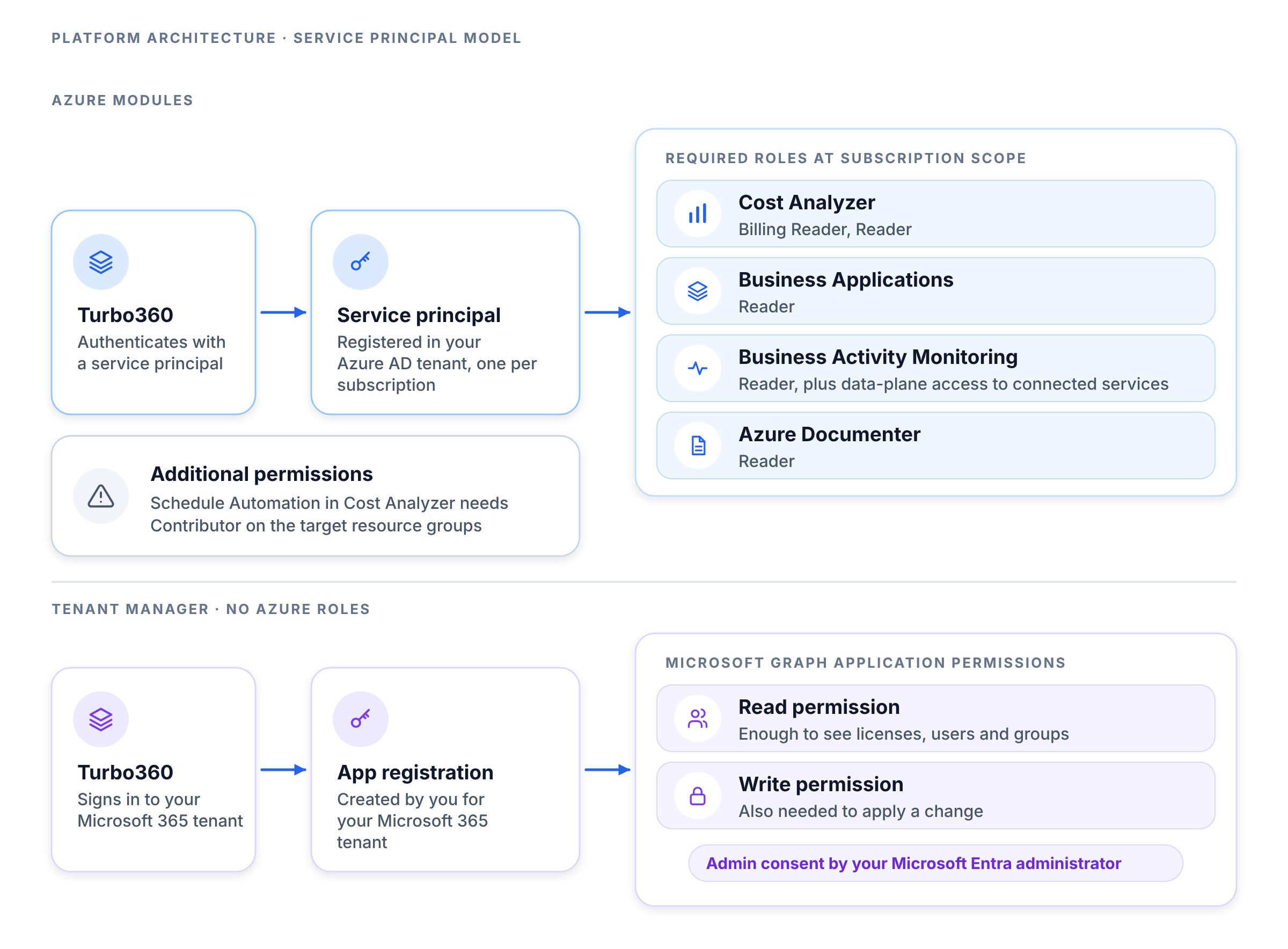
Turbo360 uses Azure Active Directory service principals to authenticate with your Azure environment. Service principals are registered in your Azure AD tenant and granted the required roles at the subscription level.
Each service principal requires the following minimum permissions at the subscription scope for the four Azure modules:
| Module | Required Azure role |
|---|---|
| Cost Analyzer | Billing Reader, Reader |
| Business Applications | Reader |
| Business Activity Monitoring | Reader, plus data-plane access to connected services |
| Azure Documenter | Reader |
Additional permissions may be required for automation features (e.g., Schedule Automation in Cost Analyzer requires Contributor on the target resource groups).
Tenant Manager does not use Azure roles. Its app registration needs Microsoft Graph application permissions, which your Microsoft Entra administrator grants with admin consent. One read permission is enough to see licenses, users, and Microsoft Entra ID groups. Applying a change from Tenant Manager also needs the matching write permission.
Data flow
Each module follows its own data retrieval and processing path:
Cost Analyzer
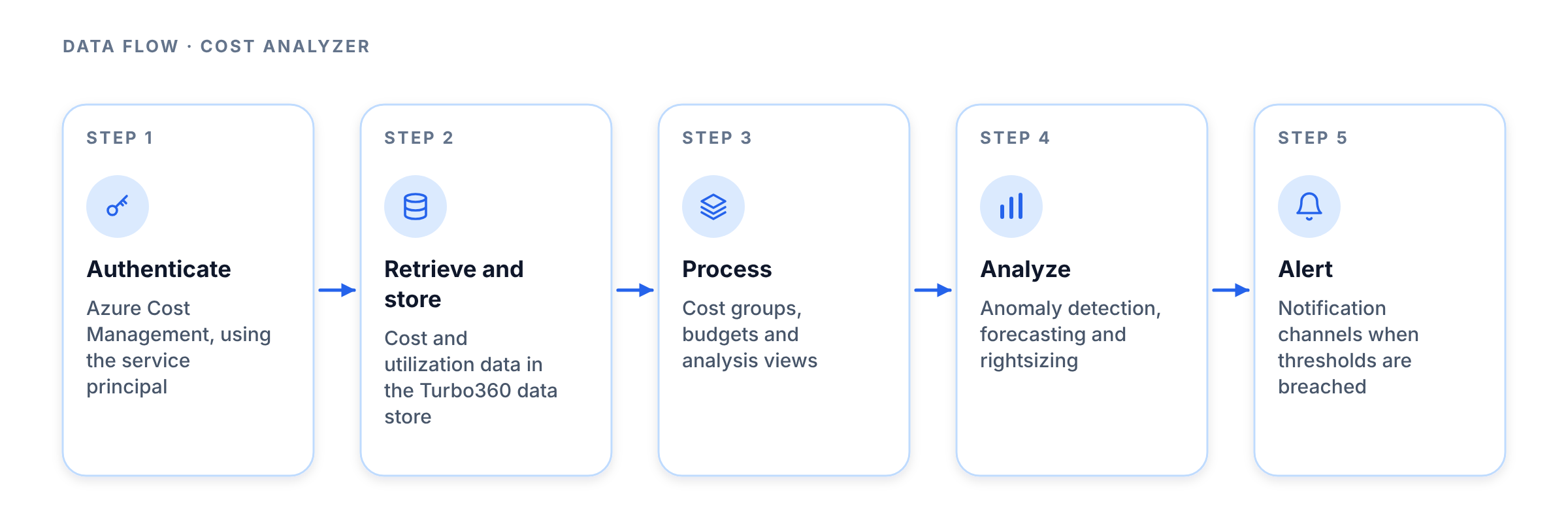
- Turbo360 authenticates to Azure Cost Management using the service principal.
- Cost and utilization data is retrieved and stored in Turbo360's data store.
- Cost Analyzer processes the data into cost groups, budgets, and analysis views.
- Anomaly detection, forecasting, and rightsizing run against the stored data.
- Alerts are dispatched to configured notification channels when thresholds are breached.
Business Applications
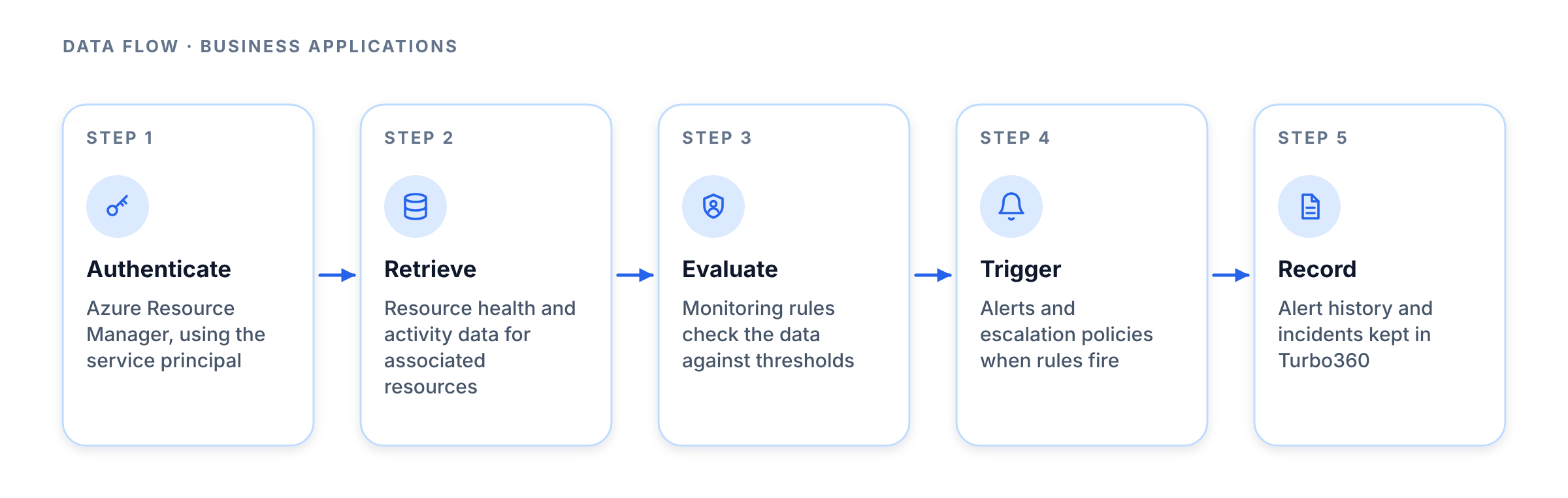
- Turbo360 authenticates to Azure Resource Manager using the service principal.
- Resource health and activity data is retrieved for resources associated with Business Applications.
- Monitoring rules evaluate the retrieved data against configured thresholds.
- Alerts and escalation policies are triggered when rules fire.
- Alert history and incidents are recorded in Turbo360.
Business Activity Monitoring
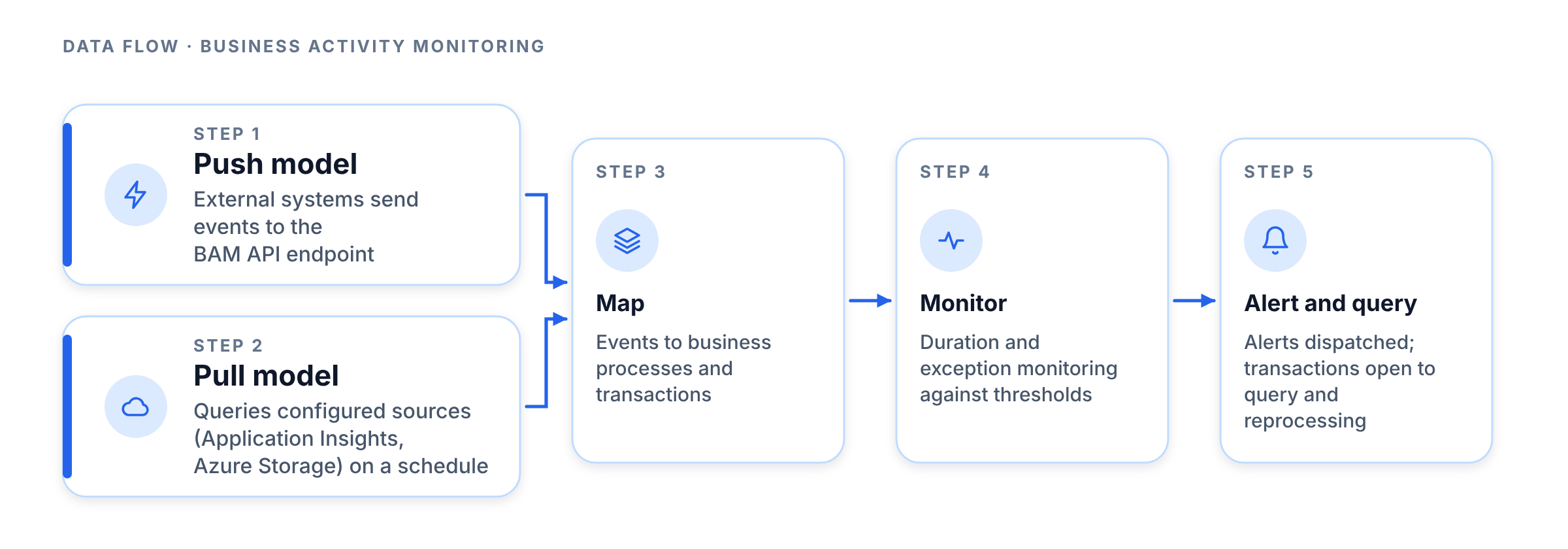
- In the push model, external systems send tracking events to the BAM API endpoint.
- In the pull model, Turbo360 queries configured data sources (e.g., Application Insights, Azure Storage) on a schedule.
- Events are mapped to business processes and transactions.
- Duration and exception monitoring evaluate transactions against configured thresholds.
- Alerts are dispatched and transaction instances are available for query and reprocessing.
Azure Documenter
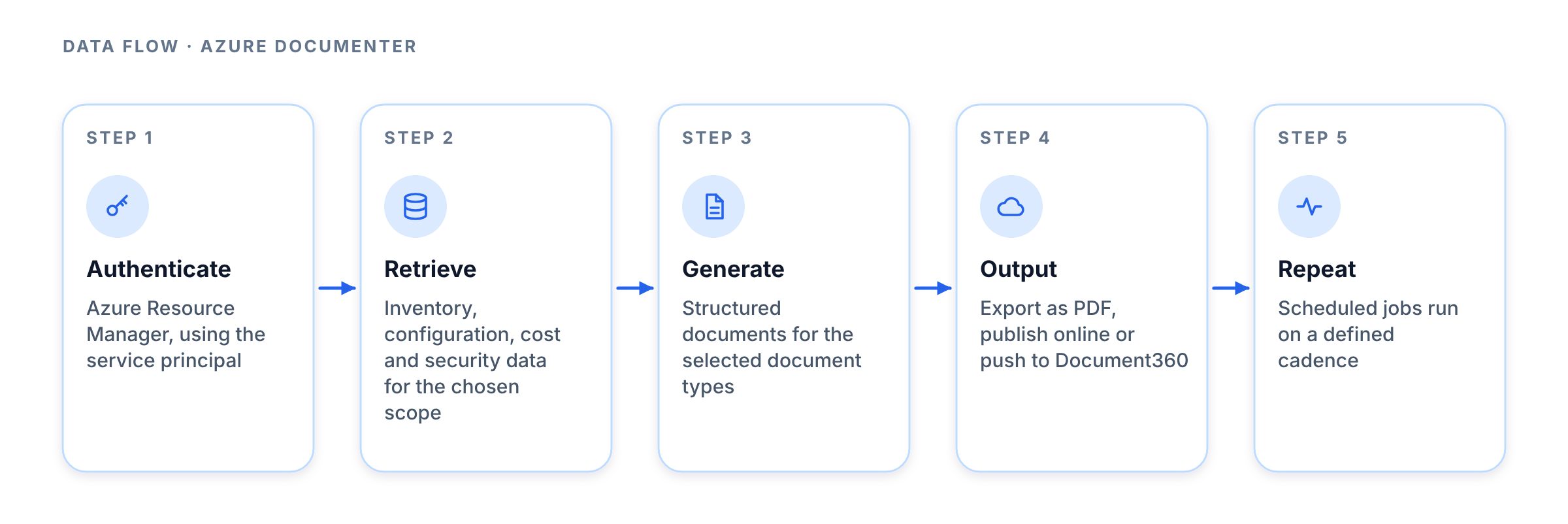
- Turbo360 authenticates to Azure Resource Manager using the service principal.
- Resource inventory, configuration, cost, and security data is retrieved for the selected subscription or resource group scope.
- Azure Documenter generates structured documents based on the selected document types.
- Documents can be exported as PDF, published online, or pushed to Document360.
- Scheduled generation jobs repeat this process on a defined cadence.
Tenant Manager
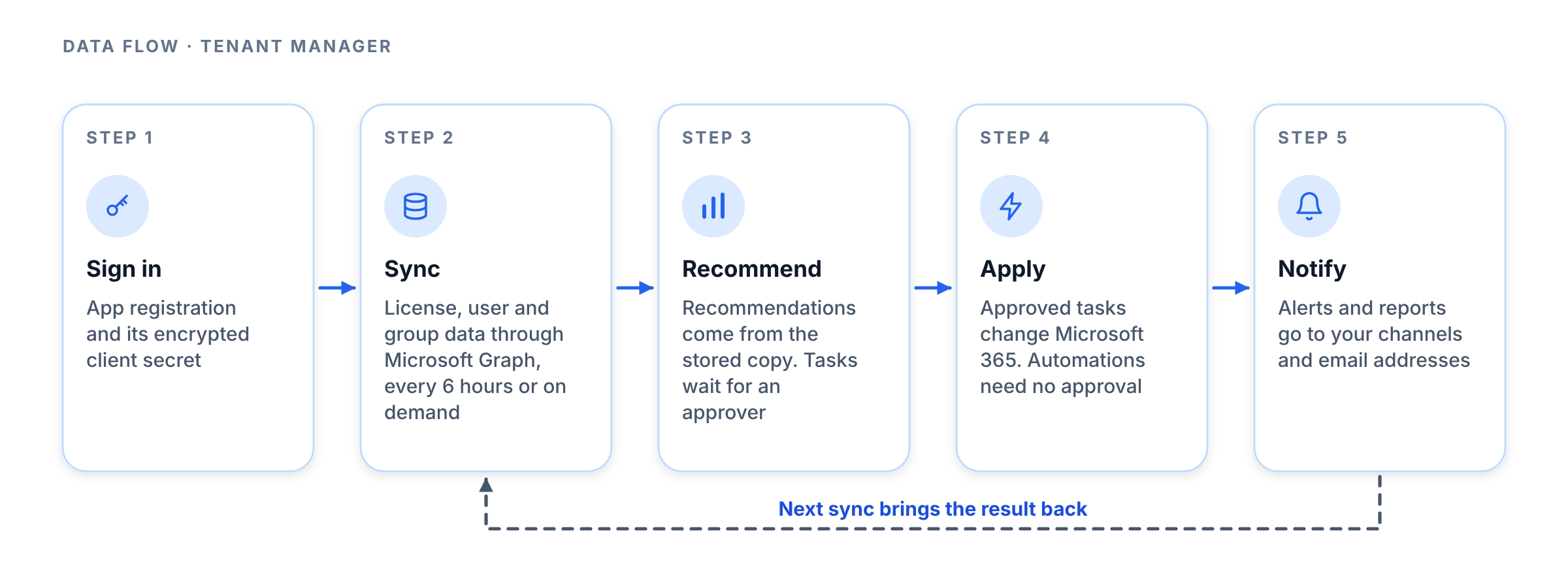
- Turbo360 signs in to your Microsoft 365 tenant using the app registration and its client secret, which is stored encrypted.
- Tenant Manager syncs license, user, and Microsoft Entra ID group data through Microsoft Graph every 6 hours or when you start a sync, and replaces its stored copy with the latest data.
- Optimization raises recommendations from the stored copy. Adding a recommendation to tasks creates a request that waits for an approver.
- When an approver approves a task, Tenant Manager makes that change in Microsoft 365 through the app registration. An automation does the same under its rules and has no approval step.
- The next sync brings the result back into the stored copy. Alerts and reports are sent through the notification channels and email addresses you choose.
Notification and integration architecture
-
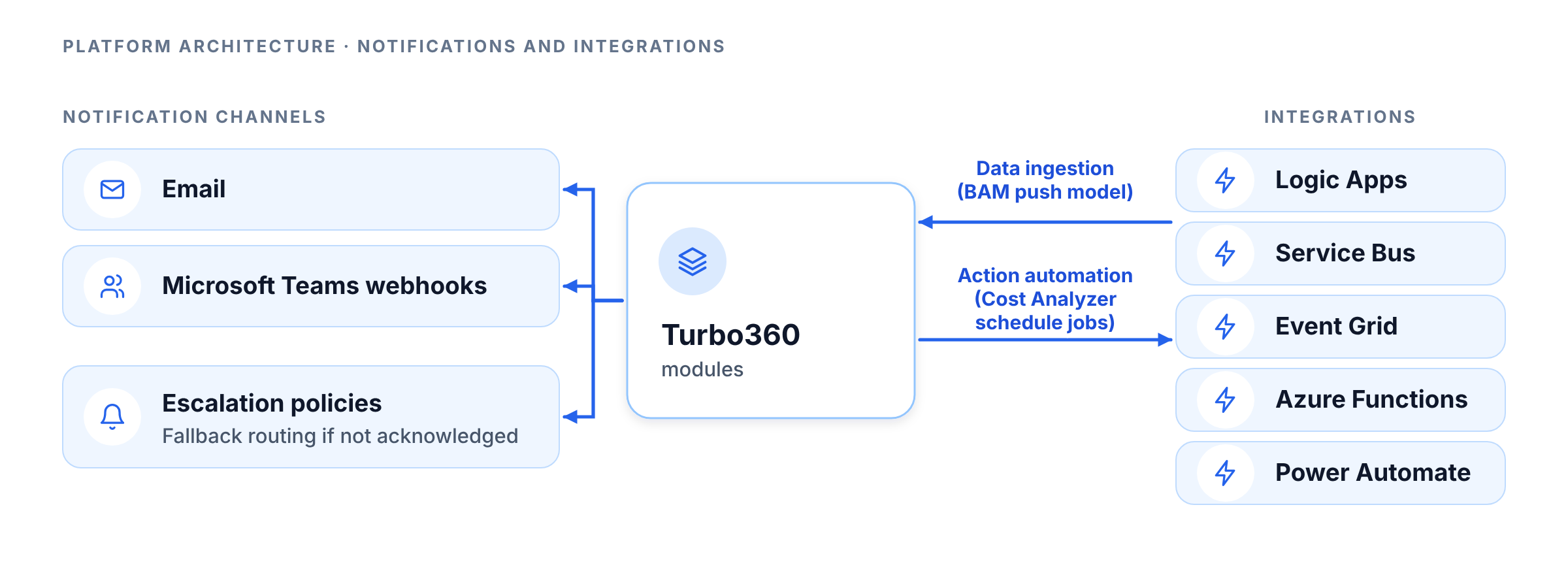
Turbo360 dispatches notifications through configured channels. Supported channels include email and Microsoft Teams webhooks. Escalation policies define fallback routing when primary recipients do not acknowledge alerts within the configured window.
-
Turbo360 integrates with external systems including Logic Apps, Service Bus, Event Grid, Azure Functions, and Power Automate. These integrations are configured at the module level and are used for both data ingestion (BAM push model) and action automation (Cost Analyzer schedule jobs).
Private hosting
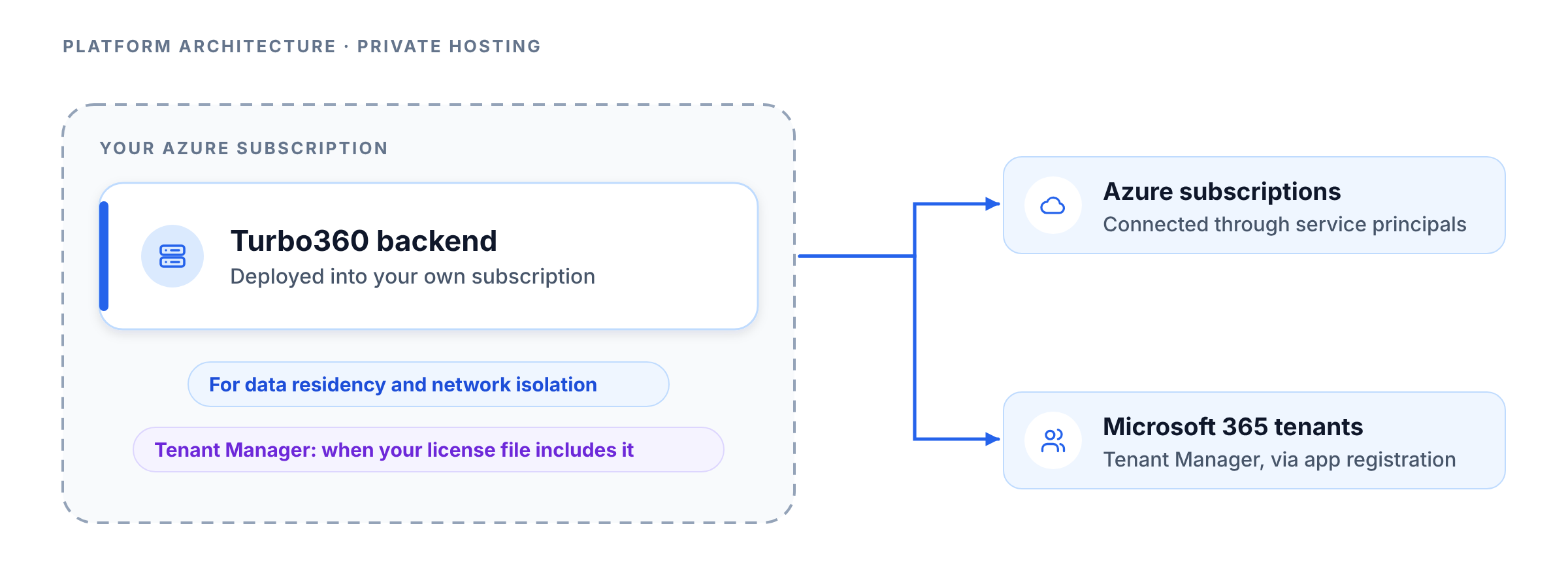
Turbo360 supports a private hosting model for organizations with strict data residency or network isolation requirements. In the private hosting model, the Turbo360 backend is deployed into the customer's own Azure subscription. Tenant Manager is available on private hosting when your license file includes it.
Troubleshooting
-
Subscription data is not appearing after connecting a new subscription.
Cause: The service principal may not have been granted the required roles, or the role assignment has not propagated yet.
Fix: Verify the service principal has Billing Reader and Reader at the subscription scope in Azure IAM. Role assignments can take up to 5 minutes to propagate. Trigger a manual import in Cost Analyzer to force a data retrieval. -
BAM events are not appearing after configuring the push model.
Cause: The event source may be sending to an incorrect BAM API endpoint, or the API key used in the request is invalid.
Fix: Confirm the BAM API endpoint URL and API key in the BAM settings. Verify the event source (e.g., Logic App) is using the correct endpoint and that the request payload matches the expected BAM event schema. -
Azure Documenter is failing to generate documents.
Cause: The service principal may have lost Reader access to the target subscription or resource group, or the selected document types include data sources that require additional permissions.
Fix: Verify the service principal's role assignment in Azure IAM. Review the document generation error log for specific permission errors and grant the required roles. -
Notifications are not being received after an alert fires.
Cause: The notification channel configuration may be incomplete, or the webhook URL for Microsoft Teams has expired.
Fix: Test the notification channel in Platform Administration > Notification Management. Re-enter or refresh the Teams webhook URL if it has expired. Confirm the recipient email addresses are correct and not blocked by spam filters. -
The service principal validation fails in Platform Administration.
Cause: The service principal credentials may have expired, or the application registration may have been deleted or disabled in Azure AD.
Fix: Navigate to Azure Active Directory in the Azure portal and verify the application registration is active. Regenerate the client secret if it has expired and update the credentials in Turbo360's Authentication & SSO settings.
FAQs
- Does Turbo360 store my Azure resource data outside my region?
Turbo360 is a SaaS platform and processes data in its hosted environment. Organizations with strict data residency requirements should evaluate the private hosting model, which deploys the Turbo360 backend into their own Azure subscription.