Overview
Tenant Manager sits between Turbo360 and your Microsoft 365 tenants. It reads license, user, and Microsoft Entra ID group data through an app registration that you create, keeps a copy in Turbo360, and applies a change back to Microsoft 365 only after an approval or under an automation rule you switch on.
Business value
- Know which permissions to grant and why a write permission is needed only to apply changes
- Understand why pages show data from the last sync rather than live data
- Show your security team what Tenant Manager can and cannot do in your tenants
- Know where a change is made and how its result comes back
How it works
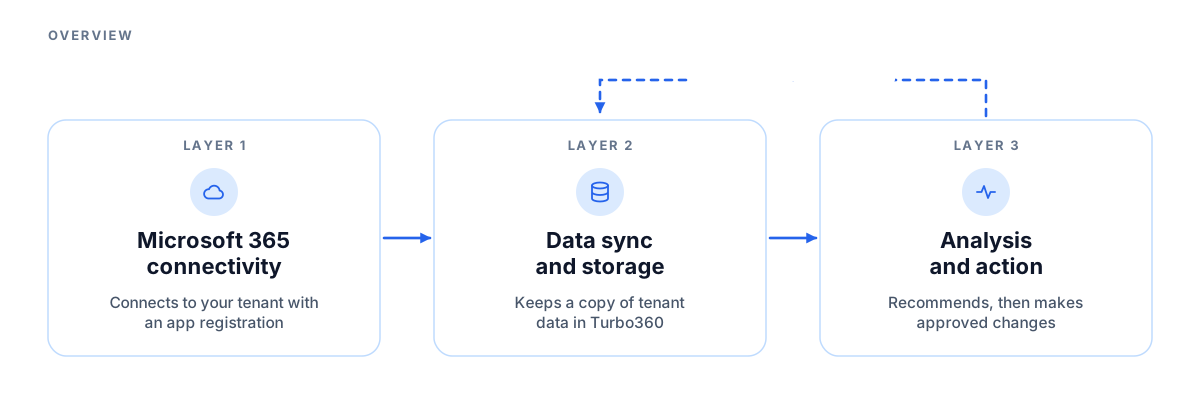
Tenant Manager is built around three architectural layers: Microsoft 365 connectivity, data sync and storage, and analysis and action. The flow in one line: connect a tenant, sync it, read the copy, raise a recommendation, approve a task, make the change in Microsoft 365, and sync again to see it.
Layer 1: Microsoft 365 connectivity
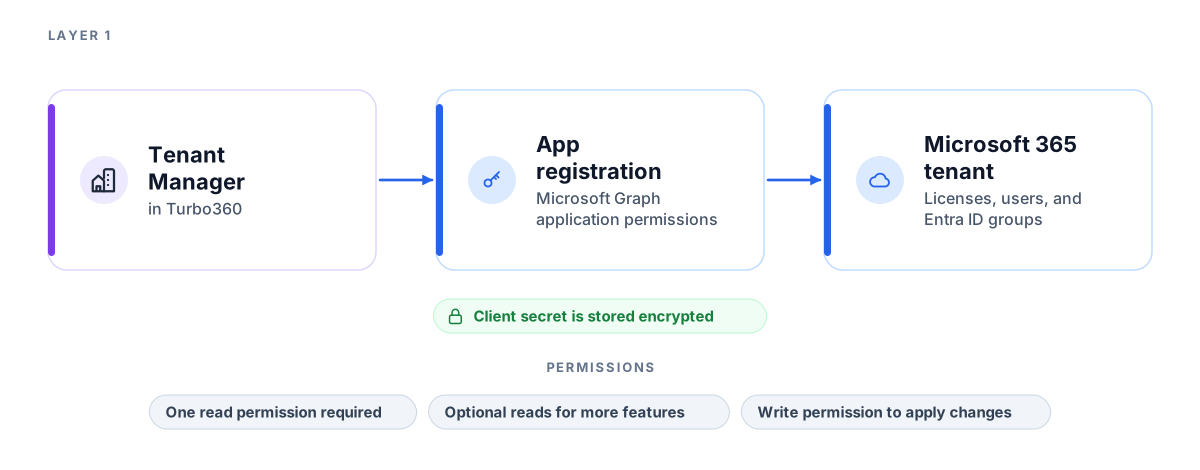
This layer is how Tenant Manager signs in to your tenant.
- Your Microsoft 365 tenant: The source of license, user, and Microsoft Entra ID group data. It is also where an approved change is made.
- App registration: The identity in Microsoft Entra ID that Tenant Manager signs in with. You create it, grant it Microsoft Graph application permissions, and give admin consent.
- Client secret: You give Tenant Manager the app registration details and a client secret when you connect a tenant. The client secret is stored encrypted.
One read permission is required, and it is enough to see licenses, users, and Microsoft Entra ID groups. Other read permissions are optional and switch on features such as sign-in activity, usage reports, and swap recommendations. To apply a change from Tenant Manager, the app registration also needs the matching write permission. The Dependencies section of the connection article lists every permission, what it allows, and what happens without it.
Layer 2: Data sync and storage
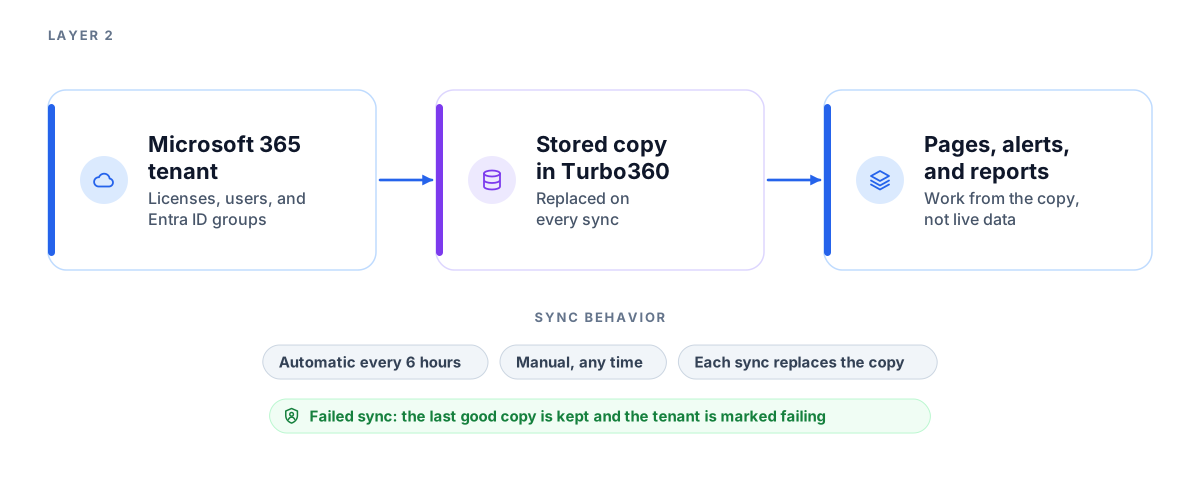
This layer keeps a copy of your tenant data in Turbo360. Every page, alert, and report works from this copy.
| Behavior | Description |
|---|---|
| Automatic sync | Each tenant syncs every 6 hours. |
| Manual sync | You can start a sync yourself at any time. |
| Replace on sync | A sync replaces the stored copy with the latest data. |
| Failed sync | Tenant Manager keeps the last good copy and marks the tenant as failing, so pages keep working with older data. |
Layer 3: Analysis and action
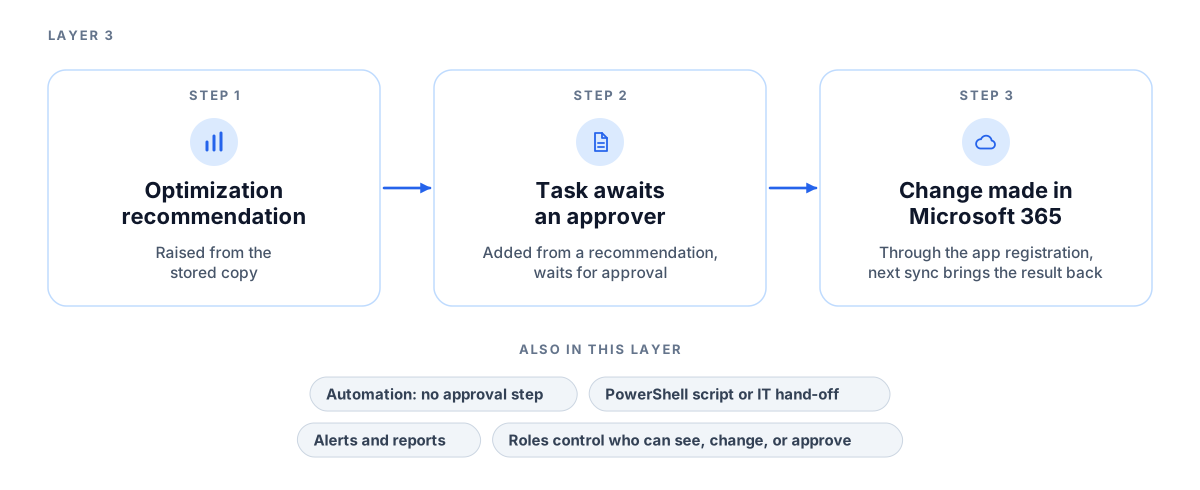
This layer turns the stored data into answers and changes.
- Tenant groups and tenants: The tree you build in Tenant Manager. A tenant is one connected Microsoft 365 tenant. A tenant group brings related tenants together and adds up their totals.
- Optimization: Looks at the copy and raises recommendations. Adding a recommendation to tasks creates a request that waits for an approver.
- Changes: When an approver approves a task, Tenant Manager makes that one change in Microsoft 365 through the app registration. An automation does the same under its rules and has no approval step, so only its switch decides. The next sync brings the result back into the copy.
- Alerts and reports: Watch the data and send notifications and scheduled reports through the channels and email addresses you choose.
If you would rather make a change yourself, you can send the task to your IT team or generate a PowerShell script.
Access control uses Turbo360 roles to decide who can see, change, or approve what. You can assign them for the whole module, for a tenant group, or for a single tenant.
Limitations
- Pages, alerts, and reports show data from the last sync. They are not live.
- Tenant Manager cannot change a tenant unless the app registration has the matching write permission. Without it, tasks for that tenant cannot be approved.
- Tenant Manager has no public API.
- National or sovereign Microsoft clouds are not supported. Microsoft Graph, sign-in, and billing addresses are for the public cloud only.