Overview
This article describes the Azure infrastructure that makes up a Turbo360 private hosting deployment: what gets deployed, how components authenticate, and what additional resources the Business Activity Monitoring (BAM) push model requires. It also covers the network isolation options available during and after installation.
Core architecture
The diagram below shows the architecture for a standard Turbo360 private hosting deployment. This covers the following modules:
- Cost Analyzer
- Business Applications
- Azure Documenter
- Business Activity Monitoring (BAM) in pull model (using Log Analytics and Application Insights as data sources)
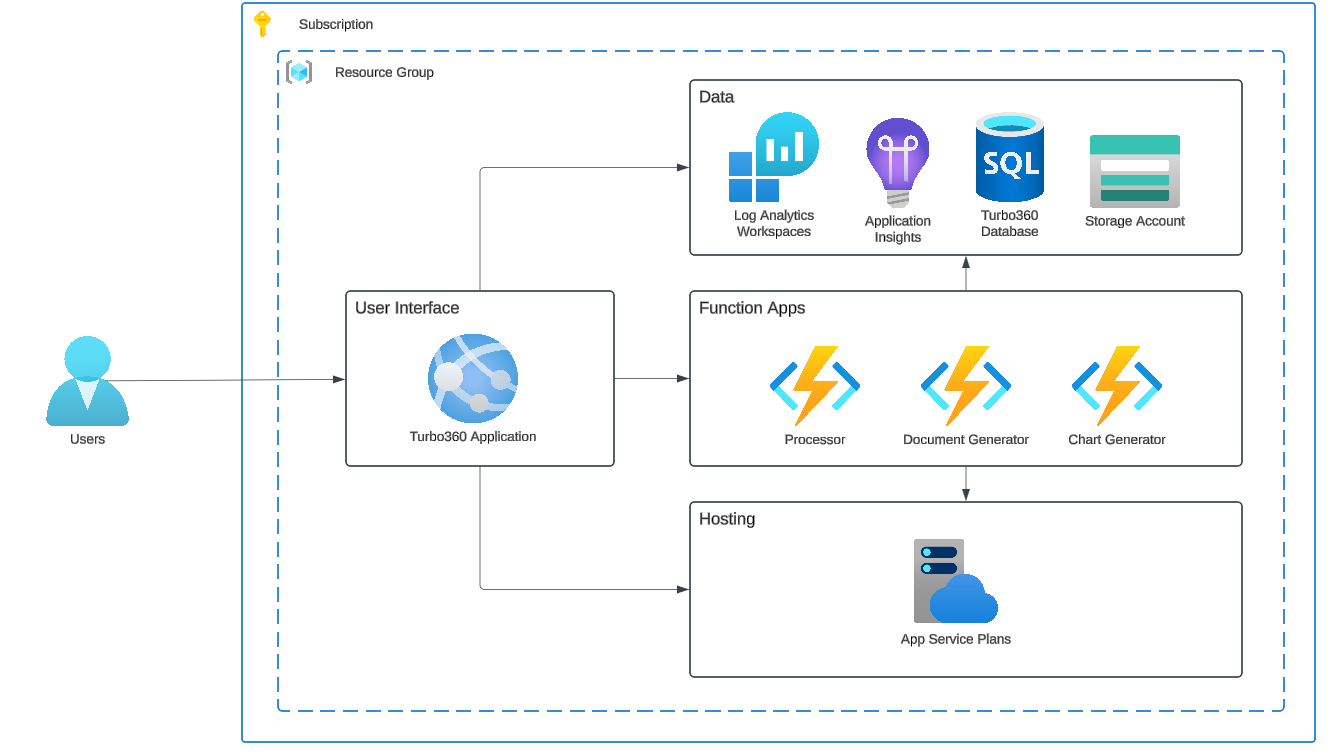
| Component | Usage |
|---|---|
| App Service Plan | Hosts the web app and function apps |
| Web App | The main user interface your users access |
| Function Apps | Three function apps with distinct roles: the processor handles most background work; the other two handle document generation and chart generation |
| Storage Account | Hosts deployment code for the function apps and web app |
| SQL Database | Stores Turbo360 configuration data and the applications, monitoring data, or cost data you work with |
| Application Insights | Standard application monitoring for the web app and function apps |
| Log Analytics | Underlying data store for Application Insights |
Resource authentication
During installation, you choose between connection string authentication and managed identity authentication. Turbo360 recommends using a user-assigned managed identity. Once associated with your resources, the managed identity handles authentication between components. For example, the web app uses it when accessing the SQL database and the storage account.
User authentication
Users can authenticate to Turbo360 via one of two methods:
- SSO with Entra ID: recommended for most organisations, as it aligns with other Microsoft-based applications
- Username and password
Network isolation with VNET
There are two ways to configure VNET integration for a private hosting instance.
During deployment: VNet configuration can be enabled as part of the deployment wizard. When enabled, all function apps, SQL, and Storage resources are placed inside a private virtual network, and public network access to SQL and Storage is disabled automatically after post-deployment verification completes. This is the recommended approach when you want full network isolation from day one. See VNet configuration during deployment for the full walkthrough.
After deployment: You can also add VNET integration to an existing deployment. Because every customer's network setup is different, the typical approach is to deploy the application first and then layer on network controls. The following configurations are supported:
- Outbound VNET integration for the Web App and Function Apps: routes outbound traffic through your VNET
- Inbound private endpoints for the app service resources: removes public inbound access to the web app and function apps
- Private endpoint for SQL: restricts database access to your VNET
- Private endpoint for Storage: restricts storage account access to your VNET
Turbo360 will assist with post-deployment VNET configuration after the initial installation.
BAM push model architecture
If you use Business Activity Monitoring (BAM) in push model mode, where integration components such as Logic Apps or Power Automate send events to Turbo360, additional infrastructure is required beyond the core deployment.
The two BAM data processing models are:
- Push: your integration components send events to Turbo360; requires the additional components below
- Pull: Turbo360 queries your existing log sources such as Application Insights; no additional components needed
The diagram below shows the additional architecture for BAM push model deployments. An integration component (for example, a Logic App) calls the Turbo360 BAM API, which you expose via API Management or a custom connector. Behind the scenes the API is implemented with Azure Functions: incoming messages are received, placed onto a queue, and processed in the background. Custom business data is stored in the data layer.
.png)
The BAM module shares the same user interface as all other modules. Only the data processing infrastructure differs.
FAQs
-
Can I configure VNET during deployment?
Yes. The deployment wizard includes an optional Include VNet configuration checkbox on the Resource details step. When enabled, function apps, SQL, and Storage are placed inside a private VNET and public access to SQL and Storage is disabled automatically after deployment. See VNet configuration during deployment. -
Can I add private endpoints after deployment instead?
Yes. Deploy the application first, then add VNET integration and private endpoints for app service resources, SQL, and Storage. Turbo360 will help you set this up after the initial installation. -
Can I automate the infrastructure deployment with Terraform or Bicep?
Yes. The installer can point to pre-existing resources, so you can provision everything with Terraform, Bicep, or another infrastructure-as-code tool first and then run the installer against those resources. -
Can I choose my own names for the resources when installing?
Yes. The installer lets you specify custom resource names, or you can provision the resources yourself and point the installer at them. -
Can I host on an ASE v3 instead of an App Service Plan?
Yes. Pre-provision the web app and function apps on an App Service Environment v3 before running the Turbo360 installer.